Page:
Installing Updates
Pages
About
Adding a Remote Linux Machine
Android Application
Application Architecture
Application Updates
Automated Testing
Building from Source
CPU Monitoring
Checking for Updates
Connection Troubleshooting
Credential Management
Dedicated Hardware Monitoring Displays
Derivative Distribution Permission
Developer Documentation
Development Environment
Development Roadmap
Diagnostic Logs
Downloading Updates
Expanded Resource Monitor
First Time Configuration
Frequently Asked Questions
GPU Monitoring
GPU and VRAM Telemetry Problems
General Troubleshooting
Getting Started
Glossary
Home
Hover Monitor
How to Contribute
Install Later
Installation Guide
Installation Problems
Installing Updates
Jenkins and CI CD
Known Limitations
Licensing and Contributions
Linux Telemetry
Machine Ordering
Machine Selection
Native Linux Application
Native macOS Application
Network Monitoring Problems
Network Monitoring
Optional Monitoring Gateway
Package Authenticity
Performance Problems
Portable Edition
Quick Start
RAM Monitoring
Recovery and Rollback
Release Channels
Release Process
Remote Connection Problems
Remote Monitoring
Reporting Issues
Resource History
Resource Monitoring
SSH Configuration
Server and Service Monitoring
Settings and Persistence Problems
Settings
Software License
Source Code Organization
Storage IO Monitoring
Support and Troubleshooting
System Requirements
System Tray Context Menu
System Tray Icon
System Tray Problems
System Updates Available
Technology Stack
Third Party Licenses
Update Notifications
Update Problems
User Manual
VRAM Monitoring
Versioning
Wiki Index
Wiki Maintenance
Windows Monitoring Agent
iOS and iPadOS Application
Clone
3
Installing Updates
Sonja M Thomas edited this page 2026-11-26 23:44:57 -06:00
Home / Application Updates / Installing Updates
- Check for and download the update in About. Confirm the verified target version and review the signed release notes.
- Choose Install Update and approve the confirmation. If the license changed, ARM retrieves the matching source-license text, checks its signed hash and requests acceptance before shutting down.
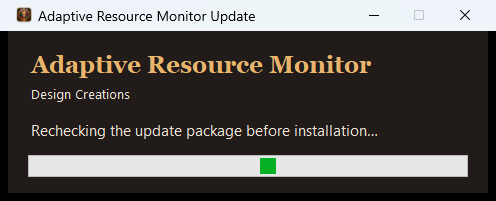
- The independent maintenance program waits for ARM to save its state and exit. It re-verifies the package and displays progress while the installer or portable replacement runs.
- The launcher checks installed files and build identity, then restarts ARM in the same user session. Enabled monitoring connections restore according to their profiles.
- The restarted process acknowledges readiness. View Changelog opens the release notes path and clears the success notice while the completion record remains available.
See Recovery and Rollback if the process reports a failure or an interruption.

Original application developed by Sonja M Thomas, SLT Design Creations, LLC. Copyright 2010-2026 SLT Design Creations, LLC. Design Creations
