Unify the Gitea and GitHub wiki histories

6
About.md
6
About.md
@@ -1,13 +1,13 @@
|
|||||||
[Home](https://phantom.zapto.org/gitea/sonja/Adaptive_Resource_Monitor/wiki/Home) / [User Manual](https://phantom.zapto.org/gitea/sonja/Adaptive_Resource_Monitor/wiki/User-Manual) / About
|
[Home](./Home) / [User Manual](./User-Manual) / About
|
||||||
|
|
||||||
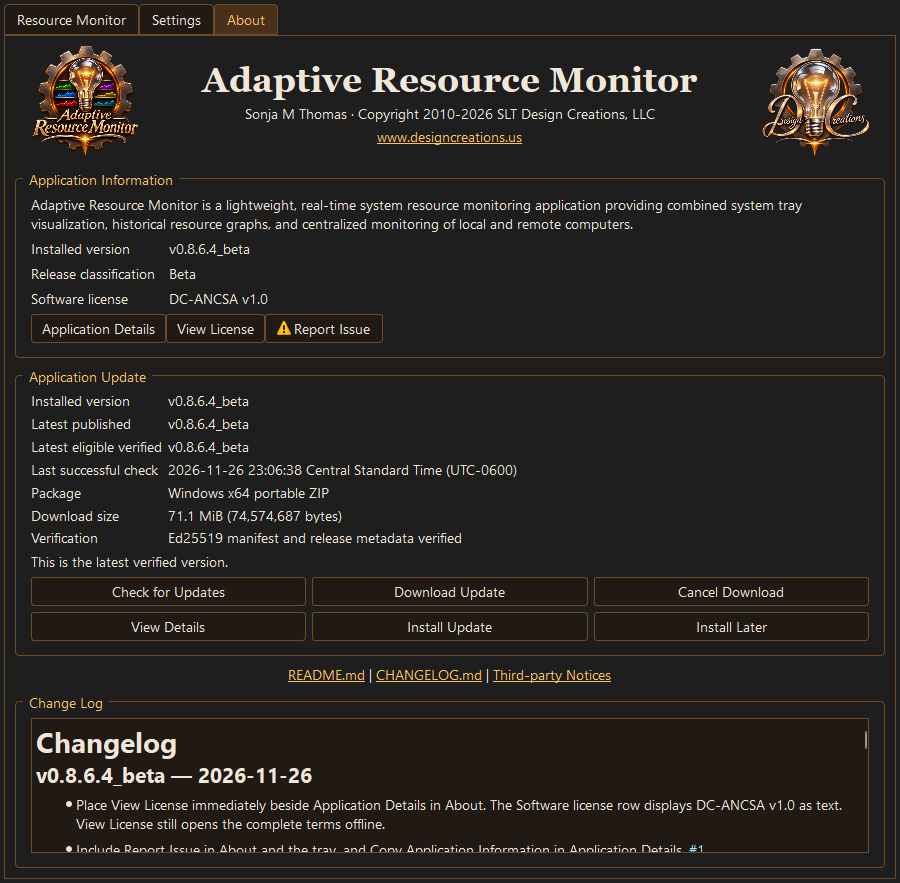
About shows the installed version, release classification and software license. **Application Details** includes the running build, platform and installation type. Its **Copy Application Information** button copies a short sanitized summary. The dialog itself contains local paths; review screenshots separately before sharing.
|
||||||
|
|
||||||
**View License** sits immediately to the right of **Application Details** and opens the complete bundled license offline. **Report Issue** opens the public issue list in your default browser. The Application Update section shows published and eligible verified versions and actions for checking, downloading and managing releases.
|
||||||
|
|
||||||
**README.md**, **CHANGELOG.md** and **Third-party Notices** switch the bundled documentation in the viewing pane. Use [Reporting Issues](https://phantom.zapto.org/gitea/sonja/Adaptive_Resource_Monitor/wiki/Reporting-Issues) for the clipboard and reporting workflow.
|
**README.md**, **CHANGELOG.md** and **Third-party Notices** switch the bundled documentation in the viewing pane. Use [Reporting Issues](./Reporting-Issues) for the clipboard and reporting workflow.
|
||||||
|
|
||||||
|

|
||||||
|
|
||||||
---
|
---
|
||||||
|
|
||||||
[Previous · Settings](https://phantom.zapto.org/gitea/sonja/Adaptive_Resource_Monitor/wiki/Settings)
|
[Previous · Settings](./Settings)
|
||||||
|
|||||||
@@ -1,4 +1,4 @@
|
|||||||
[Home](https://phantom.zapto.org/gitea/sonja/Adaptive_Resource_Monitor/wiki/Home) / [Remote Monitoring](https://phantom.zapto.org/gitea/sonja/Adaptive_Resource_Monitor/wiki/Remote-Monitoring) / Adding a Remote Linux Machine
|
[Home](./Home) / [Remote Monitoring](./Remote-Monitoring) / Adding a Remote Linux Machine
|
||||||
|
|
||||||
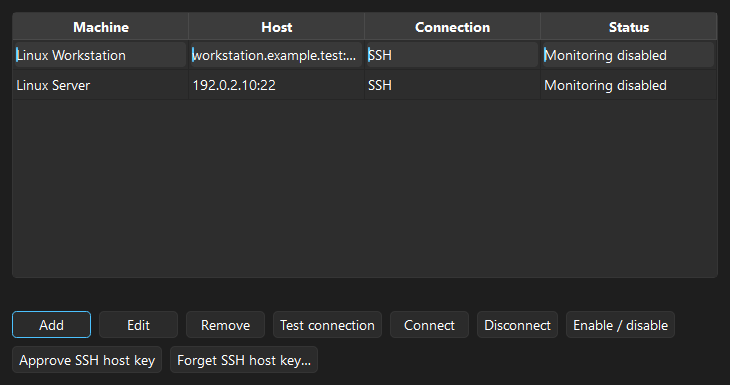
1. Open **Remote Targets → Manage Remote Targets** from the tray, then choose **Add**.
|
1. Open **Remote Targets → Manage Remote Targets** from the tray, then choose **Add**.
|
||||||
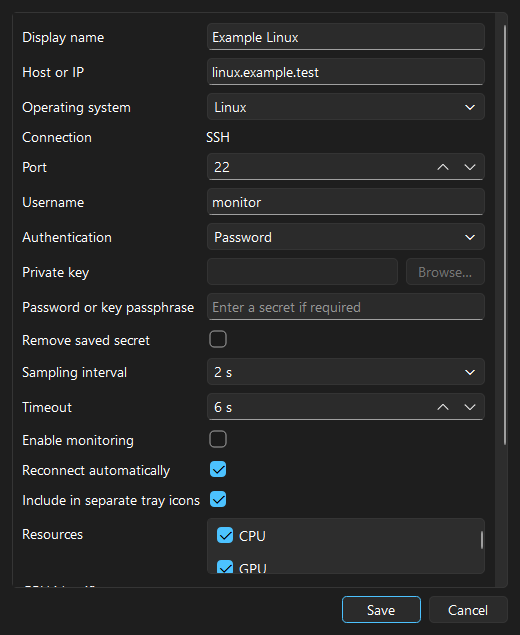
2. Set a display name such as **Lab Linux**. Enter your authorized host and port. A documentation example is `linux.example.test`, port `22`, account `monitor`.
|
2. Set a display name such as **Lab Linux**. Enter your authorized host and port. A documentation example is `linux.example.test`, port `22`, account `monitor`.
|
||||||
@@ -10,8 +10,8 @@
|
|||||||
|

|
||||||
|

|
||||||
|
|
||||||
See [SSH Configuration](https://phantom.zapto.org/gitea/sonja/Adaptive_Resource_Monitor/wiki/SSH-Configuration) for prerequisites and [Connection Troubleshooting](https://phantom.zapto.org/gitea/sonja/Adaptive_Resource_Monitor/wiki/Connection-Troubleshooting) for failures.
|
See [SSH Configuration](./SSH-Configuration) for prerequisites and [Connection Troubleshooting](./Connection-Troubleshooting) for failures.
|
||||||
|
|
||||||
---
|
---
|
||||||
|
|
||||||
[Next · SSH Configuration](https://phantom.zapto.org/gitea/sonja/Adaptive_Resource_Monitor/wiki/SSH-Configuration)
|
[Next · SSH Configuration](./SSH-Configuration)
|
||||||
|
|||||||
@@ -1,4 +1,4 @@
|
|||||||
[Home](https://phantom.zapto.org/gitea/sonja/Adaptive_Resource_Monitor/wiki/Home) / [Development Roadmap](https://phantom.zapto.org/gitea/sonja/Adaptive_Resource_Monitor/wiki/Development-Roadmap) / Android Application
|
[Home](./Home) / [Development Roadmap](./Development-Roadmap) / Android Application
|
||||||
|
|
||||||
**Planned.** The native companion would display independent resource dashboards on phones and tablets. The gateway can keep collecting while the app is suspended. Foreground live views and background behavior should meet Android notification and power policies.
|
**Planned.** The native companion would display independent resource dashboards on phones and tablets. The gateway can keep collecting while the app is suspended. Foreground live views and background behavior should meet Android notification and power policies.
|
||||||
|
|
||||||
@@ -8,4 +8,4 @@ Plan secure authenticated access and Android-backed credential storage, with rec
|
|||||||
|
|
||||||
---
|
---
|
||||||
|
|
||||||
[Previous · Native macOS Application](https://phantom.zapto.org/gitea/sonja/Adaptive_Resource_Monitor/wiki/Native-macOS-Application) · [Next · iOS and iPadOS Application](https://phantom.zapto.org/gitea/sonja/Adaptive_Resource_Monitor/wiki/iOS-and-iPadOS-Application)
|
[Previous · Native macOS Application](./Native-macOS-Application) · [Next · iOS and iPadOS Application](./iOS-and-iPadOS-Application)
|
||||||
|
|||||||
@@ -1,4 +1,4 @@
|
|||||||
[Home](https://phantom.zapto.org/gitea/sonja/Adaptive_Resource_Monitor/wiki/Home) / [Developer Documentation](https://phantom.zapto.org/gitea/sonja/Adaptive_Resource_Monitor/wiki/Developer-Documentation) / Application Architecture
|
[Home](./Home) / [Developer Documentation](./Developer-Documentation) / Application Architecture
|
||||||
|
|
||||||
ARM keeps GUI rendering on one Qt event loop. Each local provider or remote target has a supervised worker with its own sampling schedule and counter baseline. Workers send timestamped observations to the GUI-owned model through queued signals. A separate history worker handles optional SQLite operations.
|
||||||
|
|
||||||
@@ -17,8 +17,8 @@ flowchart LR
|
|||||||
|
|
||||||
Windows collectors cover native performance counters and hardware-specific data. Linux collectors send a fixed read-only script over persistent SSH channels. Machine, device and metric identities remain distinct. First observations, counter resets and stale data use availability and time information rather than fabricated zeros.
|
||||||
|
|
||||||
Settings, SSH trust and optional recording remain separate from app deployment. Updates check a pinned public signature and package hashes and hand off to an independent maintenance executable. See [architecture notes](https://phantom.zapto.org/gitea/sonja/Adaptive_Resource_Monitor/src/branch/main/ARCHITECTURE.md) and [Source Code Organization](https://phantom.zapto.org/gitea/sonja/Adaptive_Resource_Monitor/wiki/Source-Code-Organization).
|
Settings, SSH trust and optional recording remain separate from app deployment. Updates check a pinned public signature and package hashes and hand off to an independent maintenance executable. See [architecture notes](https://phantom.zapto.org/gitea/sonja/Adaptive_Resource_Monitor/src/branch/main/ARCHITECTURE.md) and [Source Code Organization](./Source-Code-Organization).
|
||||||
|
|
||||||
---
|
---
|
||||||
|
|
||||||
[Next · Technology Stack](https://phantom.zapto.org/gitea/sonja/Adaptive_Resource_Monitor/wiki/Technology-Stack)
|
[Next · Technology Stack](./Technology-Stack)
|
||||||
|
|||||||
@@ -1,14 +1,14 @@
|
|||||||
[Home](https://phantom.zapto.org/gitea/sonja/Adaptive_Resource_Monitor/wiki/Home) / Application Updates
|
[Home](./Home) / Application Updates
|
||||||
|
|
||||||
Use About to check, download or install an eligible verified ARM release. The built-in updater selects the correct distribution and verifies the signed manifest and package bytes before installation. Startup and periodic checks are optional.
|
Use About to check, download or install an eligible verified ARM release. The built-in updater selects the correct distribution and verifies the signed manifest and package bytes before installation. Startup and periodic checks are optional.
|
||||||
|
|
||||||
- [Checking for Updates](https://phantom.zapto.org/gitea/sonja/Adaptive_Resource_Monitor/wiki/Checking-for-Updates)
|
- [Checking for Updates](./Checking-for-Updates)
|
||||||
- [Update Notifications](https://phantom.zapto.org/gitea/sonja/Adaptive_Resource_Monitor/wiki/Update-Notifications)
|
- [Update Notifications](./Update-Notifications)
|
||||||
- [Downloading Updates](https://phantom.zapto.org/gitea/sonja/Adaptive_Resource_Monitor/wiki/Downloading-Updates)
|
- [Downloading Updates](./Downloading-Updates)
|
||||||
- [Installing Updates](https://phantom.zapto.org/gitea/sonja/Adaptive_Resource_Monitor/wiki/Installing-Updates)
|
- [Installing Updates](./Installing-Updates)
|
||||||
- [Install Later](https://phantom.zapto.org/gitea/sonja/Adaptive_Resource_Monitor/wiki/Install-Later)
|
- [Install Later](./Install-Later)
|
||||||
- [Release Channels](https://phantom.zapto.org/gitea/sonja/Adaptive_Resource_Monitor/wiki/Release-Channels)
|
- [Release Channels](./Release-Channels)
|
||||||
- [Package Authenticity](https://phantom.zapto.org/gitea/sonja/Adaptive_Resource_Monitor/wiki/Package-Authenticity)
|
- [Package Authenticity](./Package-Authenticity)
|
||||||
- [Recovery and Rollback](https://phantom.zapto.org/gitea/sonja/Adaptive_Resource_Monitor/wiki/Recovery-and-Rollback)
|
- [Recovery and Rollback](./Recovery-and-Rollback)
|
||||||
|
|
||||||
[Public releases](https://phantom.zapto.org/gitea/sonja/Adaptive_Resource_Monitor/releases) · [Technical update reference](https://phantom.zapto.org/gitea/sonja/Adaptive_Resource_Monitor/src/branch/main/UPDATE_MECHANISM.md)
|
[Public releases](https://phantom.zapto.org/gitea/sonja/Adaptive_Resource_Monitor/releases) · [Technical update reference](https://phantom.zapto.org/gitea/sonja/Adaptive_Resource_Monitor/src/branch/main/UPDATE_MECHANISM.md)
|
||||||
|
|||||||
@@ -1,11 +1,11 @@
|
|||||||
[Home](https://phantom.zapto.org/gitea/sonja/Adaptive_Resource_Monitor/wiki/Home) / [Developer Documentation](https://phantom.zapto.org/gitea/sonja/Adaptive_Resource_Monitor/wiki/Developer-Documentation) / Automated Testing
|
[Home](./Home) / [Developer Documentation](./Developer-Documentation) / Automated Testing
|
||||||
|
|
||||||
Run `python -m unittest discover -s tests -v` in the development environment for model, provider and update regressions. It covers telemetry semantics, history and calculation behavior, update identity and authentication, and validation before replacement.
|
Run `python -m unittest discover -s tests -v` in the development environment for model, provider and update regressions. It covers telemetry semantics, history and calculation behavior, update identity and authentication, and validation before replacement.
|
||||||
|
|
||||||
Use `python tests\windows_gui.py` for native Windows scenarios. It launches a separate desktop and temporary profile. The `--short` path covers core behavior for CI. The package mode can verify the frozen portable payload and executable metadata. Use a disposable test environment for installer interaction and recovery exercises.
|
||||||
|
|
||||||
Acceptance checks compare the intended release to the exact archived artifact and verify the supported production entry point. Verify an actual automatic shutdown and restart, the transaction result, preservation of the profile and reconnection of enabled targets. Remove disposable validation artifacts and retain relevant evidence privately. See [Release Process](https://phantom.zapto.org/gitea/sonja/Adaptive_Resource_Monitor/wiki/Release-Process).
|
Acceptance checks compare the intended release to the exact archived artifact and verify the supported production entry point. Verify an actual automatic shutdown and restart, the transaction result, preservation of the profile and reconnection of enabled targets. Remove disposable validation artifacts and retain relevant evidence privately. See [Release Process](./Release-Process).
|
||||||
|
|
||||||
---
|
---
|
||||||
|
|
||||||
[Previous · Building from Source](https://phantom.zapto.org/gitea/sonja/Adaptive_Resource_Monitor/wiki/Building-from-Source) · [Next · Versioning](https://phantom.zapto.org/gitea/sonja/Adaptive_Resource_Monitor/wiki/Versioning)
|
[Previous · Building from Source](./Building-from-Source) · [Next · Versioning](./Versioning)
|
||||||
|
|||||||
@@ -1,4 +1,4 @@
|
|||||||
[Home](https://phantom.zapto.org/gitea/sonja/Adaptive_Resource_Monitor/wiki/Home) / [Developer Documentation](https://phantom.zapto.org/gitea/sonja/Adaptive_Resource_Monitor/wiki/Developer-Documentation) / Building from Source
|
[Home](./Home) / [Developer Documentation](./Developer-Documentation) / Building from Source
|
||||||
|
|
||||||
Use native Windows x64 with Python 3.12 and Inno Setup 7. From the repository root with the development environment created:
|
Use native Windows x64 with Python 3.12 and Inno Setup 7. From the repository root with the development environment created:
|
||||||
|
|
||||||
@@ -14,4 +14,4 @@ Use the actual local ISCC.exe path. The build script freezes the payload, embeds
|
|||||||
|
|
||||||
---
|
---
|
||||||
|
|
||||||
[Previous · Development Environment](https://phantom.zapto.org/gitea/sonja/Adaptive_Resource_Monitor/wiki/Development-Environment) · [Next · Automated Testing](https://phantom.zapto.org/gitea/sonja/Adaptive_Resource_Monitor/wiki/Automated-Testing)
|
[Previous · Development Environment](./Development-Environment) · [Next · Automated Testing](./Automated-Testing)
|
||||||
|
|||||||
@@ -1,11 +1,11 @@
|
|||||||
[Home](https://phantom.zapto.org/gitea/sonja/Adaptive_Resource_Monitor/wiki/Home) / [Resource Monitoring](https://phantom.zapto.org/gitea/sonja/Adaptive_Resource_Monitor/wiki/Resource-Monitoring) / CPU Monitoring
|
[Home](./Home) / [Resource Monitoring](./Resource-Monitoring) / CPU Monitoring
|
||||||
|
|
||||||
CPU shows utilization over the sampling interval. The overall line answers how busy the machine was over that interval. In the expanded monitor, select an identified logical processor or CPU device to inspect available individual readings and reported frequency. CPU topology can differ between physical cores and logical processors.
|
||||||
|
|
||||||
Windows uses psutil CPU times plus reported topology and frequency. Linux uses procfs time deltas, processor information and readable hwmon where applicable. Frequency, thermal and power counters can be unavailable. Frequency measures clock rate and may change independently of CPU busy time.
|
Windows uses psutil CPU times plus reported topology and frequency. Linux uses procfs time deltas, processor information and readable hwmon where applicable. Frequency, thermal and power counters can be unavailable. Frequency measures clock rate and may change independently of CPU busy time.
|
||||||
|
|
||||||
Use the first few samples to establish a baseline. A reset or long interruption leaves a gap. Compare readings on the same machine and over comparable intervals. [Resource History](https://phantom.zapto.org/gitea/sonja/Adaptive_Resource_Monitor/wiki/Resource-History) explains status and gaps.
|
Use the first few samples to establish a baseline. A reset or long interruption leaves a gap. Compare readings on the same machine and over comparable intervals. [Resource History](./Resource-History) explains status and gaps.
|
||||||
|
|
||||||
---
|
---
|
||||||
|
|
||||||
[Next · GPU Monitoring](https://phantom.zapto.org/gitea/sonja/Adaptive_Resource_Monitor/wiki/GPU-Monitoring)
|
[Next · GPU Monitoring](./GPU-Monitoring)
|
||||||
|
|||||||
@@ -1,4 +1,4 @@
|
|||||||
[Home](https://phantom.zapto.org/gitea/sonja/Adaptive_Resource_Monitor/wiki/Home) / [Application Updates](https://phantom.zapto.org/gitea/sonja/Adaptive_Resource_Monitor/wiki/Application-Updates) / Checking for Updates
|
[Home](./Home) / [Application Updates](./Application-Updates) / Checking for Updates
|
||||||
|
|
||||||
Open **About → Check for Updates**, or choose **Check for Updates** from the tray. Compare **Latest published** with **Latest eligible verified** and the installed version. The last successful check uses your local timezone. A server listing alone does not establish that an artifact is eligible or authentic.
|
||||||
|
|
||||||
@@ -8,4 +8,4 @@ Under **Settings → General**, enable optional startup checks or choose periodi
|
|||||||
|
|
||||||
---
|
---
|
||||||
|
|
||||||
[Next · Update Notifications](https://phantom.zapto.org/gitea/sonja/Adaptive_Resource_Monitor/wiki/Update-Notifications)
|
[Next · Update Notifications](./Update-Notifications)
|
||||||
|
|||||||
@@ -1,4 +1,4 @@
|
|||||||
[Home](https://phantom.zapto.org/gitea/sonja/Adaptive_Resource_Monitor/wiki/Home) / [Remote Monitoring](https://phantom.zapto.org/gitea/sonja/Adaptive_Resource_Monitor/wiki/Remote-Monitoring) / Connection Troubleshooting
|
[Home](./Home) / [Remote Monitoring](./Remote-Monitoring) / Connection Troubleshooting
|
||||||
|
|
||||||
1. In **Manage Remote Targets**, confirm the intended host, SSH port, Linux profile and user. Use **Test connection** and read the displayed result.
|
1. In **Manage Remote Targets**, confirm the intended host, SSH port, Linux profile and user. Use **Test connection** and read the displayed result.
|
||||||
2. For an authentication failure, confirm account access and the selected password or key. Replace a saved value through the profile editor if required.
|
2. For an authentication failure, confirm account access and the selected password or key. Replace a saved value through the profile editor if required.
|
||||||
@@ -6,8 +6,8 @@
|
|||||||
4. For a new or changed key, obtain the current fingerprint independently. Investigate an unexpected change first. Forget an old pin and approve its replacement only after verification.
|
4. For a new or changed key, obtain the current fingerprint independently. Investigate an unexpected change first. Forget an old pin and approve its replacement only after verification.
|
||||||
5. For stale readings with an otherwise reachable host, confirm Bash and readable counters, sampling interval and collection status. Enable retry for transient outages if appropriate.
|
5. For stale readings with an otherwise reachable host, confirm Bash and readable counters, sampling interval and collection status. Enable retry for transient outages if appropriate.
|
||||||
|
|
||||||
A Windows profile shows a planned connection type in this release. [Windows Monitoring Agent](https://phantom.zapto.org/gitea/sonja/Adaptive_Resource_Monitor/wiki/Windows-Monitoring-Agent) describes future development. Share sanitized details through [Reporting Issues](https://phantom.zapto.org/gitea/sonja/Adaptive_Resource_Monitor/wiki/Reporting-Issues) if the failure persists.
|
A Windows profile shows a planned connection type in this release. [Windows Monitoring Agent](./Windows-Monitoring-Agent) describes future development. Share sanitized details through [Reporting Issues](./Reporting-Issues) if the failure persists.
|
||||||
|
|
||||||
---
|
---
|
||||||
|
|
||||||
[Previous · Credential Management](https://phantom.zapto.org/gitea/sonja/Adaptive_Resource_Monitor/wiki/Credential-Management)
|
[Previous · Credential Management](./Credential-Management)
|
||||||
|
|||||||
@@ -1,11 +1,11 @@
|
|||||||
[Home](https://phantom.zapto.org/gitea/sonja/Adaptive_Resource_Monitor/wiki/Home) / [Remote Monitoring](https://phantom.zapto.org/gitea/sonja/Adaptive_Resource_Monitor/wiki/Remote-Monitoring) / Credential Management
|
[Home](./Home) / [Remote Monitoring](./Remote-Monitoring) / Credential Management
|
||||||
|
|
||||||
ARM stores saved passwords and optional key passphrases in Windows Credential Manager. Its profile holds a reference, plus the private key's path when applicable. Keep settings, private keys and credential exports out of public reports.
|
ARM stores saved passwords and optional key passphrases in Windows Credential Manager. Its profile holds a reference, plus the private key's path when applicable. Keep settings, private keys and credential exports out of public reports.
|
||||||
|
|
||||||
To replace a secret, edit the target, enter the new secret and save. Leaving the secret field blank keeps the prior saved value unless **Remove saved secret** is checked. ARM removes an old credential entry when no other profile still uses it. Removing a machine removes its profile and unused secret reference. Manage SSH trust separately.
|
||||||
|
|
||||||
Use **Forget SSH host key** only when intentionally retiring trust or rotating a verified key. Verify any replacement fingerprint before approving it. [Connection Troubleshooting](https://phantom.zapto.org/gitea/sonja/Adaptive_Resource_Monitor/wiki/Connection-Troubleshooting) covers trust failures.
|
Use **Forget SSH host key** only when intentionally retiring trust or rotating a verified key. Verify any replacement fingerprint before approving it. [Connection Troubleshooting](./Connection-Troubleshooting) covers trust failures.
|
||||||
|
|
||||||
---
|
---
|
||||||
|
|
||||||
[Previous · Linux Telemetry](https://phantom.zapto.org/gitea/sonja/Adaptive_Resource_Monitor/wiki/Linux-Telemetry) · [Next · Connection Troubleshooting](https://phantom.zapto.org/gitea/sonja/Adaptive_Resource_Monitor/wiki/Connection-Troubleshooting)
|
[Previous · Linux Telemetry](./Linux-Telemetry) · [Next · Connection Troubleshooting](./Connection-Troubleshooting)
|
||||||
|
|||||||
@@ -1,4 +1,4 @@
|
|||||||
[Home](https://phantom.zapto.org/gitea/sonja/Adaptive_Resource_Monitor/wiki/Home) / [Development Roadmap](https://phantom.zapto.org/gitea/sonja/Adaptive_Resource_Monitor/wiki/Development-Roadmap) / Dedicated Hardware Monitoring Displays
|
[Home](./Home) / [Development Roadmap](./Development-Roadmap) / Dedicated Hardware Monitoring Displays
|
||||||
|
|
||||||
**Planned, with the embedded option conditional.** Prototype an always-on Raspberry Pi dashboard on a dedicated HDMI, DSI or supported touchscreen display. Show selected machines, independent histories, uptime and current state without taking space on the main workstation.
|
**Planned, with the embedded option conditional.** Prototype an always-on Raspberry Pi dashboard on a dedicated HDMI, DSI or supported touchscreen display. Show selected machines, independent histories, uptime and current state without taking space on the main workstation.
|
||||||
|
|
||||||
@@ -10,4 +10,4 @@ Use secure scoped device identities, verified transport, startup-to-dashboard an
|
|||||||
|
|
||||||
---
|
---
|
||||||
|
|
||||||
[Previous · Optional Monitoring Gateway](https://phantom.zapto.org/gitea/sonja/Adaptive_Resource_Monitor/wiki/Optional-Monitoring-Gateway) · [Next · Server and Service Monitoring](https://phantom.zapto.org/gitea/sonja/Adaptive_Resource_Monitor/wiki/Server-and-Service-Monitoring)
|
[Previous · Optional Monitoring Gateway](./Optional-Monitoring-Gateway) · [Next · Server and Service Monitoring](./Server-and-Service-Monitoring)
|
||||||
|
|||||||
@@ -1,4 +1,4 @@
|
|||||||
[Home](https://phantom.zapto.org/gitea/sonja/Adaptive_Resource_Monitor/wiki/Home) / [Licensing and Contributions](https://phantom.zapto.org/gitea/sonja/Adaptive_Resource_Monitor/wiki/Licensing-and-Contributions) / Derivative Distribution Permission
|
[Home](./Home) / [Licensing and Contributions](./Licensing-and-Contributions) / Derivative Distribution Permission
|
||||||
|
|
||||||
The authoritative [license](https://phantom.zapto.org/gitea/sonja/Adaptive_Resource_Monitor/src/branch/main/LICENSE.md) describes private non-commercial changes and the approvals needed to distribute a derivative or use ARM commercially. Before public distribution, obtain written approval from the licensor. A report or request is the start of the discussion.
|
||||||
|
|
||||||
@@ -8,4 +8,4 @@ Retain the original credits and distinguish modified builds from official ARM re
|
|||||||
|
|
||||||
---
|
---
|
||||||
|
|
||||||
[Previous · How to Contribute](https://phantom.zapto.org/gitea/sonja/Adaptive_Resource_Monitor/wiki/How-to-Contribute)
|
[Previous · How to Contribute](./How-to-Contribute)
|
||||||
|
|||||||
@@ -1,16 +1,16 @@
|
|||||||
[Home](https://phantom.zapto.org/gitea/sonja/Adaptive_Resource_Monitor/wiki/Home) / Developer Documentation
|
[Home](./Home) / Developer Documentation
|
||||||
|
|
||||||
The published desktop client uses native Windows telemetry, a Qt interface, and a separate update launcher. Start with the architecture and environment before building or running native checks. The version and release process identify which tested source produced each public artifact.
|
The published desktop client uses native Windows telemetry, a Qt interface, and a separate update launcher. Start with the architecture and environment before building or running native checks. The version and release process identify which tested source produced each public artifact.
|
||||||
|
|
||||||
- [Application Architecture](https://phantom.zapto.org/gitea/sonja/Adaptive_Resource_Monitor/wiki/Application-Architecture)
|
- [Application Architecture](./Application-Architecture)
|
||||||
- [Technology Stack](https://phantom.zapto.org/gitea/sonja/Adaptive_Resource_Monitor/wiki/Technology-Stack)
|
- [Technology Stack](./Technology-Stack)
|
||||||
- [Source Code Organization](https://phantom.zapto.org/gitea/sonja/Adaptive_Resource_Monitor/wiki/Source-Code-Organization)
|
- [Source Code Organization](./Source-Code-Organization)
|
||||||
- [Development Environment](https://phantom.zapto.org/gitea/sonja/Adaptive_Resource_Monitor/wiki/Development-Environment)
|
- [Development Environment](./Development-Environment)
|
||||||
- [Building from Source](https://phantom.zapto.org/gitea/sonja/Adaptive_Resource_Monitor/wiki/Building-from-Source)
|
- [Building from Source](./Building-from-Source)
|
||||||
- [Automated Testing](https://phantom.zapto.org/gitea/sonja/Adaptive_Resource_Monitor/wiki/Automated-Testing)
|
- [Automated Testing](./Automated-Testing)
|
||||||
- [Versioning](https://phantom.zapto.org/gitea/sonja/Adaptive_Resource_Monitor/wiki/Versioning)
|
- [Versioning](./Versioning)
|
||||||
- [Jenkins and CI/CD](https://phantom.zapto.org/gitea/sonja/Adaptive_Resource_Monitor/wiki/Jenkins-and-CI-CD)
|
- [Jenkins and CI/CD](./Jenkins-and-CI-CD)
|
||||||
- [Release Process](https://phantom.zapto.org/gitea/sonja/Adaptive_Resource_Monitor/wiki/Release-Process)
|
- [Release Process](./Release-Process)
|
||||||
- [Wiki Maintenance](https://phantom.zapto.org/gitea/sonja/Adaptive_Resource_Monitor/wiki/Wiki-Maintenance)
|
- [Wiki Maintenance](./Wiki-Maintenance)
|
||||||
|
|
||||||
[Repository](https://phantom.zapto.org/gitea/sonja/Adaptive_Resource_Monitor) · [Contributor guide](https://phantom.zapto.org/gitea/sonja/Adaptive_Resource_Monitor/src/branch/main/CONTRIBUTING.md)
|
[Repository](https://phantom.zapto.org/gitea/sonja/Adaptive_Resource_Monitor) · [Contributor guide](https://phantom.zapto.org/gitea/sonja/Adaptive_Resource_Monitor/src/branch/main/CONTRIBUTING.md)
|
||||||
|
|||||||
@@ -1,4 +1,4 @@
|
|||||||
[Home](https://phantom.zapto.org/gitea/sonja/Adaptive_Resource_Monitor/wiki/Home) / [Developer Documentation](https://phantom.zapto.org/gitea/sonja/Adaptive_Resource_Monitor/wiki/Developer-Documentation) / Development Environment
|
[Home](./Home) / [Developer Documentation](./Developer-Documentation) / Development Environment
|
||||||
|
|
||||||
Use native Windows x64 for the current desktop client. Install native x64 Python 3.12. Add Inno Setup 7 only when you need to produce a Windows installer.
|
Use native Windows x64 for the current desktop client. Install native x64 Python 3.12. Add Inno Setup 7 only when you need to produce a Windows installer.
|
||||||
|
|
||||||
@@ -10,8 +10,8 @@ py -3.12 -m venv .venv
|
|||||||
.\.venv\Scripts\python.exe monitor.pyw
|
.\.venv\Scripts\python.exe monitor.pyw
|
||||||
~~~
|
~~~
|
||||||
|
|
||||||
A direct source launch uses the current user's regular app profile. Use the isolated Windows harness for development checks where an active installation or data must be preserved. See [Automated Testing](https://phantom.zapto.org/gitea/sonja/Adaptive_Resource_Monitor/wiki/Automated-Testing) and [BUILD.md](https://phantom.zapto.org/gitea/sonja/Adaptive_Resource_Monitor/src/branch/main/BUILD.md).
|
A direct source launch uses the current user's regular app profile. Use the isolated Windows harness for development checks where an active installation or data must be preserved. See [Automated Testing](./Automated-Testing) and [BUILD.md](https://phantom.zapto.org/gitea/sonja/Adaptive_Resource_Monitor/src/branch/main/BUILD.md).
|
||||||
|
|
||||||
---
|
---
|
||||||
|
|
||||||
[Previous · Source Code Organization](https://phantom.zapto.org/gitea/sonja/Adaptive_Resource_Monitor/wiki/Source-Code-Organization) · [Next · Building from Source](https://phantom.zapto.org/gitea/sonja/Adaptive_Resource_Monitor/wiki/Building-from-Source)
|
[Previous · Source Code Organization](./Source-Code-Organization) · [Next · Building from Source](./Building-from-Source)
|
||||||
|
|||||||
@@ -1,4 +1,4 @@
|
|||||||
[Home](https://phantom.zapto.org/gitea/sonja/Adaptive_Resource_Monitor/wiki/Home) / Development Roadmap
|
[Home](./Home) / Development Roadmap
|
||||||
|
|
||||||
[ROADMAP.md](https://phantom.zapto.org/gitea/sonja/Adaptive_Resource_Monitor/src/branch/main/ROADMAP.md) governs future scope. Windows x64 Beta remains the shipped desktop product, with local Windows telemetry and remote Linux over SSH. Use the linked issues and milestones to follow work, dependencies and acceptance.
|
||||||
|
|
||||||
@@ -12,14 +12,14 @@
|
|||||||
|
|
||||||
[Shared telemetry contract #2](https://phantom.zapto.org/gitea/sonja/Adaptive_Resource_Monitor/issues/2) · [Shared architecture milestone](https://phantom.zapto.org/gitea/sonja/Adaptive_Resource_Monitor/milestone/3) · [Windows Beta maintenance](https://phantom.zapto.org/gitea/sonja/Adaptive_Resource_Monitor/milestone/1) · [Windows Stable readiness #15](https://phantom.zapto.org/gitea/sonja/Adaptive_Resource_Monitor/issues/15) · [Stable readiness milestone](https://phantom.zapto.org/gitea/sonja/Adaptive_Resource_Monitor/milestone/10)
|
||||||
|
|
||||||
- [Native Linux Application](https://phantom.zapto.org/gitea/sonja/Adaptive_Resource_Monitor/wiki/Native-Linux-Application)
|
- [Native Linux Application](./Native-Linux-Application)
|
||||||
- [Windows Monitoring Agent](https://phantom.zapto.org/gitea/sonja/Adaptive_Resource_Monitor/wiki/Windows-Monitoring-Agent)
|
- [Windows Monitoring Agent](./Windows-Monitoring-Agent)
|
||||||
- [Native macOS Application](https://phantom.zapto.org/gitea/sonja/Adaptive_Resource_Monitor/wiki/Native-macOS-Application)
|
- [Native macOS Application](./Native-macOS-Application)
|
||||||
- [Android Application](https://phantom.zapto.org/gitea/sonja/Adaptive_Resource_Monitor/wiki/Android-Application)
|
- [Android Application](./Android-Application)
|
||||||
- [iOS and iPadOS Application](https://phantom.zapto.org/gitea/sonja/Adaptive_Resource_Monitor/wiki/iOS-and-iPadOS-Application)
|
- [iOS and iPadOS Application](./iOS-and-iPadOS-Application)
|
||||||
- [Optional Monitoring Gateway](https://phantom.zapto.org/gitea/sonja/Adaptive_Resource_Monitor/wiki/Optional-Monitoring-Gateway)
|
- [Optional Monitoring Gateway](./Optional-Monitoring-Gateway)
|
||||||
- [Dedicated Hardware Monitoring Displays](https://phantom.zapto.org/gitea/sonja/Adaptive_Resource_Monitor/wiki/Dedicated-Hardware-Monitoring-Displays)
|
- [Dedicated Hardware Monitoring Displays](./Dedicated-Hardware-Monitoring-Displays)
|
||||||
- [Server and Service Monitoring](https://phantom.zapto.org/gitea/sonja/Adaptive_Resource_Monitor/wiki/Server-and-Service-Monitoring)
|
- [Server and Service Monitoring](./Server-and-Service-Monitoring)
|
||||||
- [System Updates Available](https://phantom.zapto.org/gitea/sonja/Adaptive_Resource_Monitor/wiki/System-Updates-Available)
|
- [System Updates Available](./System-Updates-Available)
|
||||||
|
|
||||||
[Development board](https://phantom.zapto.org/gitea/sonja/Adaptive_Resource_Monitor/projects/1) · [Support board](https://phantom.zapto.org/gitea/sonja/Adaptive_Resource_Monitor/projects/2) · [All milestones](https://phantom.zapto.org/gitea/sonja/Adaptive_Resource_Monitor/milestones)
|
[Development board](https://phantom.zapto.org/gitea/sonja/Adaptive_Resource_Monitor/projects/1) · [Support board](https://phantom.zapto.org/gitea/sonja/Adaptive_Resource_Monitor/projects/2) · [All milestones](https://phantom.zapto.org/gitea/sonja/Adaptive_Resource_Monitor/milestones)
|
||||||
|
|||||||
@@ -1,11 +1,11 @@
|
|||||||
[Home](https://phantom.zapto.org/gitea/sonja/Adaptive_Resource_Monitor/wiki/Home) / [Support and Troubleshooting](https://phantom.zapto.org/gitea/sonja/Adaptive_Resource_Monitor/wiki/Support-and-Troubleshooting) / Diagnostic Logs
|
[Home](./Home) / [Support and Troubleshooting](./Support-and-Troubleshooting) / Diagnostic Logs
|
||||||
|
|
||||||
Open **Settings → Diagnostics** for selectable status information and logging level. The application writes `arm.log` under `%LOCALAPPDATA%\Adaptive Resource Monitor` and rotates files there. Choose DEBUG temporarily if a maintainer requests more detail. Return to the usual level afterward.
|
Open **Settings → Diagnostics** for selectable status information and logging level. The application writes `arm.log` under `%LOCALAPPDATA%\Adaptive Resource Monitor` and rotates files there. Choose DEBUG temporarily if a maintainer requests more detail. Return to the usual level afterward.
|
||||||
|
|
||||||
Updater transactions live under the profile's `updates\transactions` directory. Look for the relevant transaction's `maintenance.log`, `installer.log` when Setup ran, and its status and restart records. Keep originals private and work from copies when preparing a report.
|
Updater transactions live under the profile's `updates\transactions` directory. Look for the relevant transaction's `maintenance.log`, `installer.log` when Setup ran, and its status and restart records. Keep originals private and work from copies when preparing a report.
|
||||||
|
|
||||||
Share a narrow, sanitized excerpt that includes the approximate time, error, version and stage. Remove account names, hostnames, addresses, fingerprints, private paths, tokens, credentials and unrelated information. **Copy Application Information** in About supplies a smaller, sanitized starting point. See [Reporting Issues](https://phantom.zapto.org/gitea/sonja/Adaptive_Resource_Monitor/wiki/Reporting-Issues).
|
Share a narrow, sanitized excerpt that includes the approximate time, error, version and stage. Remove account names, hostnames, addresses, fingerprints, private paths, tokens, credentials and unrelated information. **Copy Application Information** in About supplies a smaller, sanitized starting point. See [Reporting Issues](./Reporting-Issues).
|
||||||
|
|
||||||
---
|
---
|
||||||
|
|
||||||
[Previous · Performance Problems](https://phantom.zapto.org/gitea/sonja/Adaptive_Resource_Monitor/wiki/Performance-Problems) · [Next · Known Limitations](https://phantom.zapto.org/gitea/sonja/Adaptive_Resource_Monitor/wiki/Known-Limitations)
|
[Previous · Performance Problems](./Performance-Problems) · [Next · Known Limitations](./Known-Limitations)
|
||||||
|
|||||||
@@ -1,11 +1,11 @@
|
|||||||
[Home](https://phantom.zapto.org/gitea/sonja/Adaptive_Resource_Monitor/wiki/Home) / [Application Updates](https://phantom.zapto.org/gitea/sonja/Adaptive_Resource_Monitor/wiki/Application-Updates) / Downloading Updates
|
[Home](./Home) / [Application Updates](./Application-Updates) / Downloading Updates
|
||||||
|
|
||||||
After a successful check, use **View Details** for signed release notes and **Download Update** to fetch the correct installed or portable package. About displays transfer progress. ARM checks the manifest first, then compares the downloaded size and SHA-256 with the signed values.
|
After a successful check, use **View Details** for signed release notes and **Download Update** to fetch the correct installed or portable package. About displays transfer progress. ARM checks the manifest first, then compares the downloaded size and SHA-256 with the signed values.
|
||||||
|
|
||||||
**Cancel Download** retains a partial file. Retrying requests the remaining bytes where the server supports a valid byte-range response. If a server sends the whole file, the updater starts the content again. A completed file still needs integrity verification.
|
**Cancel Download** retains a partial file. Retrying requests the remaining bytes where the server supports a valid byte-range response. If a server sends the whole file, the updater starts the content again. A completed file still needs integrity verification.
|
||||||
|
|
||||||
Avoid replacing cached files by hand. For network or verification problems, see [Update Problems](https://phantom.zapto.org/gitea/sonja/Adaptive_Resource_Monitor/wiki/Update-Problems). For a verified package you want to keep for later, see [Install Later](https://phantom.zapto.org/gitea/sonja/Adaptive_Resource_Monitor/wiki/Install-Later).
|
Avoid replacing cached files by hand. For network or verification problems, see [Update Problems](./Update-Problems). For a verified package you want to keep for later, see [Install Later](./Install-Later).
|
||||||
|
|
||||||
---
|
---
|
||||||
|
|
||||||
[Previous · Update Notifications](https://phantom.zapto.org/gitea/sonja/Adaptive_Resource_Monitor/wiki/Update-Notifications) · [Next · Installing Updates](https://phantom.zapto.org/gitea/sonja/Adaptive_Resource_Monitor/wiki/Installing-Updates)
|
[Previous · Update Notifications](./Update-Notifications) · [Next · Installing Updates](./Installing-Updates)
|
||||||
|
|||||||
@@ -1,4 +1,4 @@
|
|||||||
[Home](https://phantom.zapto.org/gitea/sonja/Adaptive_Resource_Monitor/wiki/Home) / [User Manual](https://phantom.zapto.org/gitea/sonja/Adaptive_Resource_Monitor/wiki/User-Manual) / Expanded Resource Monitor
|
[Home](./Home) / [User Manual](./User-Manual) / Expanded Resource Monitor
|
||||||
|
|
||||||
Open **Details** from hover or choose **Open Resource Monitor** from the tray. The top tabs are **Resource Monitor**, **Settings** and **About**. The monitor keeps the shared machine selection and offers longer history ranges. For one machine, select an available processor, GPU, disk or interface when you need a per-device view.
|
||||||
|
|
||||||
@@ -9,4 +9,4 @@ The detailed measurements table shows **Metric**, **Current**, **Minimum**, **Ma
|
|||||||
|
|
||||||
---
|
---
|
||||||
|
|
||||||
[Previous · Machine Ordering](https://phantom.zapto.org/gitea/sonja/Adaptive_Resource_Monitor/wiki/Machine-Ordering) · [Next · Settings](https://phantom.zapto.org/gitea/sonja/Adaptive_Resource_Monitor/wiki/Settings)
|
[Previous · Machine Ordering](./Machine-Ordering) · [Next · Settings](./Settings)
|
||||||
|
|||||||
@@ -1,13 +1,13 @@
|
|||||||
[Home](https://phantom.zapto.org/gitea/sonja/Adaptive_Resource_Monitor/wiki/Home) / [Getting Started](https://phantom.zapto.org/gitea/sonja/Adaptive_Resource_Monitor/wiki/Getting-Started) / First-Time Configuration
|
[Home](./Home) / [Getting Started](./Getting-Started) / First-Time Configuration
|
||||||
|
|
||||||
Start with the default local-only display. In **Settings → Monitoring**, choose a local sampling interval based on how quickly measurements should change. In **Tray Icon**, adjust refresh separately and choose visible resources, history range and colors. Short refresh times update the drawing more often. Short sampling times ask providers for more observations.
|
||||||
|
|
||||||
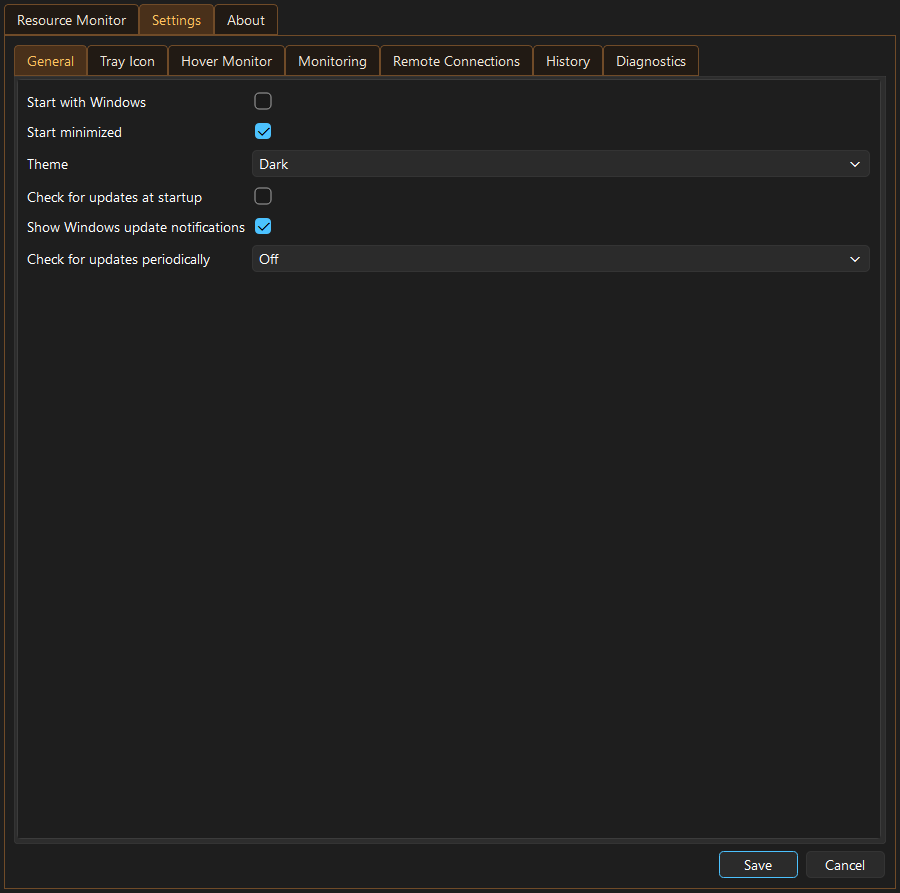
Use **Settings → General** for theme, Start minimized and Start with Windows. Startup and scheduled update checks are optional. Set a hover delay and size in **Hover Monitor** if the popup opens too easily or feels cramped.
|
Use **Settings → General** for theme, Start minimized and Start with Windows. Startup and scheduled update checks are optional. Set a hover delay and size in **Hover Monitor** if the popup opens too easily or feels cramped.
|
||||||
|
|
||||||
History recording is optional. Choose retention and location only when you want data saved across sessions. Use **Remote Connections** to add authorized Linux systems after local readings appear. Review [Settings](https://phantom.zapto.org/gitea/sonja/Adaptive_Resource_Monitor/wiki/Settings) for each available control.
|
History recording is optional. Choose retention and location only when you want data saved across sessions. Use **Remote Connections** to add authorized Linux systems after local readings appear. Review [Settings](./Settings) for each available control.
|
||||||
|
|
||||||
|

|
||||||
|
|
||||||
---
|
---
|
||||||
|
|
||||||
[Previous · Quick Start](https://phantom.zapto.org/gitea/sonja/Adaptive_Resource_Monitor/wiki/Quick-Start)
|
[Previous · Quick Start](./Quick-Start)
|
||||||
|
|||||||
@@ -1,4 +1,4 @@
|
|||||||
[Home](https://phantom.zapto.org/gitea/sonja/Adaptive_Resource_Monitor/wiki/Home) / [Support and Troubleshooting](https://phantom.zapto.org/gitea/sonja/Adaptive_Resource_Monitor/wiki/Support-and-Troubleshooting) / Frequently Asked Questions
|
[Home](./Home) / [Support and Troubleshooting](./Support-and-Troubleshooting) / Frequently Asked Questions
|
||||||
|
|
||||||
**Does ARM run on Linux?** The current desktop app runs on Windows x64. It can monitor a Linux machine over SSH. Native Linux is planned.
|
**Does ARM run on Linux?** The current desktop app runs on Windows x64. It can monitor a Linux machine over SSH. Native Linux is planned.
|
||||||
|
|
||||||
@@ -10,8 +10,8 @@
|
|||||||
|
|
||||||
**Why is one metric missing?** Availability can vary by device, provider and driver. An unavailable field does not indicate idle hardware.
|
**Why is one metric missing?** Availability can vary by device, provider and driver. An unavailable field does not indicate idle hardware.
|
||||||
|
|
||||||
**Where should I send a report?** Start with [Reporting Issues](https://phantom.zapto.org/gitea/sonja/Adaptive_Resource_Monitor/wiki/Reporting-Issues). Use the private route on [SECURITY.md](https://phantom.zapto.org/gitea/sonja/Adaptive_Resource_Monitor/src/branch/main/SECURITY.md#report-a-security-issue) for vulnerabilities or exposed secrets.
|
**Where should I send a report?** Start with [Reporting Issues](./Reporting-Issues). Use the private route on [SECURITY.md](https://phantom.zapto.org/gitea/sonja/Adaptive_Resource_Monitor/src/branch/main/SECURITY.md#report-a-security-issue) for vulnerabilities or exposed secrets.
|
||||||
|
|
||||||
---
|
---
|
||||||
|
|
||||||
[Next · General Troubleshooting](https://phantom.zapto.org/gitea/sonja/Adaptive_Resource_Monitor/wiki/General-Troubleshooting)
|
[Next · General Troubleshooting](./General-Troubleshooting)
|
||||||
|
|||||||
@@ -1,11 +1,11 @@
|
|||||||
[Home](https://phantom.zapto.org/gitea/sonja/Adaptive_Resource_Monitor/wiki/Home) / [Resource Monitoring](https://phantom.zapto.org/gitea/sonja/Adaptive_Resource_Monitor/wiki/Resource-Monitoring) / GPU Monitoring
|
[Home](./Home) / [Resource Monitoring](./Resource-Monitoring) / GPU Monitoring
|
||||||
|
|
||||||
On Windows, DXGI provides adapter identity and WDDM exposes engine activity. ARM can use NVIDIA NVML where the driver makes it available, matching it to the adapter. Where supported, the detailed view can distinguish engines such as 3D, decode, encode and compute. A WDDM summary reflects the busiest observed engine, and the machine GPU percentage is the maximum of the included GPUs.
|
||||||
|
|
||||||
An integrated GPU and a discrete GPU can both appear. Inspect each by selecting the adapter in the expanded monitor. Device selections under **Settings → Monitoring → GPUs** change which devices contribute to local readings. A blank selection uses automatic detection.
|
An integrated GPU and a discrete GPU can both appear. Inspect each by selecting the adapter in the expanded monitor. Device selections under **Settings → Monitoring → GPUs** change which devices contribute to local readings. A blank selection uses automatic detection.
|
||||||
|
|
||||||
Linux uses readable DRM/vendor sysfs values and optional NVIDIA tooling. Temperature, power, clocks and fan data depend on hardware and drivers. Check [GPU and VRAM Telemetry Problems](https://phantom.zapto.org/gitea/sonja/Adaptive_Resource_Monitor/wiki/GPU-and-VRAM-Telemetry-Problems) before interpreting a missing reading.
|
Linux uses readable DRM/vendor sysfs values and optional NVIDIA tooling. Temperature, power, clocks and fan data depend on hardware and drivers. Check [GPU and VRAM Telemetry Problems](./GPU-and-VRAM-Telemetry-Problems) before interpreting a missing reading.
|
||||||
|
|
||||||
---
|
---
|
||||||
|
|
||||||
[Previous · CPU Monitoring](https://phantom.zapto.org/gitea/sonja/Adaptive_Resource_Monitor/wiki/CPU-Monitoring) · [Next · RAM Monitoring](https://phantom.zapto.org/gitea/sonja/Adaptive_Resource_Monitor/wiki/RAM-Monitoring)
|
[Previous · CPU Monitoring](./CPU-Monitoring) · [Next · RAM Monitoring](./RAM-Monitoring)
|
||||||
|
|||||||
@@ -1,4 +1,4 @@
|
|||||||
[Home](https://phantom.zapto.org/gitea/sonja/Adaptive_Resource_Monitor/wiki/Home) / [Support and Troubleshooting](https://phantom.zapto.org/gitea/sonja/Adaptive_Resource_Monitor/wiki/Support-and-Troubleshooting) / GPU and VRAM Telemetry Problems
|
[Home](./Home) / [Support and Troubleshooting](./Support-and-Troubleshooting) / GPU and VRAM Telemetry Problems
|
||||||
|
|
||||||
A GPU can report utilization while its dedicated memory, temperature, clocks or power remain unavailable. An integrated adapter may rely on shared system memory. A headless Linux system may lack driver interfaces exposed to the SSH account.
|
A GPU can report utilization while its dedicated memory, temperature, clocks or power remain unavailable. An integrated adapter may rely on shared system memory. A headless Linux system may lack driver interfaces exposed to the SSH account.
|
||||||
|
|
||||||
@@ -7,8 +7,8 @@ A GPU can report utilization while its dedicated memory, temperature, clocks or
|
|||||||
3. Check the relevant installed driver and, on Linux, whether the user can read the supported DRM or vendor counters. Do not change privileges merely to fill a field.
|
3. Check the relevant installed driver and, on Linux, whether the user can read the supported DRM or vendor counters. Do not change privileges merely to fill a field.
|
||||||
4. If a supported counter differs reproducibly, submit **Hardware Compatibility** with GPU model, driver version, platform, provider and sanitized output.
|
4. If a supported counter differs reproducibly, submit **Hardware Compatibility** with GPU model, driver version, platform, provider and sanitized output.
|
||||||
|
|
||||||
See [GPU Monitoring](https://phantom.zapto.org/gitea/sonja/Adaptive_Resource_Monitor/wiki/GPU-Monitoring) and [VRAM Monitoring](https://phantom.zapto.org/gitea/sonja/Adaptive_Resource_Monitor/wiki/VRAM-Monitoring) for the definitions.
|
See [GPU Monitoring](./GPU-Monitoring) and [VRAM Monitoring](./VRAM-Monitoring) for the definitions.
|
||||||
|
|
||||||
---
|
---
|
||||||
|
|
||||||
[Previous · Remote Connection Problems](https://phantom.zapto.org/gitea/sonja/Adaptive_Resource_Monitor/wiki/Remote-Connection-Problems) · [Next · Network Monitoring Problems](https://phantom.zapto.org/gitea/sonja/Adaptive_Resource_Monitor/wiki/Network-Monitoring-Problems)
|
[Previous · Remote Connection Problems](./Remote-Connection-Problems) · [Next · Network Monitoring Problems](./Network-Monitoring-Problems)
|
||||||
|
|||||||
@@ -1,15 +1,15 @@
|
|||||||
[Home](https://phantom.zapto.org/gitea/sonja/Adaptive_Resource_Monitor/wiki/Home) / [Support and Troubleshooting](https://phantom.zapto.org/gitea/sonja/Adaptive_Resource_Monitor/wiki/Support-and-Troubleshooting) / General Troubleshooting
|
[Home](./Home) / [Support and Troubleshooting](./Support-and-Troubleshooting) / General Troubleshooting
|
||||||
|
|
||||||
Identify the affected machine, timestamp, resource and distribution before changing settings.
|
Identify the affected machine, timestamp, resource and distribution before changing settings.
|
||||||
|
|
||||||
1. Check About for the installed version and whether ARM is installed or portable.
|
1. Check About for the installed version and whether ARM is installed or portable.
|
||||||
2. Compare the hover display with the expanded monitor. Confirm the intended machine and device, the sampling interval and whether the sample is stale.
|
2. Compare the hover display with the expanded monitor. Confirm the intended machine and device, the sampling interval and whether the sample is stale.
|
||||||
3. If the problem concerns one resource, compare it with the native tool and match its time window and units.
|
3. If the problem concerns one resource, compare it with the native tool and match its time window and units.
|
||||||
4. Review the relevant page in [Support and Troubleshooting](https://phantom.zapto.org/gitea/sonja/Adaptive_Resource_Monitor/wiki/Support-and-Troubleshooting) or look in [Diagnostic Logs](https://phantom.zapto.org/gitea/sonja/Adaptive_Resource_Monitor/wiki/Diagnostic-Logs). When feasible, reproduce with the simplest setting that still shows the issue.
|
4. Review the relevant page in [Support and Troubleshooting](./Support-and-Troubleshooting) or look in [Diagnostic Logs](./Diagnostic-Logs). When feasible, reproduce with the simplest setting that still shows the issue.
|
||||||
5. Search the issue tracker and report the symptom, expected result and reproduction. Include a sanitized snippet or screenshot when it clarifies the problem.
|
5. Search the issue tracker and report the symptom, expected result and reproduction. Include a sanitized snippet or screenshot when it clarifies the problem.
|
||||||
|
|
||||||
Keep an unchanged copy of configuration and evidence for your own diagnosis. The ordinary workflow uses targeted checks and preserves existing data.
|
Keep an unchanged copy of configuration and evidence for your own diagnosis. The ordinary workflow uses targeted checks and preserves existing data.
|
||||||
|
|
||||||
---
|
---
|
||||||
|
|
||||||
[Previous · Frequently Asked Questions](https://phantom.zapto.org/gitea/sonja/Adaptive_Resource_Monitor/wiki/Frequently-Asked-Questions) · [Next · System Tray Problems](https://phantom.zapto.org/gitea/sonja/Adaptive_Resource_Monitor/wiki/System-Tray-Problems)
|
[Previous · Frequently Asked Questions](./Frequently-Asked-Questions) · [Next · System Tray Problems](./System-Tray-Problems)
|
||||||
|
|||||||
@@ -1,11 +1,11 @@
|
|||||||
[Home](https://phantom.zapto.org/gitea/sonja/Adaptive_Resource_Monitor/wiki/Home) / Getting Started
|
[Home](./Home) / Getting Started
|
||||||
|
|
||||||
Start with the installer for a per-user Windows setup and Start menu shortcut, or choose the portable ZIP to run from a folder you manage. Both contain the runtime needed to launch. Read the installation guide before choosing optional Windows startup and history recording.
|
Start with the installer for a per-user Windows setup and Start menu shortcut, or choose the portable ZIP to run from a folder you manage. Both contain the runtime needed to launch. Read the installation guide before choosing optional Windows startup and history recording.
|
||||||
|
|
||||||
- [System Requirements](https://phantom.zapto.org/gitea/sonja/Adaptive_Resource_Monitor/wiki/System-Requirements)
|
- [System Requirements](./System-Requirements)
|
||||||
- [Installation Guide](https://phantom.zapto.org/gitea/sonja/Adaptive_Resource_Monitor/wiki/Installation-Guide)
|
- [Installation Guide](./Installation-Guide)
|
||||||
- [Portable Edition](https://phantom.zapto.org/gitea/sonja/Adaptive_Resource_Monitor/wiki/Portable-Edition)
|
- [Portable Edition](./Portable-Edition)
|
||||||
- [Quick Start](https://phantom.zapto.org/gitea/sonja/Adaptive_Resource_Monitor/wiki/Quick-Start)
|
- [Quick Start](./Quick-Start)
|
||||||
- [First-Time Configuration](https://phantom.zapto.org/gitea/sonja/Adaptive_Resource_Monitor/wiki/First-Time-Configuration)
|
- [First-Time Configuration](./First-Time-Configuration)
|
||||||
|
|
||||||
[Current Beta downloads](https://phantom.zapto.org/gitea/sonja/Adaptive_Resource_Monitor/releases/tag/v0.8.6.4_beta)
|
[Current Beta downloads](https://phantom.zapto.org/gitea/sonja/Adaptive_Resource_Monitor/releases/tag/v0.8.6.4_beta)
|
||||||
|
|||||||
@@ -1,4 +1,4 @@
|
|||||||
[Home](https://phantom.zapto.org/gitea/sonja/Adaptive_Resource_Monitor/wiki/Home) / Glossary
|
[Home](./Home) / Glossary
|
||||||
|
|
||||||
| Term | Meaning |
|
| Term | Meaning |
|
||||||
| --- | --- |
|
| --- | --- |
|
||||||
@@ -25,4 +25,4 @@
|
|||||||
| Rollback | Restoring the previous app files after a failed update. |
|
| Rollback | Restoring the previous app files after a failed update. |
|
||||||
| Service availability | Reachability or successful response among observed checks, which can differ from machine or service uptime. |
|
| Service availability | Reachability or successful response among observed checks, which can differ from machine or service uptime. |
|
||||||
|
|
||||||
See [Resource Monitoring](https://phantom.zapto.org/gitea/sonja/Adaptive_Resource_Monitor/wiki/Resource-Monitoring), [Release Channels](https://phantom.zapto.org/gitea/sonja/Adaptive_Resource_Monitor/wiki/Release-Channels) and [Package Authenticity](https://phantom.zapto.org/gitea/sonja/Adaptive_Resource_Monitor/wiki/Package-Authenticity) for context.
|
See [Resource Monitoring](./Resource-Monitoring), [Release Channels](./Release-Channels) and [Package Authenticity](./Package-Authenticity) for context.
|
||||||
|
|||||||
28
Home.md
28
Home.md
@@ -6,7 +6,7 @@ Adaptive Resource Monitor (ARM) is a lightweight, source-available monitoring ap
|
|||||||
|
|
||||||
**Current public release · v0.8.6.4_beta · Beta**
|
**Current public release · v0.8.6.4_beta · Beta**
|
||||||
|
|
||||||
[Download Windows installer or portable ZIP](https://phantom.zapto.org/gitea/sonja/Adaptive_Resource_Monitor/releases/tag/v0.8.6.4_beta) · [Quick Start](https://phantom.zapto.org/gitea/sonja/Adaptive_Resource_Monitor/wiki/Quick-Start) · [User Manual](https://phantom.zapto.org/gitea/sonja/Adaptive_Resource_Monitor/wiki/User-Manual) · [Reporting Issues](https://phantom.zapto.org/gitea/sonja/Adaptive_Resource_Monitor/wiki/Reporting-Issues)
|
[Download Windows installer or portable ZIP](https://phantom.zapto.org/gitea/sonja/Adaptive_Resource_Monitor/releases/tag/v0.8.6.4_beta) · [Quick Start](./Quick-Start) · [User Manual](./User-Manual) · [Reporting Issues](./Reporting-Issues)
|
||||||
|
|
||||||
|

|
||||||
|
|
||||||
@@ -14,17 +14,19 @@ Adaptive Resource Monitor (ARM) is a lightweight, source-available monitoring ap
|
|||||||
|
|
||||||
## Find your topic
|
## Find your topic
|
||||||
|
|
||||||
- [Getting Started](https://phantom.zapto.org/gitea/sonja/Adaptive_Resource_Monitor/wiki/Getting-Started) — Install or run the portable ZIP and open your first graph.
|
- [Getting Started](./Getting-Started) — Install or run the portable ZIP and open your first graph.
|
||||||
- [User Manual](https://phantom.zapto.org/gitea/sonja/Adaptive_Resource_Monitor/wiki/User-Manual) — Tray, hover, expanded view, machine controls, Settings and About.
|
- [User Manual](./User-Manual) — Tray, hover, expanded view, machine controls, Settings and About.
|
||||||
- [Resource Monitoring](https://phantom.zapto.org/gitea/sonja/Adaptive_Resource_Monitor/wiki/Resource-Monitoring) — Definitions for CPU, GPU, RAM, VRAM, disk, network and history.
|
- [Resource Monitoring](./Resource-Monitoring) — Definitions for CPU, GPU, RAM, VRAM, disk, network and history.
|
||||||
- [Remote Monitoring](https://phantom.zapto.org/gitea/sonja/Adaptive_Resource_Monitor/wiki/Remote-Monitoring) — Add Linux targets and verify SSH trust.
|
- [Remote Monitoring](./Remote-Monitoring) — Add Linux targets and verify SSH trust.
|
||||||
- [Application Updates](https://phantom.zapto.org/gitea/sonja/Adaptive_Resource_Monitor/wiki/Application-Updates) — Check, verify, install and recover application updates.
|
- [Application Updates](./Application-Updates) — Check, verify, install and recover application updates.
|
||||||
- [Support and Troubleshooting](https://phantom.zapto.org/gitea/sonja/Adaptive_Resource_Monitor/wiki/Support-and-Troubleshooting) — Solve common problems and report issues safely.
|
- [Support and Troubleshooting](./Support-and-Troubleshooting) — Solve common problems and report issues safely.
|
||||||
- [Developer Documentation](https://phantom.zapto.org/gitea/sonja/Adaptive_Resource_Monitor/wiki/Developer-Documentation) — Architecture, source, testing, build and release workflow.
|
- [Developer Documentation](./Developer-Documentation) — Architecture, source, testing, build and release workflow.
|
||||||
- [Development Roadmap](https://phantom.zapto.org/gitea/sonja/Adaptive_Resource_Monitor/wiki/Development-Roadmap) — Planned and conditional capabilities, milestones and issues.
|
- [Development Roadmap](./Development-Roadmap) — Planned and conditional capabilities, milestones and issues.
|
||||||
- [Licensing and Contributions](https://phantom.zapto.org/gitea/sonja/Adaptive_Resource_Monitor/wiki/Licensing-and-Contributions) — License terms, notices and contribution guidance.
|
- [Licensing and Contributions](./Licensing-and-Contributions) — License terms, notices and contribution guidance.
|
||||||
- [Software License](https://phantom.zapto.org/gitea/sonja/Adaptive_Resource_Monitor/wiki/Software-License) · [Glossary](https://phantom.zapto.org/gitea/sonja/Adaptive_Resource_Monitor/wiki/Glossary) · [Complete page index](https://phantom.zapto.org/gitea/sonja/Adaptive_Resource_Monitor/wiki/Wiki-Index)
|
- [Software License](./Software-License) · [Glossary](./Glossary) · [Complete page index](./Wiki-Index)
|
||||||
|
|
||||||
[Public issue tracker](https://phantom.zapto.org/gitea/sonja/Adaptive_Resource_Monitor/issues) · [Public releases](https://phantom.zapto.org/gitea/sonja/Adaptive_Resource_Monitor/releases) · [Project repository](https://phantom.zapto.org/gitea/sonja/Adaptive_Resource_Monitor)
|
[GitHub issues](https://github.com/sonjamichelle/Adaptive_Resource_Monitor/issues) · [Public releases](https://phantom.zapto.org/gitea/sonja/Adaptive_Resource_Monitor/releases) · [GitHub public project](https://github.com/sonjamichelle/Adaptive_Resource_Monitor) · [Gitea development repository](https://phantom.zapto.org/gitea/sonja/Adaptive_Resource_Monitor)
|
||||||
|
|
||||||
The Windows desktop client and Linux SSH collection are available now. [Development Roadmap](https://phantom.zapto.org/gitea/sonja/Adaptive_Resource_Monitor/wiki/Development-Roadmap) identifies planned and conditional platforms and features.
|
The Windows desktop client and Linux SSH collection are available now. [Development Roadmap](./Development-Roadmap) identifies planned and conditional platforms and features.
|
||||||
|
|
||||||
|
GitHub is the public point of entry for issues, contributions and mirrored downloads. Development, signing and update publication continue in Gitea. [Downloads on GitHub](https://github.com/sonjamichelle/Adaptive_Resource_Monitor/releases) · [Authoritative Gitea releases](https://phantom.zapto.org/gitea/sonja/Adaptive_Resource_Monitor/releases)
|
||||||
|
|||||||
@@ -1,13 +1,13 @@
|
|||||||
[Home](https://phantom.zapto.org/gitea/sonja/Adaptive_Resource_Monitor/wiki/Home) / [User Manual](https://phantom.zapto.org/gitea/sonja/Adaptive_Resource_Monitor/wiki/User-Manual) / Hover Monitor
|
[Home](./Home) / [User Manual](./User-Manual) / Hover Monitor
|
||||||
|
|
||||||
Hover over a live tray icon to see recent readings. The popup normally closes after the cursor leaves the icon and popup, with the configured dismissal delay. **Pin** keeps it open until **Unpin**. Clicking the icon can open the popup, while the popup's button changes its pin state. **Details** opens the expanded view.
|
||||||
|
|
||||||
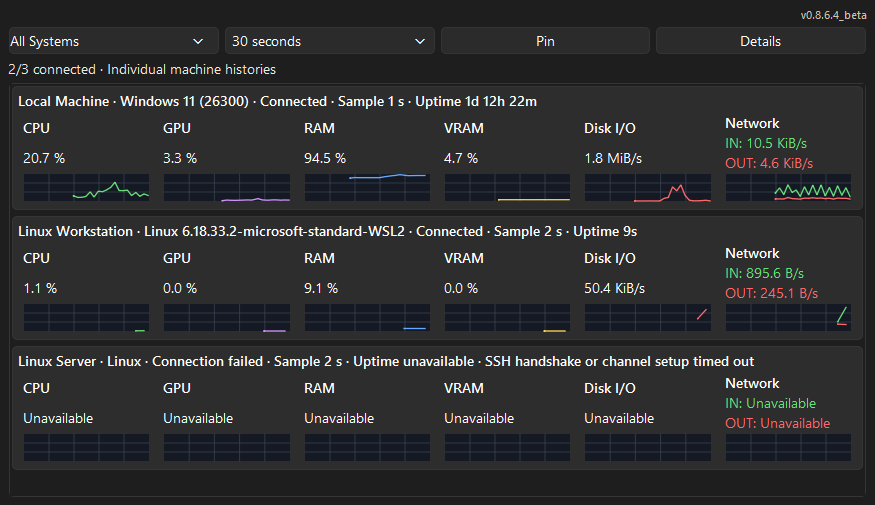
The top-right version label helps identify the running build. Use the machine and history selectors above the graphs. A single selection shows the resource grid. Several selected systems show separate cards, each with its own connection status, interval, uptime when available and graphs. Scrolling keeps a larger machine list accessible.
|
||||||
|
|
||||||
An update message opens About when a verified release is available or ready. See [Update Notifications](https://phantom.zapto.org/gitea/sonja/Adaptive_Resource_Monitor/wiki/Update-Notifications) and [Machine Selection](https://phantom.zapto.org/gitea/sonja/Adaptive_Resource_Monitor/wiki/Machine-Selection).
|
An update message opens About when a verified release is available or ready. See [Update Notifications](./Update-Notifications) and [Machine Selection](./Machine-Selection).
|
||||||
|
|
||||||

|

|
||||||
|
|
||||||
---
|
---
|
||||||
|
|
||||||
[Previous · System Tray Context Menu](https://phantom.zapto.org/gitea/sonja/Adaptive_Resource_Monitor/wiki/System-Tray-Context-Menu) · [Next · Machine Selection](https://phantom.zapto.org/gitea/sonja/Adaptive_Resource_Monitor/wiki/Machine-Selection)
|
[Previous · System Tray Context Menu](./System-Tray-Context-Menu) · [Next · Machine Selection](./Machine-Selection)
|
||||||
|
|||||||
@@ -1,11 +1,11 @@
|
|||||||
[Home](https://phantom.zapto.org/gitea/sonja/Adaptive_Resource_Monitor/wiki/Home) / [Licensing and Contributions](https://phantom.zapto.org/gitea/sonja/Adaptive_Resource_Monitor/wiki/Licensing-and-Contributions) / How to Contribute
|
[Home](./Home) / [Licensing and Contributions](./Licensing-and-Contributions) / How to Contribute
|
||||||
|
|
||||||
Search existing issues first. Use **Documentation Issue** for unclear instructions, **Feature Request** for proposed work and a fitting bug form for reproducible defects. For an improvement or bug fix, discuss scope and acceptance in the original project before sending a patch.
|
Search existing issues first. Use **Documentation Issue** for unclear instructions, **Feature Request** for proposed work and a fitting bug form for reproducible defects. For an improvement or bug fix, discuss scope and acceptance in the original project before sending a patch.
|
||||||
|
|
||||||
Base the patch on the current branch. Include a concise explanation, tests performed and an issue reference such as `Refs #123`. Retain existing notices and credit. Submit your proposal directly via the [Design Creations contact form](https://www.designcreations.us/contact/index.php) or coordinate with a maintainer after issue triage.
|
||||||
|
|
||||||
Private modification and direct contribution are described in [LICENSE.md](https://phantom.zapto.org/gitea/sonja/Adaptive_Resource_Monitor/src/branch/main/LICENSE.md). Public distribution of a modified fork falls under [Derivative Distribution Permission](https://phantom.zapto.org/gitea/sonja/Adaptive_Resource_Monitor/wiki/Derivative-Distribution-Permission). [Repository contribution guide](https://phantom.zapto.org/gitea/sonja/Adaptive_Resource_Monitor/src/branch/main/CONTRIBUTING.md)
|
Private modification and direct contribution are described in [LICENSE.md](https://phantom.zapto.org/gitea/sonja/Adaptive_Resource_Monitor/src/branch/main/LICENSE.md). Public distribution of a modified fork falls under [Derivative Distribution Permission](./Derivative-Distribution-Permission). [Repository contribution guide](https://phantom.zapto.org/gitea/sonja/Adaptive_Resource_Monitor/src/branch/main/CONTRIBUTING.md)
|
||||||
|
|
||||||
---
|
---
|
||||||
|
|
||||||
[Previous · Third-Party Licenses](https://phantom.zapto.org/gitea/sonja/Adaptive_Resource_Monitor/wiki/Third-Party-Licenses) · [Next · Derivative Distribution Permission](https://phantom.zapto.org/gitea/sonja/Adaptive_Resource_Monitor/wiki/Derivative-Distribution-Permission)
|
[Previous · Third-Party Licenses](./Third-Party-Licenses) · [Next · Derivative Distribution Permission](./Derivative-Distribution-Permission)
|
||||||
|
|||||||
@@ -1,9 +1,9 @@
|
|||||||
[Home](https://phantom.zapto.org/gitea/sonja/Adaptive_Resource_Monitor/wiki/Home) / [Application Updates](https://phantom.zapto.org/gitea/sonja/Adaptive_Resource_Monitor/wiki/Application-Updates) / Install Later
|
[Home](./Home) / [Application Updates](./Application-Updates) / Install Later
|
||||||
|
|
||||||
After a verified package is ready, choose **Install Later** in About to postpone installing it. ARM retains the verified files in its per-user update storage and continues monitoring. The readiness action can still reopen About. When you are ready, use **Install Update** and confirm.
|
After a verified package is ready, choose **Install Later** in About to postpone installing it. ARM retains the verified files in its per-user update storage and continues monitoring. The readiness action can still reopen About. When you are ready, use **Install Update** and confirm.
|
||||||
|
|
||||||
Leaving a download incomplete and deferring a verified update are different states. An incomplete download first needs the remaining bytes and a successful check. ARM rechecks the verified package immediately before replacement. See [Downloading Updates](https://phantom.zapto.org/gitea/sonja/Adaptive_Resource_Monitor/wiki/Downloading-Updates) and [Installing Updates](https://phantom.zapto.org/gitea/sonja/Adaptive_Resource_Monitor/wiki/Installing-Updates).
|
Leaving a download incomplete and deferring a verified update are different states. An incomplete download first needs the remaining bytes and a successful check. ARM rechecks the verified package immediately before replacement. See [Downloading Updates](./Downloading-Updates) and [Installing Updates](./Installing-Updates).
|
||||||
|
|
||||||
---
|
---
|
||||||
|
|
||||||
[Previous · Installing Updates](https://phantom.zapto.org/gitea/sonja/Adaptive_Resource_Monitor/wiki/Installing-Updates) · [Next · Release Channels](https://phantom.zapto.org/gitea/sonja/Adaptive_Resource_Monitor/wiki/Release-Channels)
|
[Previous · Installing Updates](./Installing-Updates) · [Next · Release Channels](./Release-Channels)
|
||||||
|
|||||||
@@ -1,7 +1,7 @@
|
|||||||
[Home](https://phantom.zapto.org/gitea/sonja/Adaptive_Resource_Monitor/wiki/Home) / [Getting Started](https://phantom.zapto.org/gitea/sonja/Adaptive_Resource_Monitor/wiki/Getting-Started) / Installation Guide
|
[Home](./Home) / [Getting Started](./Getting-Started) / Installation Guide
|
||||||
|
|
||||||
1. Open [the public release](https://phantom.zapto.org/gitea/sonja/Adaptive_Resource_Monitor/releases/tag/v0.8.6.4_beta). Download the Windows x64 installer and SHA256SUMS.txt.
|
1. Open [the public release](https://phantom.zapto.org/gitea/sonja/Adaptive_Resource_Monitor/releases/tag/v0.8.6.4_beta). Download the Windows x64 installer and SHA256SUMS.txt.
|
||||||
2. In the download folder, run `Get-FileHash -Algorithm SHA256 .\AdaptiveResourceMonitor-*-windows-x64-setup.exe` in PowerShell. Compare the result and filename with the release checksum list. See [Package Authenticity](https://phantom.zapto.org/gitea/sonja/Adaptive_Resource_Monitor/wiki/Package-Authenticity) for signed-manifest verification.
|
2. In the download folder, run `Get-FileHash -Algorithm SHA256 .\AdaptiveResourceMonitor-*-windows-x64-setup.exe` in PowerShell. Compare the result and filename with the release checksum list. See [Package Authenticity](./Package-Authenticity) for signed-manifest verification.
|
||||||
3. Run Setup under the Windows user who will run ARM. Review and accept the license to proceed.
|
3. Run Setup under the Windows user who will run ARM. Review and accept the license to proceed.
|
||||||
4. Choose a destination or retain the default per-user path. Setup creates a Start menu shortcut. Select the optional desktop shortcut or Start with Windows task if wanted.
|
4. Choose a destination or retain the default per-user path. Setup creates a Start menu shortcut. Select the optional desktop shortcut or Start with Windows task if wanted.
|
||||||
5. Finish Setup and launch **Adaptive Resource Monitor** from the Start menu. Check the notification-area overflow if the icon is hidden.
|
5. Finish Setup and launch **Adaptive Resource Monitor** from the Start menu. Check the notification-area overflow if the icon is hidden.
|
||||||
@@ -14,4 +14,4 @@ To uninstall, close ARM with its tray **Exit** action, then use Windows **Settin
|
|||||||
|
|
||||||
---
|
---
|
||||||
|
|
||||||
[Previous · System Requirements](https://phantom.zapto.org/gitea/sonja/Adaptive_Resource_Monitor/wiki/System-Requirements) · [Next · Portable Edition](https://phantom.zapto.org/gitea/sonja/Adaptive_Resource_Monitor/wiki/Portable-Edition)
|
[Previous · System Requirements](./System-Requirements) · [Next · Portable Edition](./Portable-Edition)
|
||||||
|
|||||||
@@ -1,11 +1,11 @@
|
|||||||
[Home](https://phantom.zapto.org/gitea/sonja/Adaptive_Resource_Monitor/wiki/Home) / [Support and Troubleshooting](https://phantom.zapto.org/gitea/sonja/Adaptive_Resource_Monitor/wiki/Support-and-Troubleshooting) / Installation Problems
|
[Home](./Home) / [Support and Troubleshooting](./Support-and-Troubleshooting) / Installation Problems
|
||||||
|
|
||||||
Verify that the package is for Windows x64 and check its SHA-256. Setup enforces a Windows build floor and needs a usable installation location and room for its files. If ARM is running, use the tray Exit action and then retry a manually launched Setup. For portable use, extract the whole ZIP before launching.
|
||||||
|
|
||||||
A rejected license or canceled setup should stop installation. Review the license and continue only with explicit acceptance. For an in-app upgrade that fails after closing ARM, review [Recovery and Rollback](https://phantom.zapto.org/gitea/sonja/Adaptive_Resource_Monitor/wiki/Recovery-and-Rollback) before using another installer.
|
A rejected license or canceled setup should stop installation. Review the license and continue only with explicit acceptance. For an in-app upgrade that fails after closing ARM, review [Recovery and Rollback](./Recovery-and-Rollback) before using another installer.
|
||||||
|
|
||||||
Report persistent errors with the Windows build, exact installer version, stage, sanitized error and whether the same package hash matches. Use the Installation or Update Issue form.
|
Report persistent errors with the Windows build, exact installer version, stage, sanitized error and whether the same package hash matches. Use the Installation or Update Issue form.
|
||||||
|
|
||||||
---
|
---
|
||||||
|
|
||||||
[Previous · Network Monitoring Problems](https://phantom.zapto.org/gitea/sonja/Adaptive_Resource_Monitor/wiki/Network-Monitoring-Problems) · [Next · Update Problems](https://phantom.zapto.org/gitea/sonja/Adaptive_Resource_Monitor/wiki/Update-Problems)
|
[Previous · Network Monitoring Problems](./Network-Monitoring-Problems) · [Next · Update Problems](./Update-Problems)
|
||||||
|
|||||||
@@ -1,4 +1,4 @@
|
|||||||
[Home](https://phantom.zapto.org/gitea/sonja/Adaptive_Resource_Monitor/wiki/Home) / [Application Updates](https://phantom.zapto.org/gitea/sonja/Adaptive_Resource_Monitor/wiki/Application-Updates) / Installing Updates
|
[Home](./Home) / [Application Updates](./Application-Updates) / Installing Updates
|
||||||
|
|
||||||
1. Check for and download the update in About. Confirm the verified target version and review the signed release notes.
|
1. Check for and download the update in About. Confirm the verified target version and review the signed release notes.
|
||||||
2. Choose **Install Update** and approve the confirmation. If the license changed, ARM retrieves the matching source-license text, checks its signed hash and requests acceptance before shutting down.
|
2. Choose **Install Update** and approve the confirmation. If the license changed, ARM retrieves the matching source-license text, checks its signed hash and requests acceptance before shutting down.
|
||||||
@@ -8,8 +8,8 @@
|
|||||||
|
|
||||||
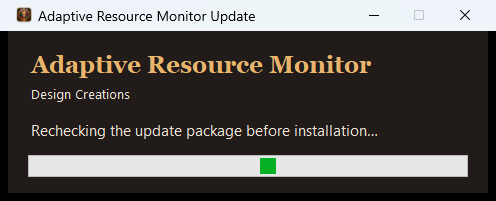
|

|
||||||
|
|
||||||
See [Recovery and Rollback](https://phantom.zapto.org/gitea/sonja/Adaptive_Resource_Monitor/wiki/Recovery-and-Rollback) if the process reports a failure or an interruption.
|
See [Recovery and Rollback](./Recovery-and-Rollback) if the process reports a failure or an interruption.
|
||||||
|
|
||||||
---
|
---
|
||||||
|
|
||||||
[Previous · Downloading Updates](https://phantom.zapto.org/gitea/sonja/Adaptive_Resource_Monitor/wiki/Downloading-Updates) · [Next · Install Later](https://phantom.zapto.org/gitea/sonja/Adaptive_Resource_Monitor/wiki/Install-Later)
|
[Previous · Downloading Updates](./Downloading-Updates) · [Next · Install Later](./Install-Later)
|
||||||
|
|||||||
@@ -1,4 +1,4 @@
|
|||||||
[Home](https://phantom.zapto.org/gitea/sonja/Adaptive_Resource_Monitor/wiki/Home) / [Developer Documentation](https://phantom.zapto.org/gitea/sonja/Adaptive_Resource_Monitor/wiki/Developer-Documentation) / Jenkins and CI/CD
|
[Home](./Home) / [Developer Documentation](./Developer-Documentation) / Jenkins and CI/CD
|
||||||
|
|
||||||
The public-facing workflow starts with a source revision. Jenkins validates the version, runs regressions and native checks, builds the Windows distribution and archives the tested artifacts. Signing, package identity and SHA-256 verification bind that archive to its source and build number.
|
The public-facing workflow starts with a source revision. Jenkins validates the version, runs regressions and native checks, builds the Windows distribution and archives the tested artifacts. Signing, package identity and SHA-256 verification bind that archive to its source and build number.
|
||||||
|
|
||||||
@@ -8,4 +8,4 @@ Documentation changes use the checkout and version path rather than application
|
|||||||
|
|
||||||
---
|
---
|
||||||
|
|
||||||
[Previous · Versioning](https://phantom.zapto.org/gitea/sonja/Adaptive_Resource_Monitor/wiki/Versioning) · [Next · Release Process](https://phantom.zapto.org/gitea/sonja/Adaptive_Resource_Monitor/wiki/Release-Process)
|
[Previous · Versioning](./Versioning) · [Next · Release Process](./Release-Process)
|
||||||
|
|||||||
@@ -1,4 +1,4 @@
|
|||||||
[Home](https://phantom.zapto.org/gitea/sonja/Adaptive_Resource_Monitor/wiki/Home) / [Support and Troubleshooting](https://phantom.zapto.org/gitea/sonja/Adaptive_Resource_Monitor/wiki/Support-and-Troubleshooting) / Known Limitations
|
[Home](./Home) / [Support and Troubleshooting](./Support-and-Troubleshooting) / Known Limitations
|
||||||
|
|
||||||
| Area | Present boundary |
|
| Area | Present boundary |
|
||||||
| --- | --- |
|
| --- | --- |
|
||||||
@@ -10,8 +10,8 @@
|
|||||||
| Package signing | Update authenticity uses signed manifests and SHA-256. The current Windows packages do not use Authenticode. |
|
| Package signing | Update authenticity uses signed manifests and SHA-256. The current Windows packages do not use Authenticode. |
|
||||||
| Maturity | The public Windows release is Beta. Check its release notes for the exact shipped scope. |
|
| Maturity | The public Windows release is Beta. Check its release notes for the exact shipped scope. |
|
||||||
|
|
||||||
Refer to [Development Roadmap](https://phantom.zapto.org/gitea/sonja/Adaptive_Resource_Monitor/wiki/Development-Roadmap) for status and dependencies. Report unexpected behavior in a supported configuration through [Reporting Issues](https://phantom.zapto.org/gitea/sonja/Adaptive_Resource_Monitor/wiki/Reporting-Issues).
|
Refer to [Development Roadmap](./Development-Roadmap) for status and dependencies. Report unexpected behavior in a supported configuration through [Reporting Issues](./Reporting-Issues).
|
||||||
|
|
||||||
---
|
---
|
||||||
|
|
||||||
[Previous · Diagnostic Logs](https://phantom.zapto.org/gitea/sonja/Adaptive_Resource_Monitor/wiki/Diagnostic-Logs) · [Next · Reporting Issues](https://phantom.zapto.org/gitea/sonja/Adaptive_Resource_Monitor/wiki/Reporting-Issues)
|
[Previous · Diagnostic Logs](./Diagnostic-Logs) · [Next · Reporting Issues](./Reporting-Issues)
|
||||||
|
|||||||
@@ -1,8 +1,8 @@
|
|||||||
[Home](https://phantom.zapto.org/gitea/sonja/Adaptive_Resource_Monitor/wiki/Home) / Licensing and Contributions
|
[Home](./Home) / Licensing and Contributions
|
||||||
|
|
||||||
The Windows client is distributed under DC-ANCSA v1.0. This section covers the governing license, upstream runtime notices, contribution workflow and the process for requesting written permission to distribute a derivative.
|
The Windows client is distributed under DC-ANCSA v1.0. This section covers the governing license, upstream runtime notices, contribution workflow and the process for requesting written permission to distribute a derivative.
|
||||||
|
|
||||||
- [Software License](https://phantom.zapto.org/gitea/sonja/Adaptive_Resource_Monitor/wiki/Software-License)
|
- [Software License](./Software-License)
|
||||||
- [Third-Party Licenses](https://phantom.zapto.org/gitea/sonja/Adaptive_Resource_Monitor/wiki/Third-Party-Licenses)
|
- [Third-Party Licenses](./Third-Party-Licenses)
|
||||||
- [How to Contribute](https://phantom.zapto.org/gitea/sonja/Adaptive_Resource_Monitor/wiki/How-to-Contribute)
|
- [How to Contribute](./How-to-Contribute)
|
||||||
- [Derivative Distribution Permission](https://phantom.zapto.org/gitea/sonja/Adaptive_Resource_Monitor/wiki/Derivative-Distribution-Permission)
|
- [Derivative Distribution Permission](./Derivative-Distribution-Permission)
|
||||||
|
|||||||
@@ -1,4 +1,4 @@
|
|||||||
[Home](https://phantom.zapto.org/gitea/sonja/Adaptive_Resource_Monitor/wiki/Home) / [Remote Monitoring](https://phantom.zapto.org/gitea/sonja/Adaptive_Resource_Monitor/wiki/Remote-Monitoring) / Linux Telemetry
|
[Home](./Home) / [Remote Monitoring](./Remote-Monitoring) / Linux Telemetry
|
||||||
|
|
||||||
The Windows client sends a small read-only Bash telemetry program over SSH. Each enabled target owns its SSH channel and sampling schedule. A Linux target with the expected tools and readable counters does not need a full ARM installation.
|
The Windows client sends a small read-only Bash telemetry program over SSH. Each enabled target owns its SSH channel and sampling schedule. A Linux target with the expected tools and readable counters does not need a full ARM installation.
|
||||||
|
|
||||||
@@ -14,4 +14,4 @@ A headless system can report CPU, memory, disk and network while exposing little
|
|||||||
|
|
||||||
---
|
---
|
||||||
|
|
||||||
[Previous · SSH Configuration](https://phantom.zapto.org/gitea/sonja/Adaptive_Resource_Monitor/wiki/SSH-Configuration) · [Next · Credential Management](https://phantom.zapto.org/gitea/sonja/Adaptive_Resource_Monitor/wiki/Credential-Management)
|
[Previous · SSH Configuration](./SSH-Configuration) · [Next · Credential Management](./Credential-Management)
|
||||||
|
|||||||
@@ -1,4 +1,4 @@
|
|||||||
[Home](https://phantom.zapto.org/gitea/sonja/Adaptive_Resource_Monitor/wiki/Home) / [User Manual](https://phantom.zapto.org/gitea/sonja/Adaptive_Resource_Monitor/wiki/User-Manual) / Machine Ordering
|
[Home](./Home) / [User Manual](./User-Manual) / Machine Ordering
|
||||||
|
|
||||||
Drag an enabled machine card by its header or graph area in the multi-machine hover or expanded view. Drop at the insertion line. You can also rearrange rows in **Manage Remote Targets**. Use the card surface clear of buttons and other controls.
|
Drag an enabled machine card by its header or graph area in the multi-machine hover or expanded view. Drop at the insertion line. You can also rearrange rows in **Manage Remote Targets**. Use the card surface clear of buttons and other controls.
|
||||||
|
|
||||||
@@ -8,4 +8,4 @@ ARM saves the order on a completed drop, without waiting for application exit. T
|
|||||||
|
|
||||||
---
|
---
|
||||||
|
|
||||||
[Previous · Machine Selection](https://phantom.zapto.org/gitea/sonja/Adaptive_Resource_Monitor/wiki/Machine-Selection) · [Next · Expanded Resource Monitor](https://phantom.zapto.org/gitea/sonja/Adaptive_Resource_Monitor/wiki/Expanded-Resource-Monitor)
|
[Previous · Machine Selection](./Machine-Selection) · [Next · Expanded Resource Monitor](./Expanded-Resource-Monitor)
|
||||||
|
|||||||
@@ -1,4 +1,4 @@
|
|||||||
[Home](https://phantom.zapto.org/gitea/sonja/Adaptive_Resource_Monitor/wiki/Home) / [User Manual](https://phantom.zapto.org/gitea/sonja/Adaptive_Resource_Monitor/wiki/User-Manual) / Machine Selection
|
[Home](./Home) / [User Manual](./User-Manual) / Machine Selection
|
||||||
|
|
||||||
Open the machine dropdown and check the systems you want to see. The selection applies to the hover monitor, expanded monitor and **Monitor Machine** tray submenu. The dropdown remains open while you check machines. Click outside it or press **Escape** to close it.
|
Open the machine dropdown and check the systems you want to see. The selection applies to the hover monitor, expanded monitor and **Monitor Machine** tray submenu. The dropdown remains open while you check machines. Click outside it or press **Escape** to close it.
|
||||||
|
|
||||||
@@ -9,4 +9,4 @@ Open the machine dropdown and check the systems you want to see. The selection a
|
|||||||
|
|
||||||
---
|
---
|
||||||
|
|
||||||
[Previous · Hover Monitor](https://phantom.zapto.org/gitea/sonja/Adaptive_Resource_Monitor/wiki/Hover-Monitor) · [Next · Machine Ordering](https://phantom.zapto.org/gitea/sonja/Adaptive_Resource_Monitor/wiki/Machine-Ordering)
|
[Previous · Hover Monitor](./Hover-Monitor) · [Next · Machine Ordering](./Machine-Ordering)
|
||||||
|
|||||||
@@ -1,4 +1,4 @@
|
|||||||
[Home](https://phantom.zapto.org/gitea/sonja/Adaptive_Resource_Monitor/wiki/Home) / [Development Roadmap](https://phantom.zapto.org/gitea/sonja/Adaptive_Resource_Monitor/wiki/Development-Roadmap) / Native Linux Application
|
[Home](./Home) / [Development Roadmap](./Development-Roadmap) / Native Linux Application
|
||||||
|
|
||||||
**Planned.** Build a native Linux desktop client around Qt, with local Linux telemetry and the familiar tray and independent machine views. Start with KDE Plasma, assess GNOME separately and test X11 and Wayland behavior. Where native hover is unavailable, plan a documented accessible popup path.
|
**Planned.** Build a native Linux desktop client around Qt, with local Linux telemetry and the familiar tray and independent machine views. Start with KDE Plasma, assess GNOME separately and test X11 and Wayland behavior. Where native hover is unavailable, plan a documented accessible popup path.
|
||||||
|
|
||||||
@@ -8,4 +8,4 @@ The roadmap starts with Debian packaging, XDG locations and platform secret stor
|
|||||||
|
|
||||||
---
|
---
|
||||||
|
|
||||||
[Next · Windows Monitoring Agent](https://phantom.zapto.org/gitea/sonja/Adaptive_Resource_Monitor/wiki/Windows-Monitoring-Agent)
|
[Next · Windows Monitoring Agent](./Windows-Monitoring-Agent)
|
||||||
|
|||||||
@@ -1,4 +1,4 @@
|
|||||||
[Home](https://phantom.zapto.org/gitea/sonja/Adaptive_Resource_Monitor/wiki/Home) / [Development Roadmap](https://phantom.zapto.org/gitea/sonja/Adaptive_Resource_Monitor/wiki/Development-Roadmap) / Native macOS Application
|
[Home](./Home) / [Development Roadmap](./Development-Roadmap) / Native macOS Application
|
||||||
|
|
||||||
**Planned.** An Apple silicon-first desktop application would use native macOS telemetry, a menu-bar integration and independent machine graphs. Use Qt where practical and native platform integration where needed. Evaluate Intel support separately.
|
**Planned.** An Apple silicon-first desktop application would use native macOS telemetry, a menu-bar integration and independent machine graphs. Use Qt where practical and native platform integration where needed. Evaluate Intel support separately.
|
||||||
|
|
||||||
@@ -8,4 +8,4 @@ Use Keychain for credentials and model unified memory accurately. Read-only SSH
|
|||||||
|
|
||||||
---
|
---
|
||||||
|
|
||||||
[Previous · Windows Monitoring Agent](https://phantom.zapto.org/gitea/sonja/Adaptive_Resource_Monitor/wiki/Windows-Monitoring-Agent) · [Next · Android Application](https://phantom.zapto.org/gitea/sonja/Adaptive_Resource_Monitor/wiki/Android-Application)
|
[Previous · Windows Monitoring Agent](./Windows-Monitoring-Agent) · [Next · Android Application](./Android-Application)
|
||||||
|
|||||||
@@ -1,11 +1,11 @@
|
|||||||
[Home](https://phantom.zapto.org/gitea/sonja/Adaptive_Resource_Monitor/wiki/Home) / [Support and Troubleshooting](https://phantom.zapto.org/gitea/sonja/Adaptive_Resource_Monitor/wiki/Support-and-Troubleshooting) / Network Monitoring Problems
|
[Home](./Home) / [Support and Troubleshooting](./Support-and-Troubleshooting) / Network Monitoring Problems
|
||||||
|
|
||||||
If both traces remain flat, check the selected machine, interface and whether fresh samples arrive. Confirm that traffic is actually using the chosen adapter. A valid zero can be normal during an idle interval. A missing directional history may come from a reset or an older combined-only record.
|
If both traces remain flat, check the selected machine, interface and whether fresh samples arrive. Confirm that traffic is actually using the chosen adapter. A valid zero can be normal during an idle interval. A missing directional history may come from a reset or an older combined-only record.
|
||||||
|
|
||||||
If totals look much higher than expected during VPN or bridge activity, check for overlapping network layers. Select one interface from each path. If one line compresses the other, inspect the shared scale and temporarily choose a suitable fixed reference.
|
If totals look much higher than expected during VPN or bridge activity, check for overlapping network layers. Select one interface from each path. If one line compresses the other, inspect the shared scale and temporarily choose a suitable fixed reference.
|
||||||
|
|
||||||
Report a reproducible issue with the interface type, transfer direction, scale, units and sampling interval. Use generic interface names in shared screenshots and logs where needed. See [Network Monitoring](https://phantom.zapto.org/gitea/sonja/Adaptive_Resource_Monitor/wiki/Network-Monitoring).
|
Report a reproducible issue with the interface type, transfer direction, scale, units and sampling interval. Use generic interface names in shared screenshots and logs where needed. See [Network Monitoring](./Network-Monitoring).
|
||||||
|
|
||||||
---
|
---
|
||||||
|
|
||||||
[Previous · GPU and VRAM Telemetry Problems](https://phantom.zapto.org/gitea/sonja/Adaptive_Resource_Monitor/wiki/GPU-and-VRAM-Telemetry-Problems) · [Next · Installation Problems](https://phantom.zapto.org/gitea/sonja/Adaptive_Resource_Monitor/wiki/Installation-Problems)
|
[Previous · GPU and VRAM Telemetry Problems](./GPU-and-VRAM-Telemetry-Problems) · [Next · Installation Problems](./Installation-Problems)
|
||||||
|
|||||||
@@ -1,4 +1,4 @@
|
|||||||
[Home](https://phantom.zapto.org/gitea/sonja/Adaptive_Resource_Monitor/wiki/Home) / [Resource Monitoring](https://phantom.zapto.org/gitea/sonja/Adaptive_Resource_Monitor/wiki/Resource-Monitoring) / Network Monitoring
|
[Home](./Home) / [Resource Monitoring](./Resource-Monitoring) / Network Monitoring
|
||||||
|
|
||||||
**Network IN (RX)** is received traffic and is green by default. **Network OUT (TX)** is sent traffic and is red by default. They share one automatic or fixed scale per graph. Throughput is in bytes per second, with units such as KiB/s and MiB/s. Network link speed and throughput are distinct quantities.
|
||||||
|
|
||||||
@@ -10,4 +10,4 @@ A VPN, bridge or virtual switch may count the same traffic at more than one laye
|
|||||||
|
|
||||||
---
|
---
|
||||||
|
|
||||||
[Previous · Storage I/O Monitoring](https://phantom.zapto.org/gitea/sonja/Adaptive_Resource_Monitor/wiki/Storage-IO-Monitoring) · [Next · Resource History](https://phantom.zapto.org/gitea/sonja/Adaptive_Resource_Monitor/wiki/Resource-History)
|
[Previous · Storage I/O Monitoring](./Storage-IO-Monitoring) · [Next · Resource History](./Resource-History)
|
||||||
|
|||||||
@@ -1,4 +1,4 @@
|
|||||||
[Home](https://phantom.zapto.org/gitea/sonja/Adaptive_Resource_Monitor/wiki/Home) / [Development Roadmap](https://phantom.zapto.org/gitea/sonja/Adaptive_Resource_Monitor/wiki/Development-Roadmap) / Optional Monitoring Gateway
|
[Home](./Home) / [Development Roadmap](./Development-Roadmap) / Optional Monitoring Gateway
|
||||||
|
|
||||||
**Planned and optional.** A separately deployed gateway would maintain explicitly configured SSH and agent connections, independent histories and bounded optional retention. It would expose a read-only authenticated interface to authorized desktop, mobile and embedded displays.
|
**Planned and optional.** A separately deployed gateway would maintain explicitly configured SSH and agent connections, independent histories and bounded optional retention. It would expose a read-only authenticated interface to authorized desktop, mobile and embedded displays.
|
||||||
|
|
||||||
@@ -8,4 +8,4 @@ The design calls for per-machine authorization, limited connection and request r
|
|||||||
|
|
||||||
---
|
---
|
||||||
|
|
||||||
[Previous · iOS and iPadOS Application](https://phantom.zapto.org/gitea/sonja/Adaptive_Resource_Monitor/wiki/iOS-and-iPadOS-Application) · [Next · Dedicated Hardware Monitoring Displays](https://phantom.zapto.org/gitea/sonja/Adaptive_Resource_Monitor/wiki/Dedicated-Hardware-Monitoring-Displays)
|
[Previous · iOS and iPadOS Application](./iOS-and-iPadOS-Application) · [Next · Dedicated Hardware Monitoring Displays](./Dedicated-Hardware-Monitoring-Displays)
|
||||||
|
|||||||
@@ -1,11 +1,11 @@
|
|||||||
[Home](https://phantom.zapto.org/gitea/sonja/Adaptive_Resource_Monitor/wiki/Home) / [Application Updates](https://phantom.zapto.org/gitea/sonja/Adaptive_Resource_Monitor/wiki/Application-Updates) / Package Authenticity
|
[Home](./Home) / [Application Updates](./Application-Updates) / Package Authenticity
|
||||||
|
|
||||||
The release page provides `SHA256SUMS.txt`, a signed update manifest and a verification key. A manual SHA-256 comparison detects changes relative to the published checksum. For the built-in updater, Ed25519 authenticates the manifest with the public key pinned inside ARM. The signed metadata binds the version, app identity, architecture, package kind, filenames, sizes and hashes to a release.
|
||||||
|
|
||||||
ARM checks the package SHA-256 before staging and again before replacement. A release's signed notes also bind the license hash. Read the authoritative contract in [UPDATE_MECHANISM.md](https://phantom.zapto.org/gitea/sonja/Adaptive_Resource_Monitor/src/branch/main/UPDATE_MECHANISM.md).
|
ARM checks the package SHA-256 before staging and again before replacement. A release's signed notes also bind the license hash. Read the authoritative contract in [UPDATE_MECHANISM.md](https://phantom.zapto.org/gitea/sonja/Adaptive_Resource_Monitor/src/branch/main/UPDATE_MECHANISM.md).
|
||||||
|
|
||||||
Windows Authenticode is a separate mechanism for checking executable publishers. ARM's Ed25519 signatures cover the update manifest and the packages it references. The current packages do not apply Authenticode. For verification errors, follow [Update Problems](https://phantom.zapto.org/gitea/sonja/Adaptive_Resource_Monitor/wiki/Update-Problems) and retain all verification controls.
|
Windows Authenticode is a separate mechanism for checking executable publishers. ARM's Ed25519 signatures cover the update manifest and the packages it references. The current packages do not apply Authenticode. For verification errors, follow [Update Problems](./Update-Problems) and retain all verification controls.
|
||||||
|
|
||||||
---
|
---
|
||||||
|
|
||||||
[Previous · Release Channels](https://phantom.zapto.org/gitea/sonja/Adaptive_Resource_Monitor/wiki/Release-Channels) · [Next · Recovery and Rollback](https://phantom.zapto.org/gitea/sonja/Adaptive_Resource_Monitor/wiki/Recovery-and-Rollback)
|
[Previous · Release Channels](./Release-Channels) · [Next · Recovery and Rollback](./Recovery-and-Rollback)
|
||||||
|
|||||||
@@ -1,4 +1,4 @@
|
|||||||
[Home](https://phantom.zapto.org/gitea/sonja/Adaptive_Resource_Monitor/wiki/Home) / [Support and Troubleshooting](https://phantom.zapto.org/gitea/sonja/Adaptive_Resource_Monitor/wiki/Support-and-Troubleshooting) / Performance Problems
|
[Home](./Home) / [Support and Troubleshooting](./Support-and-Troubleshooting) / Performance Problems
|
||||||
|
|
||||||
Separate the cost of sampling, rendering and recording when narrowing down a problem. In Task Manager, note the ARM process CPU and working set for a consistent interval. Compare tray-only with the popup or expanded monitor open. Record target count, sampling rates, visible cards, tray mode and history recording.
|
||||||
|
|
||||||
@@ -8,4 +8,4 @@ If the issue persists, use Performance Issue with hardware, OS version, app vers
|
|||||||
|
|
||||||
---
|
---
|
||||||
|
|
||||||
[Previous · Settings and Persistence Problems](https://phantom.zapto.org/gitea/sonja/Adaptive_Resource_Monitor/wiki/Settings-and-Persistence-Problems) · [Next · Diagnostic Logs](https://phantom.zapto.org/gitea/sonja/Adaptive_Resource_Monitor/wiki/Diagnostic-Logs)
|
[Previous · Settings and Persistence Problems](./Settings-and-Persistence-Problems) · [Next · Diagnostic Logs](./Diagnostic-Logs)
|
||||||
|
|||||||
@@ -1,11 +1,11 @@
|
|||||||
[Home](https://phantom.zapto.org/gitea/sonja/Adaptive_Resource_Monitor/wiki/Home) / [Getting Started](https://phantom.zapto.org/gitea/sonja/Adaptive_Resource_Monitor/wiki/Getting-Started) / Portable Edition
|
[Home](./Home) / [Getting Started](./Getting-Started) / Portable Edition
|
||||||
|
|
||||||
Choose the Windows x64 ZIP on the [public release](https://phantom.zapto.org/gitea/sonja/Adaptive_Resource_Monitor/releases/tag/v0.8.6.4_beta) and compare its SHA-256 against the published list. Extract the entire archive to a folder you own, then run `AdaptiveResourceMonitor.exe` in that folder. Keep the other files and subfolders beside it. Launching from inside the ZIP can leave required runtime files unavailable.
|
||||||
|
|
||||||
The ZIP creates no installer registration or installer shortcuts. It uses the same per-user settings and history location as the installed version. For a portable upgrade, use **About → Install Update** so ARM selects its verified portable package and replaces the release-owned entries. Extracting a clean copy into a separate folder is an option when recovering manually.
|
||||||
|
|
||||||
Portable ARM can still use **Start with Windows**. Turn it off before moving or deleting that folder, then enable it from the new location if wanted. See [Recovery and Rollback](https://phantom.zapto.org/gitea/sonja/Adaptive_Resource_Monitor/wiki/Recovery-and-Rollback) for update failures.
|
Portable ARM can still use **Start with Windows**. Turn it off before moving or deleting that folder, then enable it from the new location if wanted. See [Recovery and Rollback](./Recovery-and-Rollback) for update failures.
|
||||||
|
|
||||||
---
|
---
|
||||||
|
|
||||||
[Previous · Installation Guide](https://phantom.zapto.org/gitea/sonja/Adaptive_Resource_Monitor/wiki/Installation-Guide) · [Next · Quick Start](https://phantom.zapto.org/gitea/sonja/Adaptive_Resource_Monitor/wiki/Quick-Start)
|
[Previous · Installation Guide](./Installation-Guide) · [Next · Quick Start](./Quick-Start)
|
||||||
|
|||||||
@@ -1,11 +1,11 @@
|
|||||||
[Home](https://phantom.zapto.org/gitea/sonja/Adaptive_Resource_Monitor/wiki/Home) / [Getting Started](https://phantom.zapto.org/gitea/sonja/Adaptive_Resource_Monitor/wiki/Getting-Started) / Quick Start
|
[Home](./Home) / [Getting Started](./Getting-Started) / Quick Start
|
||||||
|
|
||||||
1. Install or extract ARM, then launch it.
|
1. Install or extract ARM, then launch it.
|
||||||
2. Find the graph icon by the Windows clock. Use the overflow arrow if needed.
|
2. Find the graph icon by the Windows clock. Use the overflow arrow if needed.
|
||||||
3. Hover until the monitor opens. Select **Local Machine** once for a first view. Wait for a few samples to populate the lines.
|
3. Hover until the monitor opens. Select **Local Machine** once for a first view. Wait for a few samples to populate the lines.
|
||||||
4. Select **Details** for a larger view. Use **Pin** to keep the small monitor on screen.
|
4. Select **Details** for a larger view. Use **Pin** to keep the small monitor on screen.
|
||||||
5. Open **Settings** in the main window or from the tray. Choose a theme, colors and sampling interval, then **Save**.
|
5. Open **Settings** in the main window or from the tray. Choose a theme, colors and sampling interval, then **Save**.
|
||||||
6. To add another machine, follow [Adding a Remote Linux Machine](https://phantom.zapto.org/gitea/sonja/Adaptive_Resource_Monitor/wiki/Adding-a-Remote-Linux-Machine).
|
6. To add another machine, follow [Adding a Remote Linux Machine](./Adding-a-Remote-Linux-Machine).
|
||||||
|
|
||||||
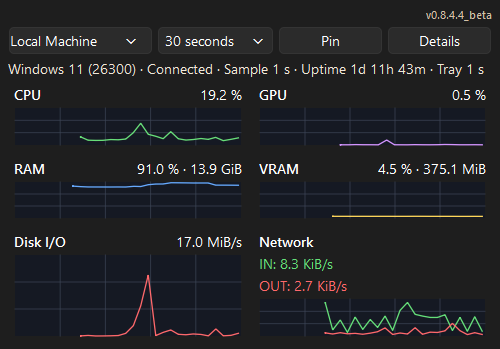
|

|
||||||
|
|
||||||
@@ -13,4 +13,4 @@ The example uses the previous Beta capture of the same single-machine layout.
|
|||||||
|
|
||||||
---
|
---
|
||||||
|
|
||||||
[Previous · Portable Edition](https://phantom.zapto.org/gitea/sonja/Adaptive_Resource_Monitor/wiki/Portable-Edition) · [Next · First-Time Configuration](https://phantom.zapto.org/gitea/sonja/Adaptive_Resource_Monitor/wiki/First-Time-Configuration)
|
[Previous · Portable Edition](./Portable-Edition) · [Next · First-Time Configuration](./First-Time-Configuration)
|
||||||
|
|||||||
@@ -1,11 +1,11 @@
|
|||||||
[Home](https://phantom.zapto.org/gitea/sonja/Adaptive_Resource_Monitor/wiki/Home) / [Resource Monitoring](https://phantom.zapto.org/gitea/sonja/Adaptive_Resource_Monitor/wiki/Resource-Monitoring) / RAM Monitoring
|
[Home](./Home) / [Resource Monitoring](./Resource-Monitoring) / RAM Monitoring
|
||||||
|
|
||||||
RAM refers to physical memory. ARM uses **total minus available** for physical used memory. Available memory includes what the operating system can reclaim under its own accounting. The utilization percentage is physical used divided by physical total.
|
RAM refers to physical memory. ARM uses **total minus available** for physical used memory. Available memory includes what the operating system can reclaim under its own accounting. The utilization percentage is physical used divided by physical total.
|
||||||
|
|
||||||
The detailed view may show Windows commit and pagefile counters or Linux commit and swap fields. These describe virtual-memory backing and use different totals. An increase in commit does not necessarily mean resident RAM rose by the same amount.
|
The detailed view may show Windows commit and pagefile counters or Linux commit and swap fields. These describe virtual-memory backing and use different totals. An increase in commit does not necessarily mean resident RAM rose by the same amount.
|
||||||
|
|
||||||
Compare ARM with a native tool using the same definition, machine and sample time. Give missing fields their own interpretation. Read [CPU Monitoring](https://phantom.zapto.org/gitea/sonja/Adaptive_Resource_Monitor/wiki/CPU-Monitoring) for sample deltas and [VRAM Monitoring](https://phantom.zapto.org/gitea/sonja/Adaptive_Resource_Monitor/wiki/VRAM-Monitoring) for GPU memory.
|
Compare ARM with a native tool using the same definition, machine and sample time. Give missing fields their own interpretation. Read [CPU Monitoring](./CPU-Monitoring) for sample deltas and [VRAM Monitoring](./VRAM-Monitoring) for GPU memory.
|
||||||
|
|
||||||
---
|
---
|
||||||
|
|
||||||
[Previous · GPU Monitoring](https://phantom.zapto.org/gitea/sonja/Adaptive_Resource_Monitor/wiki/GPU-Monitoring) · [Next · VRAM Monitoring](https://phantom.zapto.org/gitea/sonja/Adaptive_Resource_Monitor/wiki/VRAM-Monitoring)
|
[Previous · GPU Monitoring](./GPU-Monitoring) · [Next · VRAM Monitoring](./VRAM-Monitoring)
|
||||||
|
|||||||
@@ -1,13 +1,13 @@
|
|||||||
[Home](https://phantom.zapto.org/gitea/sonja/Adaptive_Resource_Monitor/wiki/Home) / [Application Updates](https://phantom.zapto.org/gitea/sonja/Adaptive_Resource_Monitor/wiki/Application-Updates) / Recovery and Rollback
|
[Home](./Home) / [Application Updates](./Application-Updates) / Recovery and Rollback
|
||||||
|
|
||||||
The maintenance launcher journals its work and holds the previous app files until a new process confirms readiness. If replacement or restart fails, it can restore the previous application files and installer registration. An interrupted update can recover through the independently staged per-user Windows startup action.
|
||||||
|
|
||||||
1. Allow the maintenance process to finish. Review the result in **About → Application Update**.
|
1. Allow the maintenance process to finish. Review the result in **About → Application Update**.
|
||||||
2. Keep your settings, SSH trust, history and the transaction records. Inspect `maintenance.log` and, for the installer, `installer.log` under the transaction folder. See [Diagnostic Logs](https://phantom.zapto.org/gitea/sonja/Adaptive_Resource_Monitor/wiki/Diagnostic-Logs).
|
2. Keep your settings, SSH trust, history and the transaction records. Inspect `maintenance.log` and, for the installer, `installer.log` under the transaction folder. See [Diagnostic Logs](./Diagnostic-Logs).
|
||||||
3. If automatic restore reports failure, exit ARM normally before recovery. Use the previous verified installer for an installed copy or restore a previous verified portable payload. Preserve the per-user data directory. Seek support if files remain locked or a version mismatch persists.
|
3. If automatic restore reports failure, exit ARM normally before recovery. Use the previous verified installer for an installed copy or restore a previous verified portable payload. Preserve the per-user data directory. Seek support if files remain locked or a version mismatch persists.
|
||||||
|
|
||||||
Use [Package Authenticity](https://phantom.zapto.org/gitea/sonja/Adaptive_Resource_Monitor/wiki/Package-Authenticity) to check any recovery package. If reporting, share sanitized error details and transaction status rather than the raw transaction directory.
|
Use [Package Authenticity](./Package-Authenticity) to check any recovery package. If reporting, share sanitized error details and transaction status rather than the raw transaction directory.
|
||||||
|
|
||||||
---
|
---
|
||||||
|
|
||||||
[Previous · Package Authenticity](https://phantom.zapto.org/gitea/sonja/Adaptive_Resource_Monitor/wiki/Package-Authenticity)
|
[Previous · Package Authenticity](./Package-Authenticity)
|
||||||
|
|||||||
@@ -1,4 +1,4 @@
|
|||||||
[Home](https://phantom.zapto.org/gitea/sonja/Adaptive_Resource_Monitor/wiki/Home) / [Application Updates](https://phantom.zapto.org/gitea/sonja/Adaptive_Resource_Monitor/wiki/Application-Updates) / Release Channels
|
[Home](./Home) / [Application Updates](./Application-Updates) / Release Channels
|
||||||
|
|
||||||
ARM ranks release maturity in this order.
|
ARM ranks release maturity in this order.
|
||||||
|
|
||||||
@@ -11,8 +11,8 @@ ARM ranks release maturity in this order.
|
|||||||
|
|
||||||
The four numeric counters are compared before maturity. A more mature class can advance an otherwise identical numeric tuple, as with Alpha to Beta. A lower numeric tuple is excluded even if its maturity is higher. An identical verified release can confirm that ARM is current; installation requires a strictly newer eligible release.
|
||||||
|
|
||||||
About reports channel exclusions separately from verification errors. These rules describe the current client. Historical versions may have used different eligibility rules. See [Versioning](https://phantom.zapto.org/gitea/sonja/Adaptive_Resource_Monitor/wiki/Versioning).
|
About reports channel exclusions separately from verification errors. These rules describe the current client. Historical versions may have used different eligibility rules. See [Versioning](./Versioning).
|
||||||
|
|
||||||
---
|
---
|
||||||
|
|
||||||
[Previous · Install Later](https://phantom.zapto.org/gitea/sonja/Adaptive_Resource_Monitor/wiki/Install-Later) · [Next · Package Authenticity](https://phantom.zapto.org/gitea/sonja/Adaptive_Resource_Monitor/wiki/Package-Authenticity)
|
[Previous · Install Later](./Install-Later) · [Next · Package Authenticity](./Package-Authenticity)
|
||||||
|
|||||||
@@ -1,4 +1,4 @@
|
|||||||
[Home](https://phantom.zapto.org/gitea/sonja/Adaptive_Resource_Monitor/wiki/Home) / [Developer Documentation](https://phantom.zapto.org/gitea/sonja/Adaptive_Resource_Monitor/wiki/Developer-Documentation) / Release Process
|
[Home](./Home) / [Developer Documentation](./Developer-Documentation) / Release Process
|
||||||
|
|
||||||
| Stage | What it establishes |
|
| Stage | What it establishes |
|
||||||
| --- | --- |
|
| --- | --- |
|
||||||
@@ -21,4 +21,4 @@ A source reference can remain open while acceptance is pending. [Release workflo
|
|||||||
|
|
||||||
---
|
---
|
||||||
|
|
||||||
[Previous · Jenkins and CI-CD](https://phantom.zapto.org/gitea/sonja/Adaptive_Resource_Monitor/wiki/Jenkins-and-CI-CD) · [Next · Wiki Maintenance](https://phantom.zapto.org/gitea/sonja/Adaptive_Resource_Monitor/wiki/Wiki-Maintenance)
|
[Previous · Jenkins and CI-CD](./Jenkins-and-CI-CD) · [Next · Wiki Maintenance](./Wiki-Maintenance)
|
||||||
|
|||||||
@@ -1,11 +1,11 @@
|
|||||||
[Home](https://phantom.zapto.org/gitea/sonja/Adaptive_Resource_Monitor/wiki/Home) / [Support and Troubleshooting](https://phantom.zapto.org/gitea/sonja/Adaptive_Resource_Monitor/wiki/Support-and-Troubleshooting) / Remote Connection Problems
|
[Home](./Home) / [Support and Troubleshooting](./Support-and-Troubleshooting) / Remote Connection Problems
|
||||||
|
|
||||||
Start in **Manage Remote Targets** and reproduce with **Test connection**. A rejected credential should produce an authentication error; a network timeout points first to reachability, listener port or timeout. Confirm the profile is enabled when you expect live telemetry.
|
Start in **Manage Remote Targets** and reproduce with **Test connection**. A rejected credential should produce an authentication error; a network timeout points first to reachability, listener port or timeout. Confirm the profile is enabled when you expect live telemetry.
|
||||||
|
|
||||||
A new or changed key requires independently verified trust. Review [Connection Troubleshooting](https://phantom.zapto.org/gitea/sonja/Adaptive_Resource_Monitor/wiki/Connection-Troubleshooting) before forgetting a pin. A connected target with partial data may simply lack one readable provider. Compare a live timestamp and the relevant counter rather than replacing the profile.
|
A new or changed key requires independently verified trust. Review [Connection Troubleshooting](./Connection-Troubleshooting) before forgetting a pin. A connected target with partial data may simply lack one readable provider. Compare a live timestamp and the relevant counter rather than replacing the profile.
|
||||||
|
|
||||||
Retry can recover from transient interruption when enabled. If the issue repeats, choose **Remote Monitoring Issue**. Provide the remote OS, authentication type, error text and affected resource. Replace host addresses, usernames and other identifying connection values in the report.
|
Retry can recover from transient interruption when enabled. If the issue repeats, choose **Remote Monitoring Issue**. Provide the remote OS, authentication type, error text and affected resource. Replace host addresses, usernames and other identifying connection values in the report.
|
||||||
|
|
||||||
---
|
---
|
||||||
|
|
||||||
[Previous · System Tray Problems](https://phantom.zapto.org/gitea/sonja/Adaptive_Resource_Monitor/wiki/System-Tray-Problems) · [Next · GPU and VRAM Telemetry Problems](https://phantom.zapto.org/gitea/sonja/Adaptive_Resource_Monitor/wiki/GPU-and-VRAM-Telemetry-Problems)
|
[Previous · System Tray Problems](./System-Tray-Problems) · [Next · GPU and VRAM Telemetry Problems](./GPU-and-VRAM-Telemetry-Problems)
|
||||||
|
|||||||
@@ -1,11 +1,11 @@
|
|||||||
[Home](https://phantom.zapto.org/gitea/sonja/Adaptive_Resource_Monitor/wiki/Home) / Remote Monitoring
|
[Home](./Home) / Remote Monitoring
|
||||||
|
|
||||||
The Windows desktop monitors authorized Linux targets over SSH without adding a full ARM installation to the remote machine. Confirm the account, service port and host fingerprint with the target administrator. Manage each profile's collection and trust separately.
|
The Windows desktop monitors authorized Linux targets over SSH without adding a full ARM installation to the remote machine. Confirm the account, service port and host fingerprint with the target administrator. Manage each profile's collection and trust separately.
|
||||||
|
|
||||||
- [Adding a Remote Linux Machine](https://phantom.zapto.org/gitea/sonja/Adaptive_Resource_Monitor/wiki/Adding-a-Remote-Linux-Machine)
|
- [Adding a Remote Linux Machine](./Adding-a-Remote-Linux-Machine)
|
||||||
- [SSH Configuration](https://phantom.zapto.org/gitea/sonja/Adaptive_Resource_Monitor/wiki/SSH-Configuration)
|
- [SSH Configuration](./SSH-Configuration)
|
||||||
- [Linux Telemetry](https://phantom.zapto.org/gitea/sonja/Adaptive_Resource_Monitor/wiki/Linux-Telemetry)
|
- [Linux Telemetry](./Linux-Telemetry)
|
||||||
- [Credential Management](https://phantom.zapto.org/gitea/sonja/Adaptive_Resource_Monitor/wiki/Credential-Management)
|
- [Credential Management](./Credential-Management)
|
||||||
- [Connection Troubleshooting](https://phantom.zapto.org/gitea/sonja/Adaptive_Resource_Monitor/wiki/Connection-Troubleshooting)
|
- [Connection Troubleshooting](./Connection-Troubleshooting)
|
||||||
|
|
||||||
Remote Windows is a roadmap item. See [Windows Monitoring Agent](https://phantom.zapto.org/gitea/sonja/Adaptive_Resource_Monitor/wiki/Windows-Monitoring-Agent).
|
Remote Windows is a roadmap item. See [Windows Monitoring Agent](./Windows-Monitoring-Agent).
|
||||||
|
|||||||
@@ -1,12 +1,12 @@
|
|||||||
[Home](https://phantom.zapto.org/gitea/sonja/Adaptive_Resource_Monitor/wiki/Home) / [Support and Troubleshooting](https://phantom.zapto.org/gitea/sonja/Adaptive_Resource_Monitor/wiki/Support-and-Troubleshooting) / Reporting Issues
|
[Home](./Home) / [Support and Troubleshooting](./Support-and-Troubleshooting) / Reporting Issues
|
||||||
|
|
||||||
Choose **Report Issue** on About or directly below **Check for Updates** in the tray menu. Both open the [public issue index](https://phantom.zapto.org/gitea/sonja/Adaptive_Resource_Monitor/issues). Browse existing reports anonymously; sign in to create an issue or comment.
|
Choose **Report Issue** on About or directly below **Check for Updates** in the tray menu. In the current ARM release both open the [Gitea issue index](https://phantom.zapto.org/gitea/sonja/Adaptive_Resource_Monitor/issues). To report from GitHub, use its [public issue index](https://github.com/sonjamichelle/Adaptive_Resource_Monitor/issues). Browse reports anonymously; a GitHub account is sufficient to create a report there.
|
||||||
|
|
||||||
1. Search open and closed issues for the affected feature, error text and version.
|
1. Search open and closed issues for the affected feature, error text and version.
|
||||||
2. Open [the form chooser](https://phantom.zapto.org/gitea/sonja/Adaptive_Resource_Monitor/issues/new/choose). Choose the form below that fits best.
|
2. Open [the form chooser](https://github.com/sonjamichelle/Adaptive_Resource_Monitor/issues/new/choose). Choose the form below that fits best.
|
||||||
3. Give the report a short title. State what you expected, what happened, how to reproduce it and how often it occurs.
|
3. Give the report a short title. State what you expected, what happened, how to reproduce it and how often it occurs.
|
||||||
4. In **About → Application Details**, choose **Copy Application Information**. Review and paste the version, classification, OS, architecture, distribution and Qt fields if useful. ARM sends only the public tracker URL when opening the browser.
|
4. In **About → Application Details**, choose **Copy Application Information**. Review and paste the version, classification, OS, architecture, distribution and Qt fields if useful. ARM sends only the public tracker URL when opening the browser.
|
||||||
5. Review screenshots and logs before attaching them. Crop unrelated content and redact personal or system details. Use [Diagnostic Logs](https://phantom.zapto.org/gitea/sonja/Adaptive_Resource_Monitor/wiki/Diagnostic-Logs) for what to share.
|
5. Review screenshots and logs before attaching them. Crop unrelated content and redact personal or system details. Use [Diagnostic Logs](./Diagnostic-Logs) for what to share.
|
||||||
6. Follow the issue for maintainer questions. Add reproducible updates as comments, particularly when a newer build changes the result.
|
6. Follow the issue for maintainer questions. Add reproducible updates as comments, particularly when a newer build changes the result.
|
||||||
|
|
||||||
| Form | Use it for |
|
| Form | Use it for |
|
||||||
@@ -27,4 +27,4 @@ Choose **Report Issue** on About or directly below **Check for Updates** in the
|
|||||||
|
|
||||||
---
|
---
|
||||||
|
|
||||||
[Previous · Known Limitations](https://phantom.zapto.org/gitea/sonja/Adaptive_Resource_Monitor/wiki/Known-Limitations)
|
[Previous · Known Limitations](./Known-Limitations)
|
||||||
|
|||||||
@@ -1,4 +1,4 @@
|
|||||||
[Home](https://phantom.zapto.org/gitea/sonja/Adaptive_Resource_Monitor/wiki/Home) / [Resource Monitoring](https://phantom.zapto.org/gitea/sonja/Adaptive_Resource_Monitor/wiki/Resource-Monitoring) / Resource History
|
[Home](./Home) / [Resource Monitoring](./Resource-Monitoring) / Resource History
|
||||||
|
|
||||||
Live history stays in bounded in-memory series for each machine and resource. A history selector changes the time window you see; the sampling interval controls how often new data arrives. The expanded view offers longer intervals than the small displays.
|
Live history stays in bounded in-memory series for each machine and resource. A history selector changes the time window you see; the sampling interval controls how often new data arrives. The expanded view offers longer intervals than the small displays.
|
||||||
|
|
||||||
@@ -16,4 +16,4 @@ Leave recording off if you only need a live session. Closing the expanded window
|
|||||||
|
|
||||||
---
|
---
|
||||||
|
|
||||||
[Previous · Network Monitoring](https://phantom.zapto.org/gitea/sonja/Adaptive_Resource_Monitor/wiki/Network-Monitoring)
|
[Previous · Network Monitoring](./Network-Monitoring)
|
||||||
|
|||||||
@@ -1,13 +1,13 @@
|
|||||||
[Home](https://phantom.zapto.org/gitea/sonja/Adaptive_Resource_Monitor/wiki/Home) / Resource Monitoring
|
[Home](./Home) / Resource Monitoring
|
||||||
|
|
||||||
ARM displays six independent resource categories for each monitored machine. Use the descriptions below to interpret values, device choices and gaps. In multi-machine mode, each machine keeps its own plots and timestamps.
|
ARM displays six independent resource categories for each monitored machine. Use the descriptions below to interpret values, device choices and gaps. In multi-machine mode, each machine keeps its own plots and timestamps.
|
||||||
|
|
||||||
- [CPU Monitoring](https://phantom.zapto.org/gitea/sonja/Adaptive_Resource_Monitor/wiki/CPU-Monitoring)
|
- [CPU Monitoring](./CPU-Monitoring)
|
||||||
- [GPU Monitoring](https://phantom.zapto.org/gitea/sonja/Adaptive_Resource_Monitor/wiki/GPU-Monitoring)
|
- [GPU Monitoring](./GPU-Monitoring)
|
||||||
- [RAM Monitoring](https://phantom.zapto.org/gitea/sonja/Adaptive_Resource_Monitor/wiki/RAM-Monitoring)
|
- [RAM Monitoring](./RAM-Monitoring)
|
||||||
- [VRAM Monitoring](https://phantom.zapto.org/gitea/sonja/Adaptive_Resource_Monitor/wiki/VRAM-Monitoring)
|
- [VRAM Monitoring](./VRAM-Monitoring)
|
||||||
- [Storage I/O Monitoring](https://phantom.zapto.org/gitea/sonja/Adaptive_Resource_Monitor/wiki/Storage-IO-Monitoring)
|
- [Storage I/O Monitoring](./Storage-IO-Monitoring)
|
||||||
- [Network Monitoring](https://phantom.zapto.org/gitea/sonja/Adaptive_Resource_Monitor/wiki/Network-Monitoring)
|
- [Network Monitoring](./Network-Monitoring)
|
||||||
- [Resource History](https://phantom.zapto.org/gitea/sonja/Adaptive_Resource_Monitor/wiki/Resource-History)
|
- [Resource History](./Resource-History)
|
||||||
|
|
||||||
[Telemetry providers reference](https://phantom.zapto.org/gitea/sonja/Adaptive_Resource_Monitor/src/branch/main/TELEMETRY_PROVIDERS.md)
|
[Telemetry providers reference](https://phantom.zapto.org/gitea/sonja/Adaptive_Resource_Monitor/src/branch/main/TELEMETRY_PROVIDERS.md)
|
||||||
|
|||||||
@@ -1,11 +1,11 @@
|
|||||||
[Home](https://phantom.zapto.org/gitea/sonja/Adaptive_Resource_Monitor/wiki/Home) / [Remote Monitoring](https://phantom.zapto.org/gitea/sonja/Adaptive_Resource_Monitor/wiki/Remote-Monitoring) / SSH Configuration
|
[Home](./Home) / [Remote Monitoring](./Remote-Monitoring) / SSH Configuration
|
||||||
|
|
||||||
The Linux host needs a reachable SSH server, an authorized account, Bash, procfs and readable sysfs. Configure the actual service port; ARM defaults to 22. Users can choose password or private-key authentication. Use a key readable by your Windows user and provide its passphrase when required. Root access is unnecessary for ordinary counters.
|
||||||
|
|
||||||
The target timeout is adjustable from 2 to 30 seconds. A profile also has a sampling interval and **Reconnect automatically**. With retry enabled, transient failures use bounded backoff. An authentication error, unknown key or changed key requires a person to resolve it.
|
The target timeout is adjustable from 2 to 30 seconds. A profile also has a sampling interval and **Reconnect automatically**. With retry enabled, transient failures use bounded backoff. An authentication error, unknown key or changed key requires a person to resolve it.
|
||||||
|
|
||||||
Approve only a fingerprint you obtained and checked independently. The collector sends a fixed read-only program and sampling requests over the existing encrypted connection. See [Credential Management](https://phantom.zapto.org/gitea/sonja/Adaptive_Resource_Monitor/wiki/Credential-Management) and [remote monitoring details](https://phantom.zapto.org/gitea/sonja/Adaptive_Resource_Monitor/src/branch/main/REMOTE_MONITORING.md).
|
Approve only a fingerprint you obtained and checked independently. The collector sends a fixed read-only program and sampling requests over the existing encrypted connection. See [Credential Management](./Credential-Management) and [remote monitoring details](https://phantom.zapto.org/gitea/sonja/Adaptive_Resource_Monitor/src/branch/main/REMOTE_MONITORING.md).
|
||||||
|
|
||||||
---
|
---
|
||||||
|
|
||||||
[Previous · Adding a Remote Linux Machine](https://phantom.zapto.org/gitea/sonja/Adaptive_Resource_Monitor/wiki/Adding-a-Remote-Linux-Machine) · [Next · Linux Telemetry](https://phantom.zapto.org/gitea/sonja/Adaptive_Resource_Monitor/wiki/Linux-Telemetry)
|
[Previous · Adding a Remote Linux Machine](./Adding-a-Remote-Linux-Machine) · [Next · Linux Telemetry](./Linux-Telemetry)
|
||||||
|
|||||||
@@ -1,4 +1,4 @@
|
|||||||
[Home](https://phantom.zapto.org/gitea/sonja/Adaptive_Resource_Monitor/wiki/Home) / [Development Roadmap](https://phantom.zapto.org/gitea/sonja/Adaptive_Resource_Monitor/wiki/Development-Roadmap) / Server and Service Monitoring
|
[Home](./Home) / [Development Roadmap](./Development-Roadmap) / Server and Service Monitoring
|
||||||
|
|
||||||
**Planned.** The roadmap adds optional read-only availability checks for explicitly configured services. Examples include Apache, Nginx, IIS, Jenkins, Gitea, SSH, databases, media services and a configured HTTP, HTTPS or TCP endpoint. A running service and a reachable endpoint can disagree.
|
**Planned.** The roadmap adds optional read-only availability checks for explicitly configured services. Examples include Apache, Nginx, IIS, Jenkins, Gitea, SSH, databases, media services and a configured HTTP, HTTPS or TCP endpoint. A running service and a reachable endpoint can disagree.
|
||||||
|
|
||||||
@@ -8,4 +8,4 @@ Initial scope uses Windows and Linux SSH targets. Other clients would consume th
|
|||||||
|
|
||||||
---
|
---
|
||||||
|
|
||||||
[Previous · Dedicated Hardware Monitoring Displays](https://phantom.zapto.org/gitea/sonja/Adaptive_Resource_Monitor/wiki/Dedicated-Hardware-Monitoring-Displays) · [Next · System Updates Available](https://phantom.zapto.org/gitea/sonja/Adaptive_Resource_Monitor/wiki/System-Updates-Available)
|
[Previous · Dedicated Hardware Monitoring Displays](./Dedicated-Hardware-Monitoring-Displays) · [Next · System Updates Available](./System-Updates-Available)
|
||||||
|
|||||||
@@ -1,4 +1,4 @@
|
|||||||
[Home](https://phantom.zapto.org/gitea/sonja/Adaptive_Resource_Monitor/wiki/Home) / [Support and Troubleshooting](https://phantom.zapto.org/gitea/sonja/Adaptive_Resource_Monitor/wiki/Support-and-Troubleshooting) / Settings and Persistence Problems
|
[Home](./Home) / [Support and Troubleshooting](./Support-and-Troubleshooting) / Settings and Persistence Problems
|
||||||
|
|
||||||
Settings edits are shared between the tray entry and main tab. Choose **Save** to apply a general settings draft. **Cancel** discards it. Machine visibility and ordering use separate immediate saves.
|
Settings edits are shared between the tray entry and main tab. Choose **Save** to apply a general settings draft. **Cancel** discards it. Machine visibility and ordering use separate immediate saves.
|
||||||
|
|
||||||
@@ -8,4 +8,4 @@ For missing retained history, confirm recording was enabled, the path is accessi
|
|||||||
|
|
||||||
---
|
---
|
||||||
|
|
||||||
[Previous · Update Problems](https://phantom.zapto.org/gitea/sonja/Adaptive_Resource_Monitor/wiki/Update-Problems) · [Next · Performance Problems](https://phantom.zapto.org/gitea/sonja/Adaptive_Resource_Monitor/wiki/Performance-Problems)
|
[Previous · Update Problems](./Update-Problems) · [Next · Performance Problems](./Performance-Problems)
|
||||||
|
|||||||
@@ -1,4 +1,4 @@
|
|||||||
[Home](https://phantom.zapto.org/gitea/sonja/Adaptive_Resource_Monitor/wiki/Home) / [User Manual](https://phantom.zapto.org/gitea/sonja/Adaptive_Resource_Monitor/wiki/User-Manual) / Settings
|
[Home](./Home) / [User Manual](./User-Manual) / Settings
|
||||||
|
|
||||||
Open **Settings** from the main window or tray. Both routes lead to the same open draft. **Save** applies and persists changes. **Cancel** discards that draft. Switching between Settings and another main tab preserves pending edits.
|
Open **Settings** from the main window or tray. Both routes lead to the same open draft. **Save** applies and persists changes. **Cancel** discards that draft. Switching between Settings and another main tab preserves pending edits.
|
||||||
|
|
||||||
@@ -20,4 +20,4 @@ When changing interface selection, select one layer of each bridge or VPN path.
|
|||||||
|
|
||||||
---
|
---
|
||||||
|
|
||||||
[Previous · Expanded Resource Monitor](https://phantom.zapto.org/gitea/sonja/Adaptive_Resource_Monitor/wiki/Expanded-Resource-Monitor) · [Next · About](https://phantom.zapto.org/gitea/sonja/Adaptive_Resource_Monitor/wiki/About)
|
[Previous · Expanded Resource Monitor](./Expanded-Resource-Monitor) · [Next · About](./About)
|
||||||
|
|||||||
@@ -1,4 +1,4 @@
|
|||||||
[Home](https://phantom.zapto.org/gitea/sonja/Adaptive_Resource_Monitor/wiki/Home) / [Licensing and Contributions](https://phantom.zapto.org/gitea/sonja/Adaptive_Resource_Monitor/wiki/Licensing-and-Contributions) / Software License
|
[Home](./Home) / [Licensing and Contributions](./Licensing-and-Contributions) / Software License
|
||||||
|
|
||||||
ARM is source-available under the **Design Creations Attribution-NonCommercial-ShareAlike License v1.0 (DC-ANCSA v1.0)**. It is a custom license. The exact terms and authoritative attribution are in [LICENSE.md](https://phantom.zapto.org/gitea/sonja/Adaptive_Resource_Monitor/src/branch/main/LICENSE.md).
|
||||||
|
|
||||||
@@ -7,10 +7,10 @@ ARM is source-available under the **Design Creations Attribution-NonCommercial-S
|
|||||||
- Public distribution of derivatives requires prior affirmative written permission. Commercial use also requires prior written permission.
|
- Public distribution of derivatives requires prior affirmative written permission. Commercial use also requires prior written permission.
|
||||||
- Authorized non-commercial derivatives are ordinarily governed by the same license and corresponding source requirements, unless separately agreed in writing. A derivative maintainer provides support for their own distribution.
|
- Authorized non-commercial derivatives are ordinarily governed by the same license and corresponding source requirements, unless separately agreed in writing. A derivative maintainer provides support for their own distribution.
|
||||||
|
|
||||||
Open **About → View License** to read the bundled terms offline. Contact the licensor through [Derivative Distribution Permission](https://phantom.zapto.org/gitea/sonja/Adaptive_Resource_Monitor/wiki/Derivative-Distribution-Permission) for requests.
|
Open **About → View License** to read the bundled terms offline. Contact the licensor through [Derivative Distribution Permission](./Derivative-Distribution-Permission) for requests.
|
||||||
|
|
||||||
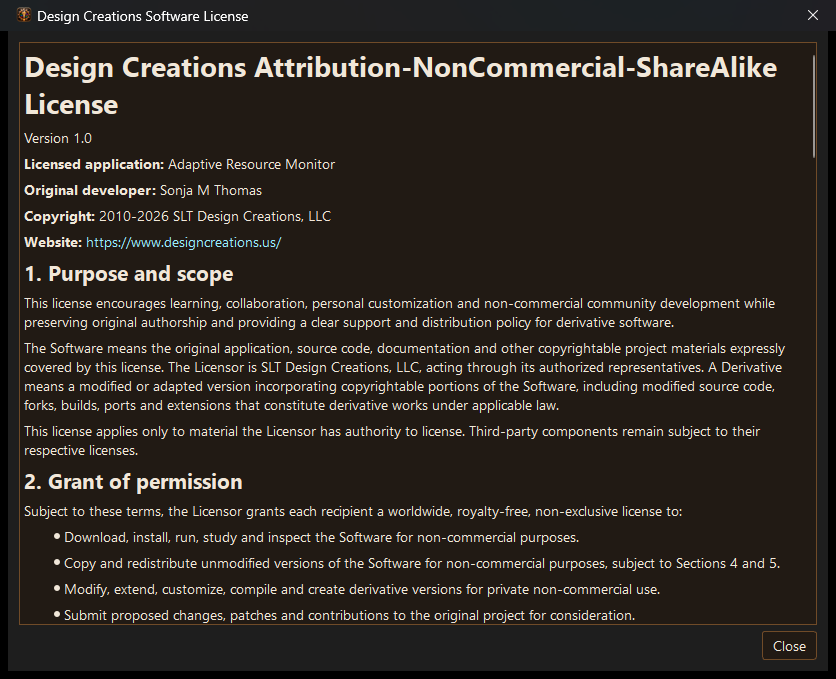
|

|
||||||
|
|
||||||
---
|
---
|
||||||
|
|
||||||
[Next · Third-Party Licenses](https://phantom.zapto.org/gitea/sonja/Adaptive_Resource_Monitor/wiki/Third-Party-Licenses)
|
[Next · Third-Party Licenses](./Third-Party-Licenses)
|
||||||
|
|||||||
@@ -1,4 +1,4 @@
|
|||||||
[Home](https://phantom.zapto.org/gitea/sonja/Adaptive_Resource_Monitor/wiki/Home) / [Developer Documentation](https://phantom.zapto.org/gitea/sonja/Adaptive_Resource_Monitor/wiki/Developer-Documentation) / Source Code Organization
|
[Home](./Home) / [Developer Documentation](./Developer-Documentation) / Source Code Organization
|
||||||
|
|
||||||
| Path | Role |
|
| Path | Role |
|
||||||
| --- | --- |
|
| --- | --- |
|
||||||
@@ -17,4 +17,4 @@
|
|||||||
|
|
||||||
---
|
---
|
||||||
|
|
||||||
[Previous · Technology Stack](https://phantom.zapto.org/gitea/sonja/Adaptive_Resource_Monitor/wiki/Technology-Stack) · [Next · Development Environment](https://phantom.zapto.org/gitea/sonja/Adaptive_Resource_Monitor/wiki/Development-Environment)
|
[Previous · Technology Stack](./Technology-Stack) · [Next · Development Environment](./Development-Environment)
|
||||||
|
|||||||
@@ -1,11 +1,11 @@
|
|||||||
[Home](https://phantom.zapto.org/gitea/sonja/Adaptive_Resource_Monitor/wiki/Home) / [Resource Monitoring](https://phantom.zapto.org/gitea/sonja/Adaptive_Resource_Monitor/wiki/Resource-Monitoring) / Storage I/O Monitoring
|
[Home](./Home) / [Resource Monitoring](./Resource-Monitoring) / Storage I/O Monitoring
|
||||||
|
|
||||||
Disk I/O depicts the movement of bytes per second. The disk display can show combined throughput, reads or writes. Use the expanded monitor to select a disk and view the measured breakdown. The **Disks** filter under Monitoring controls local devices used in totals. Remote profiles provide their own device selections.
|
||||||
|
|
||||||
Windows uses physical drive counters; Linux includes whole devices with the backing device ARM recognizes. Active time, where available, describes busy time rather than capacity or throughput. A valid observation of no activity is zero; an unavailable measurement is labeled or omitted from the trace.
|
||||||
|
|
||||||
Automatic scaling uses the displayed interval and rounds the maximum to the next power of two. A fixed display reference makes comparisons consistent between views. Sustained throughput beyond the chosen range can clip the plot. See [Resource History](https://phantom.zapto.org/gitea/sonja/Adaptive_Resource_Monitor/wiki/Resource-History).
|
Automatic scaling uses the displayed interval and rounds the maximum to the next power of two. A fixed display reference makes comparisons consistent between views. Sustained throughput beyond the chosen range can clip the plot. See [Resource History](./Resource-History).
|
||||||
|
|
||||||
---
|
---
|
||||||
|
|
||||||
[Previous · VRAM Monitoring](https://phantom.zapto.org/gitea/sonja/Adaptive_Resource_Monitor/wiki/VRAM-Monitoring) · [Next · Network Monitoring](https://phantom.zapto.org/gitea/sonja/Adaptive_Resource_Monitor/wiki/Network-Monitoring)
|
[Previous · VRAM Monitoring](./VRAM-Monitoring) · [Next · Network Monitoring](./Network-Monitoring)
|
||||||
|
|||||||
@@ -1,19 +1,19 @@
|
|||||||
[Home](https://phantom.zapto.org/gitea/sonja/Adaptive_Resource_Monitor/wiki/Home) / Support and Troubleshooting
|
[Home](./Home) / Support and Troubleshooting
|
||||||
|
|
||||||
Start with the symptom that matches your case. Keep originals of any logs or screenshots for your own reference, and sanitize copies for the tracker. Published reports can be read anonymously.
|
Start with the symptom that matches your case. Keep originals of any logs or screenshots for your own reference, and sanitize copies for the tracker. Published reports can be read anonymously.
|
||||||
|
|
||||||
- [Frequently Asked Questions](https://phantom.zapto.org/gitea/sonja/Adaptive_Resource_Monitor/wiki/Frequently-Asked-Questions)
|
- [Frequently Asked Questions](./Frequently-Asked-Questions)
|
||||||
- [General Troubleshooting](https://phantom.zapto.org/gitea/sonja/Adaptive_Resource_Monitor/wiki/General-Troubleshooting)
|
- [General Troubleshooting](./General-Troubleshooting)
|
||||||
- [System Tray Problems](https://phantom.zapto.org/gitea/sonja/Adaptive_Resource_Monitor/wiki/System-Tray-Problems)
|
- [System Tray Problems](./System-Tray-Problems)
|
||||||
- [Remote Connection Problems](https://phantom.zapto.org/gitea/sonja/Adaptive_Resource_Monitor/wiki/Remote-Connection-Problems)
|
- [Remote Connection Problems](./Remote-Connection-Problems)
|
||||||
- [GPU and VRAM Telemetry Problems](https://phantom.zapto.org/gitea/sonja/Adaptive_Resource_Monitor/wiki/GPU-and-VRAM-Telemetry-Problems)
|
- [GPU and VRAM Telemetry Problems](./GPU-and-VRAM-Telemetry-Problems)
|
||||||
- [Network Monitoring Problems](https://phantom.zapto.org/gitea/sonja/Adaptive_Resource_Monitor/wiki/Network-Monitoring-Problems)
|
- [Network Monitoring Problems](./Network-Monitoring-Problems)
|
||||||
- [Installation Problems](https://phantom.zapto.org/gitea/sonja/Adaptive_Resource_Monitor/wiki/Installation-Problems)
|
- [Installation Problems](./Installation-Problems)
|
||||||
- [Update Problems](https://phantom.zapto.org/gitea/sonja/Adaptive_Resource_Monitor/wiki/Update-Problems)
|
- [Update Problems](./Update-Problems)
|
||||||
- [Settings and Persistence Problems](https://phantom.zapto.org/gitea/sonja/Adaptive_Resource_Monitor/wiki/Settings-and-Persistence-Problems)
|
- [Settings and Persistence Problems](./Settings-and-Persistence-Problems)
|
||||||
- [Performance Problems](https://phantom.zapto.org/gitea/sonja/Adaptive_Resource_Monitor/wiki/Performance-Problems)
|
- [Performance Problems](./Performance-Problems)
|
||||||
- [Diagnostic Logs](https://phantom.zapto.org/gitea/sonja/Adaptive_Resource_Monitor/wiki/Diagnostic-Logs)
|
- [Diagnostic Logs](./Diagnostic-Logs)
|
||||||
- [Known Limitations](https://phantom.zapto.org/gitea/sonja/Adaptive_Resource_Monitor/wiki/Known-Limitations)
|
- [Known Limitations](./Known-Limitations)
|
||||||
- [Reporting Issues](https://phantom.zapto.org/gitea/sonja/Adaptive_Resource_Monitor/wiki/Reporting-Issues)
|
- [Reporting Issues](./Reporting-Issues)
|
||||||
|
|
||||||
[Public issue tracker](https://phantom.zapto.org/gitea/sonja/Adaptive_Resource_Monitor/issues) · [Support guide](https://phantom.zapto.org/gitea/sonja/Adaptive_Resource_Monitor/src/branch/main/SUPPORT.md) · [Private security reporting](https://phantom.zapto.org/gitea/sonja/Adaptive_Resource_Monitor/src/branch/main/SECURITY.md#report-a-security-issue)
|
||||||
|
|||||||
@@ -1,4 +1,4 @@
|
|||||||
[Home](https://phantom.zapto.org/gitea/sonja/Adaptive_Resource_Monitor/wiki/Home) / [Getting Started](https://phantom.zapto.org/gitea/sonja/Adaptive_Resource_Monitor/wiki/Getting-Started) / System Requirements
|
[Home](./Home) / [Getting Started](./Getting-Started) / System Requirements
|
||||||
|
|
||||||
ARM currently ships as a native Windows x64 desktop application. Windows 11 x64 build 26300 is the verified desktop configuration in the published project documentation. Setup enforces Windows build 17763 or later. That installer check does not establish tested support for every Windows edition or build.
|
||||||
|
|
||||||
@@ -10,8 +10,8 @@ ARM currently ships as a native Windows x64 desktop application. Windows 11 x64
|
|||||||
| Remote Linux | Reachable SSH, an authorized account, Bash, procfs and readable sysfs. Vendor GPU data requires its corresponding readable interfaces or supported tool. |
|
| Remote Linux | Reachable SSH, an authorized account, Bash, procfs and readable sysfs. Vendor GPU data requires its corresponding readable interfaces or supported tool. |
|
||||||
| Updates | HTTPS access to the public Gitea releases. Manual package downloads are available from the same site. |
|
| Updates | HTTPS access to the public Gitea releases. Manual package downloads are available from the same site. |
|
||||||
|
|
||||||
For developer requirements, see [Development Environment](https://phantom.zapto.org/gitea/sonja/Adaptive_Resource_Monitor/wiki/Development-Environment). For platform plans, see [Development Roadmap](https://phantom.zapto.org/gitea/sonja/Adaptive_Resource_Monitor/wiki/Development-Roadmap).
|
For developer requirements, see [Development Environment](./Development-Environment). For platform plans, see [Development Roadmap](./Development-Roadmap).
|
||||||
|
|
||||||
---
|
---
|
||||||
|
|
||||||
[Next · Installation Guide](https://phantom.zapto.org/gitea/sonja/Adaptive_Resource_Monitor/wiki/Installation-Guide)
|
[Next · Installation Guide](./Installation-Guide)
|
||||||
|
|||||||
@@ -1,4 +1,4 @@
|
|||||||
[Home](https://phantom.zapto.org/gitea/sonja/Adaptive_Resource_Monitor/wiki/Home) / [User Manual](https://phantom.zapto.org/gitea/sonja/Adaptive_Resource_Monitor/wiki/User-Manual) / System Tray Context Menu
|
[Home](./Home) / [User Manual](./User-Manual) / System Tray Context Menu
|
||||||
|
|
||||||
Right-click the ARM icon. The heading shows the product name and current version. An update action may appear beneath it when a verified release is available or ready.
|
Right-click the ARM icon. The heading shows the product name and current version. An update action may appear beneath it when a verified release is available or ready.
|
||||||
|
|
||||||
@@ -21,4 +21,4 @@ Right-click the ARM icon. The heading shows the product name and current version
|
|||||||
|
|
||||||
---
|
---
|
||||||
|
|
||||||
[Previous · System Tray Icon](https://phantom.zapto.org/gitea/sonja/Adaptive_Resource_Monitor/wiki/System-Tray-Icon) · [Next · Hover Monitor](https://phantom.zapto.org/gitea/sonja/Adaptive_Resource_Monitor/wiki/Hover-Monitor)
|
[Previous · System Tray Icon](./System-Tray-Icon) · [Next · Hover Monitor](./Hover-Monitor)
|
||||||
|
|||||||
@@ -1,4 +1,4 @@
|
|||||||
[Home](https://phantom.zapto.org/gitea/sonja/Adaptive_Resource_Monitor/wiki/Home) / [User Manual](https://phantom.zapto.org/gitea/sonja/Adaptive_Resource_Monitor/wiki/User-Manual) / System Tray Icon
|
[Home](./Home) / [User Manual](./User-Manual) / System Tray Icon
|
||||||
|
|
||||||
A dynamic icon draws recent history from the selected machine. Change it under **Settings → Tray Icon → Tray icon machine**. The display selection in either monitor stays independent of this setting. Enable **Separate machine icons** for eligible targets and use their **Include in separate tray icons** option to control which get an additional icon.
|
||||||
|
|
||||||
@@ -16,4 +16,4 @@ If the icon is hidden, open the Windows overflow menu or enable ARM under **Sett
|
|||||||
|
|
||||||
---
|
---
|
||||||
|
|
||||||
[Next · System Tray Context Menu](https://phantom.zapto.org/gitea/sonja/Adaptive_Resource_Monitor/wiki/System-Tray-Context-Menu)
|
[Next · System Tray Context Menu](./System-Tray-Context-Menu)
|
||||||
|
|||||||
@@ -1,4 +1,4 @@
|
|||||||
[Home](https://phantom.zapto.org/gitea/sonja/Adaptive_Resource_Monitor/wiki/Home) / [Support and Troubleshooting](https://phantom.zapto.org/gitea/sonja/Adaptive_Resource_Monitor/wiki/Support-and-Troubleshooting) / System Tray Problems
|
[Home](./Home) / [Support and Troubleshooting](./Support-and-Troubleshooting) / System Tray Problems
|
||||||
|
|
||||||
| Symptom | Safe check and corrective action |
|
| Symptom | Safe check and corrective action |
|
||||||
| --- | --- |
|
| --- | --- |
|
||||||
@@ -8,8 +8,8 @@
|
|||||||
| Popup remains open | Look for **Unpin**. Move the pointer away after unpinning and allow the dismissal delay. |
|
| Popup remains open | Look for **Unpin**. Move the pointer away after unpinning and allow the dismissal delay. |
|
||||||
| Wrong machine in icon | Check **Tray icon machine** and whether you are looking at a separate target icon. The monitor's machine checkboxes are independent. |
|
| Wrong machine in icon | Check **Tray icon machine** and whether you are looking at a separate target icon. The monitor's machine checkboxes are independent. |
|
||||||
|
|
||||||
If you can reproduce the problem outside the overflow with normal delays, report the Windows build, tray mode and what menu entries work. See [System Tray Icon](https://phantom.zapto.org/gitea/sonja/Adaptive_Resource_Monitor/wiki/System-Tray-Icon).
|
If you can reproduce the problem outside the overflow with normal delays, report the Windows build, tray mode and what menu entries work. See [System Tray Icon](./System-Tray-Icon).
|
||||||
|
|
||||||
---
|
---
|
||||||
|
|
||||||
[Previous · General Troubleshooting](https://phantom.zapto.org/gitea/sonja/Adaptive_Resource_Monitor/wiki/General-Troubleshooting) · [Next · Remote Connection Problems](https://phantom.zapto.org/gitea/sonja/Adaptive_Resource_Monitor/wiki/Remote-Connection-Problems)
|
[Previous · General Troubleshooting](./General-Troubleshooting) · [Next · Remote Connection Problems](./Remote-Connection-Problems)
|
||||||
|
|||||||
@@ -1,4 +1,4 @@
|
|||||||
[Home](https://phantom.zapto.org/gitea/sonja/Adaptive_Resource_Monitor/wiki/Home) / [Development Roadmap](https://phantom.zapto.org/gitea/sonja/Adaptive_Resource_Monitor/wiki/Development-Roadmap) / System Updates Available
|
[Home](./Home) / [Development Roadmap](./Development-Roadmap) / System Updates Available
|
||||||
|
|
||||||
**Planned.** This per-machine feature would report information the monitored OS already exposes. It is distinct from the signed ARM application updater.
|
**Planned.** This per-machine feature would report information the monitored OS already exposes. It is distinct from the signed ARM application updater.
|
||||||
|
|
||||||
@@ -10,4 +10,4 @@ The feature uses only supported read-only status or cached OS metadata. ARM woul
|
|||||||
|
|
||||||
---
|
---
|
||||||
|
|
||||||
[Previous · Server and Service Monitoring](https://phantom.zapto.org/gitea/sonja/Adaptive_Resource_Monitor/wiki/Server-and-Service-Monitoring)
|
[Previous · Server and Service Monitoring](./Server-and-Service-Monitoring)
|
||||||
|
|||||||
@@ -1,11 +1,11 @@
|
|||||||
[Home](https://phantom.zapto.org/gitea/sonja/Adaptive_Resource_Monitor/wiki/Home) / [Developer Documentation](https://phantom.zapto.org/gitea/sonja/Adaptive_Resource_Monitor/wiki/Developer-Documentation) / Technology Stack
|
[Home](./Home) / [Developer Documentation](./Developer-Documentation) / Technology Stack
|
||||||
|
|
||||||
The desktop client uses CPython 3.12 and PySide6/Qt 6.11.2. Qt provides the interface and drawing. Windows providers combine psutil, native configuration and counter interfaces, DXGI/WDDM and optional NVIDIA NVML. Paramiko runs the Linux read-only probe over SSH, with DRM and optional vendor data on the target.
|
||||||
|
|
||||||
SQLite stores optional history. Windows Credential Manager holds saved SSH password or key-passphrase values. The installer and update processes use PyInstaller, Inno Setup 7 and a separate maintenance launcher. The former group packages software; ARM's updater uses Ed25519 and SHA-256 to verify the published bytes.
|
||||||
|
|
||||||
See the pinned [runtime requirements](https://phantom.zapto.org/gitea/sonja/Adaptive_Resource_Monitor/src/branch/main/requirements.txt), [build requirements](https://phantom.zapto.org/gitea/sonja/Adaptive_Resource_Monitor/src/branch/main/requirements-build.txt) and [Third-Party Licenses](https://phantom.zapto.org/gitea/sonja/Adaptive_Resource_Monitor/wiki/Third-Party-Licenses) for details.
|
See the pinned [runtime requirements](https://phantom.zapto.org/gitea/sonja/Adaptive_Resource_Monitor/src/branch/main/requirements.txt), [build requirements](https://phantom.zapto.org/gitea/sonja/Adaptive_Resource_Monitor/src/branch/main/requirements-build.txt) and [Third-Party Licenses](./Third-Party-Licenses) for details.
|
||||||
|
|
||||||
---
|
---
|
||||||
|
|
||||||
[Previous · Application Architecture](https://phantom.zapto.org/gitea/sonja/Adaptive_Resource_Monitor/wiki/Application-Architecture) · [Next · Source Code Organization](https://phantom.zapto.org/gitea/sonja/Adaptive_Resource_Monitor/wiki/Source-Code-Organization)
|
[Previous · Application Architecture](./Application-Architecture) · [Next · Source Code Organization](./Source-Code-Organization)
|
||||||
|
|||||||
@@ -1,4 +1,4 @@
|
|||||||
[Home](https://phantom.zapto.org/gitea/sonja/Adaptive_Resource_Monitor/wiki/Home) / [Licensing and Contributions](https://phantom.zapto.org/gitea/sonja/Adaptive_Resource_Monitor/wiki/Licensing-and-Contributions) / Third-Party Licenses
|
[Home](./Home) / [Licensing and Contributions](./Licensing-and-Contributions) / Third-Party Licenses
|
||||||
|
|
||||||
The packaged runtime includes CPython, Qt/PySide6, psutil, Paramiko and cryptographic dependencies, NVIDIA bindings, Tcl/Tk, and the PyInstaller bootloader. Individual components retain their upstream license terms. DC-ANCSA governs original ARM material.
|
The packaged runtime includes CPython, Qt/PySide6, psutil, Paramiko and cryptographic dependencies, NVIDIA bindings, Tcl/Tk, and the PyInstaller bootloader. Individual components retain their upstream license terms. DC-ANCSA governs original ARM material.
|
||||||
|
|
||||||
@@ -8,4 +8,4 @@ Use **About → Third-party Notices** for the bundled overview. The installer an
|
|||||||
|
|
||||||
---
|
---
|
||||||
|
|
||||||
[Previous · Software License](https://phantom.zapto.org/gitea/sonja/Adaptive_Resource_Monitor/wiki/Software-License) · [Next · How to Contribute](https://phantom.zapto.org/gitea/sonja/Adaptive_Resource_Monitor/wiki/How-to-Contribute)
|
[Previous · Software License](./Software-License) · [Next · How to Contribute](./How-to-Contribute)
|
||||||
|
|||||||
@@ -1,4 +1,4 @@
|
|||||||
[Home](https://phantom.zapto.org/gitea/sonja/Adaptive_Resource_Monitor/wiki/Home) / [Application Updates](https://phantom.zapto.org/gitea/sonja/Adaptive_Resource_Monitor/wiki/Application-Updates) / Update Notifications
|
[Home](./Home) / [Application Updates](./Application-Updates) / Update Notifications
|
||||||
|
|
||||||
A verified newer release appears as **Update Available** in the hover monitor and expanded window, and below the tray menu heading. When a verified download is ready, those surfaces can show **Update Ready to Install**. Use the action to open the update controls in About. About shows package details and verification state.
|
||||||
|
|
||||||
@@ -6,8 +6,8 @@ When Windows notifications are enabled, ARM uses its existing tray icon to send
|
|||||||
|
|
||||||
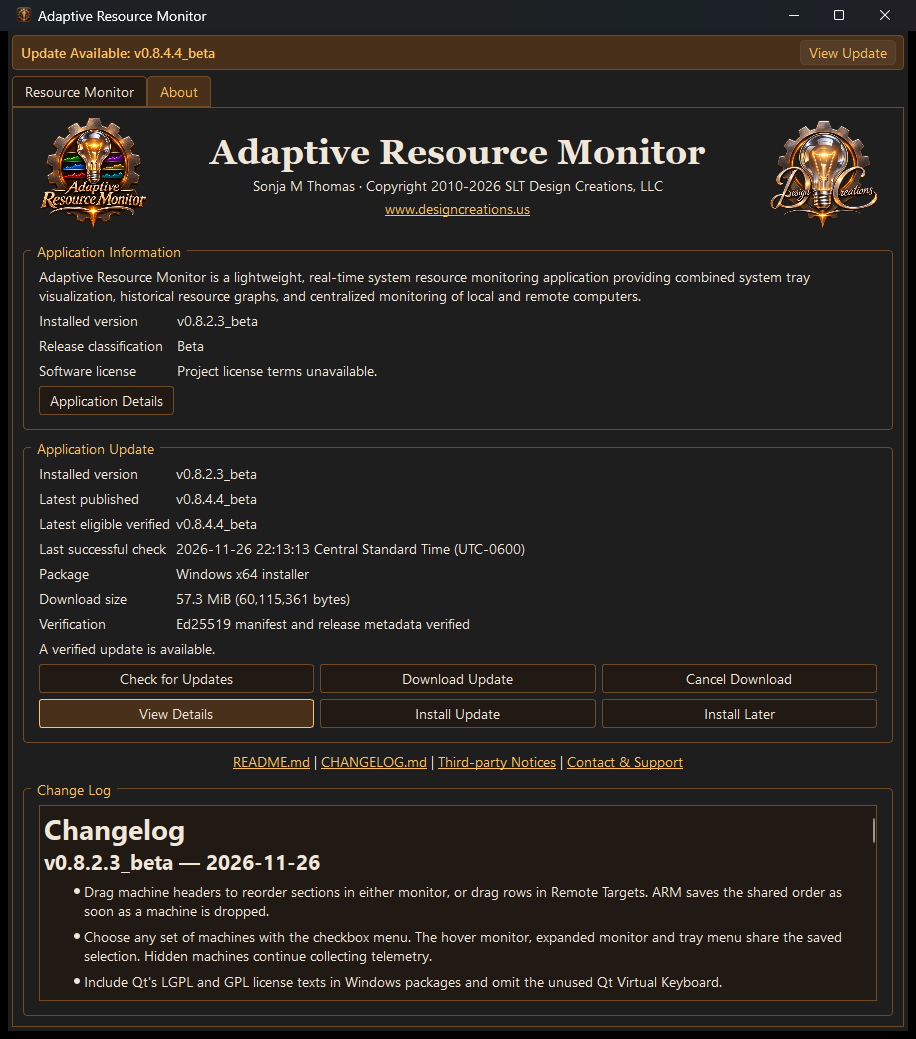
|

|
||||||
|
|
||||||
The example records the v0.8.2.3_beta to v0.8.4.4_beta upgrade. The current toolbar arrangement is shown in [About](https://phantom.zapto.org/gitea/sonja/Adaptive_Resource_Monitor/wiki/About).
|
The example records the v0.8.2.3_beta to v0.8.4.4_beta upgrade. The current toolbar arrangement is shown in [About](./About).
|
||||||
|
|
||||||
---
|
---
|
||||||
|
|
||||||
[Previous · Checking for Updates](https://phantom.zapto.org/gitea/sonja/Adaptive_Resource_Monitor/wiki/Checking-for-Updates) · [Next · Downloading Updates](https://phantom.zapto.org/gitea/sonja/Adaptive_Resource_Monitor/wiki/Downloading-Updates)
|
[Previous · Checking for Updates](./Checking-for-Updates) · [Next · Downloading Updates](./Downloading-Updates)
|
||||||
|
|||||||
@@ -1,17 +1,17 @@
|
|||||||
[Home](https://phantom.zapto.org/gitea/sonja/Adaptive_Resource_Monitor/wiki/Home) / [Support and Troubleshooting](https://phantom.zapto.org/gitea/sonja/Adaptive_Resource_Monitor/wiki/Support-and-Troubleshooting) / Update Problems
|
[Home](./Home) / [Support and Troubleshooting](./Support-and-Troubleshooting) / Update Problems
|
||||||
|
|
||||||
Open About and distinguish a check failure, an excluded release, a download problem, a verification failure and an installation or restart failure.
|
Open About and distinguish a check failure, an excluded release, a download problem, a verification failure and an installation or restart failure.
|
||||||
|
|
||||||
| Result | Next step |
|
| Result | Next step |
|
||||||
| --- | --- |
|
| --- | --- |
|
||||||
| Check cannot reach the server | Verify access to the public release page over HTTPS, then retry. |
|
| Check cannot reach the server | Verify access to the public release page over HTTPS, then retry. |
|
||||||
| A higher-looking tag is excluded | Compare the numeric version and maturity using [Release Channels](https://phantom.zapto.org/gitea/sonja/Adaptive_Resource_Monitor/wiki/Release-Channels). |
|
| A higher-looking tag is excluded | Compare the numeric version and maturity using [Release Channels](./Release-Channels). |
|
||||||
| Download stops | Retry to resume where supported. Review available storage and the network connection. |
|
| Download stops | Retry to resume where supported. Review available storage and the network connection. |
|
||||||
| Verification fails | Keep the checks enabled, retry from the public release, and compare its signed version and package details. |
|
| Verification fails | Keep the checks enabled, retry from the public release, and compare its signed version and package details. |
|
||||||
| Installation or restart fails | Review the outcome in About and follow [Recovery and Rollback](https://phantom.zapto.org/gitea/sonja/Adaptive_Resource_Monitor/wiki/Recovery-and-Rollback). |
|
| Installation or restart fails | Review the outcome in About and follow [Recovery and Rollback](./Recovery-and-Rollback). |
|
||||||
|
|
||||||
Report persistent failures using the Installation or Update Issue form. Include the old and target versions, package type, failure stage and sanitized maintenance or installer log excerpt.
|
Report persistent failures using the Installation or Update Issue form. Include the old and target versions, package type, failure stage and sanitized maintenance or installer log excerpt.
|
||||||
|
|
||||||
---
|
---
|
||||||
|
|
||||||
[Previous · Installation Problems](https://phantom.zapto.org/gitea/sonja/Adaptive_Resource_Monitor/wiki/Installation-Problems) · [Next · Settings and Persistence Problems](https://phantom.zapto.org/gitea/sonja/Adaptive_Resource_Monitor/wiki/Settings-and-Persistence-Problems)
|
[Previous · Installation Problems](./Installation-Problems) · [Next · Settings and Persistence Problems](./Settings-and-Persistence-Problems)
|
||||||
|
|||||||
@@ -1,12 +1,12 @@
|
|||||||
[Home](https://phantom.zapto.org/gitea/sonja/Adaptive_Resource_Monitor/wiki/Home) / User Manual
|
[Home](./Home) / User Manual
|
||||||
|
|
||||||
Use the notification-area graph for short checks and the expanded view for hardware details. The selection, order and settings are shared where applicable. Each icon has its own machine source.
|
Use the notification-area graph for short checks and the expanded view for hardware details. The selection, order and settings are shared where applicable. Each icon has its own machine source.
|
||||||
|
|
||||||
- [System Tray Icon](https://phantom.zapto.org/gitea/sonja/Adaptive_Resource_Monitor/wiki/System-Tray-Icon)
|
- [System Tray Icon](./System-Tray-Icon)
|
||||||
- [System Tray Context Menu](https://phantom.zapto.org/gitea/sonja/Adaptive_Resource_Monitor/wiki/System-Tray-Context-Menu)
|
- [System Tray Context Menu](./System-Tray-Context-Menu)
|
||||||
- [Hover Monitor](https://phantom.zapto.org/gitea/sonja/Adaptive_Resource_Monitor/wiki/Hover-Monitor)
|
- [Hover Monitor](./Hover-Monitor)
|
||||||
- [Machine Selection](https://phantom.zapto.org/gitea/sonja/Adaptive_Resource_Monitor/wiki/Machine-Selection)
|
- [Machine Selection](./Machine-Selection)
|
||||||
- [Machine Ordering](https://phantom.zapto.org/gitea/sonja/Adaptive_Resource_Monitor/wiki/Machine-Ordering)
|
- [Machine Ordering](./Machine-Ordering)
|
||||||
- [Expanded Resource Monitor](https://phantom.zapto.org/gitea/sonja/Adaptive_Resource_Monitor/wiki/Expanded-Resource-Monitor)
|
- [Expanded Resource Monitor](./Expanded-Resource-Monitor)
|
||||||
- [Settings](https://phantom.zapto.org/gitea/sonja/Adaptive_Resource_Monitor/wiki/Settings)
|
- [Settings](./Settings)
|
||||||
- [About](https://phantom.zapto.org/gitea/sonja/Adaptive_Resource_Monitor/wiki/About)
|
- [About](./About)
|
||||||
|
|||||||
@@ -1,11 +1,11 @@
|
|||||||
[Home](https://phantom.zapto.org/gitea/sonja/Adaptive_Resource_Monitor/wiki/Home) / [Resource Monitoring](https://phantom.zapto.org/gitea/sonja/Adaptive_Resource_Monitor/wiki/Resource-Monitoring) / VRAM Monitoring
|
[Home](./Home) / [Resource Monitoring](./Resource-Monitoring) / VRAM Monitoring
|
||||||
|
|
||||||
Dedicated memory belongs to a GPU. When the provider exposes both capacity and used memory for an included adapter, ARM can compute dedicated utilization. Machine-level dedicated totals use measured adapters with both values. Select a specific GPU in the expanded view for its own capacity and use.
|
||||||
|
|
||||||
Shared GPU memory is system-backed memory. Windows can show its usage and budget where exposed by WDDM. ARM presents it per adapter because several devices may share the same system budget. An integrated GPU may rely primarily on shared memory or present no useful separate dedicated total.
|
Shared GPU memory is system-backed memory. Windows can show its usage and budget where exposed by WDDM. ARM presents it per adapter because several devices may share the same system budget. An integrated GPU may rely primarily on shared memory or present no useful separate dedicated total.
|
||||||
|
|
||||||
Linux dedicated fields require readable vendor interfaces. Missing total or used data can leave the ratio unavailable even when GPU activity works. See [GPU and VRAM Telemetry Problems](https://phantom.zapto.org/gitea/sonja/Adaptive_Resource_Monitor/wiki/GPU-and-VRAM-Telemetry-Problems).
|
Linux dedicated fields require readable vendor interfaces. Missing total or used data can leave the ratio unavailable even when GPU activity works. See [GPU and VRAM Telemetry Problems](./GPU-and-VRAM-Telemetry-Problems).
|
||||||
|
|
||||||
---
|
---
|
||||||
|
|
||||||
[Previous · RAM Monitoring](https://phantom.zapto.org/gitea/sonja/Adaptive_Resource_Monitor/wiki/RAM-Monitoring) · [Next · Storage I/O Monitoring](https://phantom.zapto.org/gitea/sonja/Adaptive_Resource_Monitor/wiki/Storage-IO-Monitoring)
|
[Previous · RAM Monitoring](./RAM-Monitoring) · [Next · Storage I/O Monitoring](./Storage-IO-Monitoring)
|
||||||
|
|||||||
@@ -1,11 +1,11 @@
|
|||||||
[Home](https://phantom.zapto.org/gitea/sonja/Adaptive_Resource_Monitor/wiki/Home) / [Developer Documentation](https://phantom.zapto.org/gitea/sonja/Adaptive_Resource_Monitor/wiki/Developer-Documentation) / Versioning
|
[Home](./Home) / [Developer Documentation](./Developer-Documentation) / Versioning
|
||||||
|
|
||||||
The authoritative source is [VERSION.md](https://phantom.zapto.org/gitea/sonja/Adaptive_Resource_Monitor/src/branch/main/VERSION.md). Versions follow `vMAJOR.FEATURE.MINOR.BUGFIX_TAG`. Independently maintain the cumulative counters: a feature advances FEATURE, a smaller refinement advances MINOR, and a corrective fix advances BUGFIX. Preserve the other counters. Apply MAJOR for an approved major revision.
|
||||||
|
|
||||||
Release classifications are Alpha, Beta, Release Candidate (`rc`) and Stable. They describe maturity independently of the four counters. A same-number promotion can qualify under the [Release Channels](https://phantom.zapto.org/gitea/sonja/Adaptive_Resource_Monitor/wiki/Release-Channels) rules. Windows numeric version resources use the four numbers; the textual product version and release tag retain the full version.
|
Release classifications are Alpha, Beta, Release Candidate (`rc`) and Stable. They describe maturity independently of the four counters. A same-number promotion can qualify under the [Release Channels](./Release-Channels) rules. Windows numeric version resources use the four numbers; the textual product version and release tag retain the full version.
|
||||||
|
|
||||||
Build numbers identify CI runs and are separate from application versions. Documentation and labels do not change the application version. See [VERSIONING.md](https://phantom.zapto.org/gitea/sonja/Adaptive_Resource_Monitor/src/branch/main/VERSIONING.md) and the [release history](https://phantom.zapto.org/gitea/sonja/Adaptive_Resource_Monitor/src/branch/main/CHANGELOG.md).
|
||||||
|
|
||||||
---
|
---
|
||||||
|
|
||||||
[Previous · Automated Testing](https://phantom.zapto.org/gitea/sonja/Adaptive_Resource_Monitor/wiki/Automated-Testing) · [Next · Jenkins and CI-CD](https://phantom.zapto.org/gitea/sonja/Adaptive_Resource_Monitor/wiki/Jenkins-and-CI-CD)
|
[Previous · Automated Testing](./Automated-Testing) · [Next · Jenkins and CI-CD](./Jenkins-and-CI-CD)
|
||||||
|
|||||||
162
Wiki-Index.md
162
Wiki-Index.md
@@ -1,104 +1,104 @@
|
|||||||
[Home](https://phantom.zapto.org/gitea/sonja/Adaptive_Resource_Monitor/wiki/Home) / Wiki Index
|
[Home](./Home) / Wiki Index
|
||||||
|
|
||||||
Browse every page by section. This inventory also serves as a useful fallback when the native sidebar is collapsed on a narrow screen.
|
Browse every page by section. This inventory also serves as a useful fallback when the native sidebar is collapsed on a narrow screen.
|
||||||
|
|
||||||
## [Getting Started](https://phantom.zapto.org/gitea/sonja/Adaptive_Resource_Monitor/wiki/Getting-Started)
|
## [Getting Started](./Getting-Started)
|
||||||
|
|
||||||
- [System Requirements](https://phantom.zapto.org/gitea/sonja/Adaptive_Resource_Monitor/wiki/System-Requirements)
|
- [System Requirements](./System-Requirements)
|
||||||
- [Installation Guide](https://phantom.zapto.org/gitea/sonja/Adaptive_Resource_Monitor/wiki/Installation-Guide)
|
- [Installation Guide](./Installation-Guide)
|
||||||
- [Portable Edition](https://phantom.zapto.org/gitea/sonja/Adaptive_Resource_Monitor/wiki/Portable-Edition)
|
- [Portable Edition](./Portable-Edition)
|
||||||
- [Quick Start](https://phantom.zapto.org/gitea/sonja/Adaptive_Resource_Monitor/wiki/Quick-Start)
|
- [Quick Start](./Quick-Start)
|
||||||
- [First-Time Configuration](https://phantom.zapto.org/gitea/sonja/Adaptive_Resource_Monitor/wiki/First-Time-Configuration)
|
- [First-Time Configuration](./First-Time-Configuration)
|
||||||
|
|
||||||
## [User Manual](https://phantom.zapto.org/gitea/sonja/Adaptive_Resource_Monitor/wiki/User-Manual)
|
## [User Manual](./User-Manual)
|
||||||
|
|
||||||
- [System Tray Icon](https://phantom.zapto.org/gitea/sonja/Adaptive_Resource_Monitor/wiki/System-Tray-Icon)
|
- [System Tray Icon](./System-Tray-Icon)
|
||||||
- [System Tray Context Menu](https://phantom.zapto.org/gitea/sonja/Adaptive_Resource_Monitor/wiki/System-Tray-Context-Menu)
|
- [System Tray Context Menu](./System-Tray-Context-Menu)
|
||||||
- [Hover Monitor](https://phantom.zapto.org/gitea/sonja/Adaptive_Resource_Monitor/wiki/Hover-Monitor)
|
- [Hover Monitor](./Hover-Monitor)
|
||||||
- [Machine Selection](https://phantom.zapto.org/gitea/sonja/Adaptive_Resource_Monitor/wiki/Machine-Selection)
|
- [Machine Selection](./Machine-Selection)
|
||||||
- [Machine Ordering](https://phantom.zapto.org/gitea/sonja/Adaptive_Resource_Monitor/wiki/Machine-Ordering)
|
- [Machine Ordering](./Machine-Ordering)
|
||||||
- [Expanded Resource Monitor](https://phantom.zapto.org/gitea/sonja/Adaptive_Resource_Monitor/wiki/Expanded-Resource-Monitor)
|
- [Expanded Resource Monitor](./Expanded-Resource-Monitor)
|
||||||
- [Settings](https://phantom.zapto.org/gitea/sonja/Adaptive_Resource_Monitor/wiki/Settings)
|
- [Settings](./Settings)
|
||||||
- [About](https://phantom.zapto.org/gitea/sonja/Adaptive_Resource_Monitor/wiki/About)
|
- [About](./About)
|
||||||
|
|
||||||
## [Resource Monitoring](https://phantom.zapto.org/gitea/sonja/Adaptive_Resource_Monitor/wiki/Resource-Monitoring)
|
## [Resource Monitoring](./Resource-Monitoring)
|
||||||
|
|
||||||
- [CPU Monitoring](https://phantom.zapto.org/gitea/sonja/Adaptive_Resource_Monitor/wiki/CPU-Monitoring)
|
- [CPU Monitoring](./CPU-Monitoring)
|
||||||
- [GPU Monitoring](https://phantom.zapto.org/gitea/sonja/Adaptive_Resource_Monitor/wiki/GPU-Monitoring)
|
- [GPU Monitoring](./GPU-Monitoring)
|
||||||
- [RAM Monitoring](https://phantom.zapto.org/gitea/sonja/Adaptive_Resource_Monitor/wiki/RAM-Monitoring)
|
- [RAM Monitoring](./RAM-Monitoring)
|
||||||
- [VRAM Monitoring](https://phantom.zapto.org/gitea/sonja/Adaptive_Resource_Monitor/wiki/VRAM-Monitoring)
|
- [VRAM Monitoring](./VRAM-Monitoring)
|
||||||
- [Storage I/O Monitoring](https://phantom.zapto.org/gitea/sonja/Adaptive_Resource_Monitor/wiki/Storage-IO-Monitoring)
|
- [Storage I/O Monitoring](./Storage-IO-Monitoring)
|
||||||
- [Network Monitoring](https://phantom.zapto.org/gitea/sonja/Adaptive_Resource_Monitor/wiki/Network-Monitoring)
|
- [Network Monitoring](./Network-Monitoring)
|
||||||
- [Resource History](https://phantom.zapto.org/gitea/sonja/Adaptive_Resource_Monitor/wiki/Resource-History)
|
- [Resource History](./Resource-History)
|
||||||
|
|
||||||
## [Remote Monitoring](https://phantom.zapto.org/gitea/sonja/Adaptive_Resource_Monitor/wiki/Remote-Monitoring)
|
## [Remote Monitoring](./Remote-Monitoring)
|
||||||
|
|
||||||
- [Adding a Remote Linux Machine](https://phantom.zapto.org/gitea/sonja/Adaptive_Resource_Monitor/wiki/Adding-a-Remote-Linux-Machine)
|
- [Adding a Remote Linux Machine](./Adding-a-Remote-Linux-Machine)
|
||||||
- [SSH Configuration](https://phantom.zapto.org/gitea/sonja/Adaptive_Resource_Monitor/wiki/SSH-Configuration)
|
- [SSH Configuration](./SSH-Configuration)
|
||||||
- [Linux Telemetry](https://phantom.zapto.org/gitea/sonja/Adaptive_Resource_Monitor/wiki/Linux-Telemetry)
|
- [Linux Telemetry](./Linux-Telemetry)
|
||||||
- [Credential Management](https://phantom.zapto.org/gitea/sonja/Adaptive_Resource_Monitor/wiki/Credential-Management)
|
- [Credential Management](./Credential-Management)
|
||||||
- [Connection Troubleshooting](https://phantom.zapto.org/gitea/sonja/Adaptive_Resource_Monitor/wiki/Connection-Troubleshooting)
|
- [Connection Troubleshooting](./Connection-Troubleshooting)
|
||||||
|
|
||||||
## [Application Updates](https://phantom.zapto.org/gitea/sonja/Adaptive_Resource_Monitor/wiki/Application-Updates)
|
## [Application Updates](./Application-Updates)
|
||||||
|
|
||||||
- [Checking for Updates](https://phantom.zapto.org/gitea/sonja/Adaptive_Resource_Monitor/wiki/Checking-for-Updates)
|
- [Checking for Updates](./Checking-for-Updates)
|
||||||
- [Update Notifications](https://phantom.zapto.org/gitea/sonja/Adaptive_Resource_Monitor/wiki/Update-Notifications)
|
- [Update Notifications](./Update-Notifications)
|
||||||
- [Downloading Updates](https://phantom.zapto.org/gitea/sonja/Adaptive_Resource_Monitor/wiki/Downloading-Updates)
|
- [Downloading Updates](./Downloading-Updates)
|
||||||
- [Installing Updates](https://phantom.zapto.org/gitea/sonja/Adaptive_Resource_Monitor/wiki/Installing-Updates)
|
- [Installing Updates](./Installing-Updates)
|
||||||
- [Install Later](https://phantom.zapto.org/gitea/sonja/Adaptive_Resource_Monitor/wiki/Install-Later)
|
- [Install Later](./Install-Later)
|
||||||
- [Release Channels](https://phantom.zapto.org/gitea/sonja/Adaptive_Resource_Monitor/wiki/Release-Channels)
|
- [Release Channels](./Release-Channels)
|
||||||
- [Package Authenticity](https://phantom.zapto.org/gitea/sonja/Adaptive_Resource_Monitor/wiki/Package-Authenticity)
|
- [Package Authenticity](./Package-Authenticity)
|
||||||
- [Recovery and Rollback](https://phantom.zapto.org/gitea/sonja/Adaptive_Resource_Monitor/wiki/Recovery-and-Rollback)
|
- [Recovery and Rollback](./Recovery-and-Rollback)
|
||||||
|
|
||||||
## [Support and Troubleshooting](https://phantom.zapto.org/gitea/sonja/Adaptive_Resource_Monitor/wiki/Support-and-Troubleshooting)
|
## [Support and Troubleshooting](./Support-and-Troubleshooting)
|
||||||
|
|
||||||
- [Frequently Asked Questions](https://phantom.zapto.org/gitea/sonja/Adaptive_Resource_Monitor/wiki/Frequently-Asked-Questions)
|
- [Frequently Asked Questions](./Frequently-Asked-Questions)
|
||||||
- [General Troubleshooting](https://phantom.zapto.org/gitea/sonja/Adaptive_Resource_Monitor/wiki/General-Troubleshooting)
|
- [General Troubleshooting](./General-Troubleshooting)
|
||||||
- [System Tray Problems](https://phantom.zapto.org/gitea/sonja/Adaptive_Resource_Monitor/wiki/System-Tray-Problems)
|
- [System Tray Problems](./System-Tray-Problems)
|
||||||
- [Remote Connection Problems](https://phantom.zapto.org/gitea/sonja/Adaptive_Resource_Monitor/wiki/Remote-Connection-Problems)
|
- [Remote Connection Problems](./Remote-Connection-Problems)
|
||||||
- [GPU and VRAM Telemetry Problems](https://phantom.zapto.org/gitea/sonja/Adaptive_Resource_Monitor/wiki/GPU-and-VRAM-Telemetry-Problems)
|
- [GPU and VRAM Telemetry Problems](./GPU-and-VRAM-Telemetry-Problems)
|
||||||
- [Network Monitoring Problems](https://phantom.zapto.org/gitea/sonja/Adaptive_Resource_Monitor/wiki/Network-Monitoring-Problems)
|
- [Network Monitoring Problems](./Network-Monitoring-Problems)
|
||||||
- [Installation Problems](https://phantom.zapto.org/gitea/sonja/Adaptive_Resource_Monitor/wiki/Installation-Problems)
|
- [Installation Problems](./Installation-Problems)
|
||||||
- [Update Problems](https://phantom.zapto.org/gitea/sonja/Adaptive_Resource_Monitor/wiki/Update-Problems)
|
- [Update Problems](./Update-Problems)
|
||||||
- [Settings and Persistence Problems](https://phantom.zapto.org/gitea/sonja/Adaptive_Resource_Monitor/wiki/Settings-and-Persistence-Problems)
|
- [Settings and Persistence Problems](./Settings-and-Persistence-Problems)
|
||||||
- [Performance Problems](https://phantom.zapto.org/gitea/sonja/Adaptive_Resource_Monitor/wiki/Performance-Problems)
|
- [Performance Problems](./Performance-Problems)
|
||||||
- [Diagnostic Logs](https://phantom.zapto.org/gitea/sonja/Adaptive_Resource_Monitor/wiki/Diagnostic-Logs)
|
- [Diagnostic Logs](./Diagnostic-Logs)
|
||||||
- [Known Limitations](https://phantom.zapto.org/gitea/sonja/Adaptive_Resource_Monitor/wiki/Known-Limitations)
|
- [Known Limitations](./Known-Limitations)
|
||||||
- [Reporting Issues](https://phantom.zapto.org/gitea/sonja/Adaptive_Resource_Monitor/wiki/Reporting-Issues)
|
- [Reporting Issues](./Reporting-Issues)
|
||||||
|
|
||||||
## [Developer Documentation](https://phantom.zapto.org/gitea/sonja/Adaptive_Resource_Monitor/wiki/Developer-Documentation)
|
## [Developer Documentation](./Developer-Documentation)
|
||||||
|
|
||||||
- [Application Architecture](https://phantom.zapto.org/gitea/sonja/Adaptive_Resource_Monitor/wiki/Application-Architecture)
|
- [Application Architecture](./Application-Architecture)
|
||||||
- [Technology Stack](https://phantom.zapto.org/gitea/sonja/Adaptive_Resource_Monitor/wiki/Technology-Stack)
|
- [Technology Stack](./Technology-Stack)
|
||||||
- [Source Code Organization](https://phantom.zapto.org/gitea/sonja/Adaptive_Resource_Monitor/wiki/Source-Code-Organization)
|
- [Source Code Organization](./Source-Code-Organization)
|
||||||
- [Development Environment](https://phantom.zapto.org/gitea/sonja/Adaptive_Resource_Monitor/wiki/Development-Environment)
|
- [Development Environment](./Development-Environment)
|
||||||
- [Building from Source](https://phantom.zapto.org/gitea/sonja/Adaptive_Resource_Monitor/wiki/Building-from-Source)
|
- [Building from Source](./Building-from-Source)
|
||||||
- [Automated Testing](https://phantom.zapto.org/gitea/sonja/Adaptive_Resource_Monitor/wiki/Automated-Testing)
|
- [Automated Testing](./Automated-Testing)
|
||||||
- [Versioning](https://phantom.zapto.org/gitea/sonja/Adaptive_Resource_Monitor/wiki/Versioning)
|
- [Versioning](./Versioning)
|
||||||
- [Jenkins and CI/CD](https://phantom.zapto.org/gitea/sonja/Adaptive_Resource_Monitor/wiki/Jenkins-and-CI-CD)
|
- [Jenkins and CI/CD](./Jenkins-and-CI-CD)
|
||||||
- [Release Process](https://phantom.zapto.org/gitea/sonja/Adaptive_Resource_Monitor/wiki/Release-Process)
|
- [Release Process](./Release-Process)
|
||||||
- [Wiki Maintenance](https://phantom.zapto.org/gitea/sonja/Adaptive_Resource_Monitor/wiki/Wiki-Maintenance)
|
- [Wiki Maintenance](./Wiki-Maintenance)
|
||||||
|
|
||||||
## [Development Roadmap](https://phantom.zapto.org/gitea/sonja/Adaptive_Resource_Monitor/wiki/Development-Roadmap)
|
## [Development Roadmap](./Development-Roadmap)
|
||||||
|
|
||||||
- [Native Linux Application](https://phantom.zapto.org/gitea/sonja/Adaptive_Resource_Monitor/wiki/Native-Linux-Application)
|
- [Native Linux Application](./Native-Linux-Application)
|
||||||
- [Windows Monitoring Agent](https://phantom.zapto.org/gitea/sonja/Adaptive_Resource_Monitor/wiki/Windows-Monitoring-Agent)
|
- [Windows Monitoring Agent](./Windows-Monitoring-Agent)
|
||||||
- [Native macOS Application](https://phantom.zapto.org/gitea/sonja/Adaptive_Resource_Monitor/wiki/Native-macOS-Application)
|
- [Native macOS Application](./Native-macOS-Application)
|
||||||
- [Android Application](https://phantom.zapto.org/gitea/sonja/Adaptive_Resource_Monitor/wiki/Android-Application)
|
- [Android Application](./Android-Application)
|
||||||
- [iOS and iPadOS Application](https://phantom.zapto.org/gitea/sonja/Adaptive_Resource_Monitor/wiki/iOS-and-iPadOS-Application)
|
- [iOS and iPadOS Application](./iOS-and-iPadOS-Application)
|
||||||
- [Optional Monitoring Gateway](https://phantom.zapto.org/gitea/sonja/Adaptive_Resource_Monitor/wiki/Optional-Monitoring-Gateway)
|
- [Optional Monitoring Gateway](./Optional-Monitoring-Gateway)
|
||||||
- [Dedicated Hardware Monitoring Displays](https://phantom.zapto.org/gitea/sonja/Adaptive_Resource_Monitor/wiki/Dedicated-Hardware-Monitoring-Displays)
|
- [Dedicated Hardware Monitoring Displays](./Dedicated-Hardware-Monitoring-Displays)
|
||||||
- [Server and Service Monitoring](https://phantom.zapto.org/gitea/sonja/Adaptive_Resource_Monitor/wiki/Server-and-Service-Monitoring)
|
- [Server and Service Monitoring](./Server-and-Service-Monitoring)
|
||||||
- [System Updates Available](https://phantom.zapto.org/gitea/sonja/Adaptive_Resource_Monitor/wiki/System-Updates-Available)
|
- [System Updates Available](./System-Updates-Available)
|
||||||
|
|
||||||
## [Licensing and Contributions](https://phantom.zapto.org/gitea/sonja/Adaptive_Resource_Monitor/wiki/Licensing-and-Contributions)
|
## [Licensing and Contributions](./Licensing-and-Contributions)
|
||||||
|
|
||||||
- [Software License](https://phantom.zapto.org/gitea/sonja/Adaptive_Resource_Monitor/wiki/Software-License)
|
- [Software License](./Software-License)
|
||||||
- [Third-Party Licenses](https://phantom.zapto.org/gitea/sonja/Adaptive_Resource_Monitor/wiki/Third-Party-Licenses)
|
- [Third-Party Licenses](./Third-Party-Licenses)
|
||||||
- [How to Contribute](https://phantom.zapto.org/gitea/sonja/Adaptive_Resource_Monitor/wiki/How-to-Contribute)
|
- [How to Contribute](./How-to-Contribute)
|
||||||
- [Derivative Distribution Permission](https://phantom.zapto.org/gitea/sonja/Adaptive_Resource_Monitor/wiki/Derivative-Distribution-Permission)
|
- [Derivative Distribution Permission](./Derivative-Distribution-Permission)
|
||||||
|
|
||||||
## Reference
|
## Reference
|
||||||
|
|
||||||
- [Home](https://phantom.zapto.org/gitea/sonja/Adaptive_Resource_Monitor/wiki/Home)
|
- [Home](./Home)
|
||||||
- [Glossary](https://phantom.zapto.org/gitea/sonja/Adaptive_Resource_Monitor/wiki/Glossary)
|
- [Glossary](./Glossary)
|
||||||
|
|||||||
@@ -1,4 +1,4 @@
|
|||||||
[Home](https://phantom.zapto.org/gitea/sonja/Adaptive_Resource_Monitor/wiki/Home) / [Developer Documentation](https://phantom.zapto.org/gitea/sonja/Adaptive_Resource_Monitor/wiki/Developer-Documentation) / Wiki Maintenance
|
[Home](./Home) / [Developer Documentation](./Developer-Documentation) / Wiki Maintenance
|
||||||
|
|
||||||
1. Verify the newest public release, release classification and anonymous downloads. Update the Home release line and exact links when publication completes.
|
1. Verify the newest public release, release classification and anonymous downloads. Update the Home release line and exact links when publication completes.
|
||||||
2. Review the changed controls and workflows against the source and release notes. Replace or label screenshots when the shown interface differs. Use privacy-reviewed real captures.
|
2. Review the changed controls and workflows against the source and release notes. Replace or label screenshots when the shown interface differs. Use privacy-reviewed real captures.
|
||||||
@@ -10,4 +10,4 @@ Use the Gitea wiki's own Git history to review or adjust docs. The release workf
|
|||||||
|
|
||||||
---
|
---
|
||||||
|
|
||||||
[Previous · Release Process](https://phantom.zapto.org/gitea/sonja/Adaptive_Resource_Monitor/wiki/Release-Process)
|
[Previous · Release Process](./Release-Process)
|
||||||
|
|||||||
@@ -1,4 +1,4 @@
|
|||||||
[Home](https://phantom.zapto.org/gitea/sonja/Adaptive_Resource_Monitor/wiki/Home) / [Development Roadmap](https://phantom.zapto.org/gitea/sonja/Adaptive_Resource_Monitor/wiki/Development-Roadmap) / Windows Monitoring Agent
|
[Home](./Home) / [Development Roadmap](./Development-Roadmap) / Windows Monitoring Agent
|
||||||
|
|
||||||
**Planned.** A small headless Windows service would expose read-only telemetry to authorized clients on Windows, Linux or macOS without a logged-in desktop session. Service installation is independent of the ARM desktop app. Sample once on the host, retain bounded buffers and serve multiple authorized clients.
|
||||||
|
|
||||||
@@ -8,4 +8,4 @@ Evaluate a least-privilege service account, authenticated TLS, explicit enrollme
|
|||||||
|
|
||||||
---
|
---
|
||||||
|
|
||||||
[Previous · Native Linux Application](https://phantom.zapto.org/gitea/sonja/Adaptive_Resource_Monitor/wiki/Native-Linux-Application) · [Next · Native macOS Application](https://phantom.zapto.org/gitea/sonja/Adaptive_Resource_Monitor/wiki/Native-macOS-Application)
|
[Previous · Native Linux Application](./Native-Linux-Application) · [Next · Native macOS Application](./Native-macOS-Application)
|
||||||
|
|||||||
@@ -2,4 +2,4 @@
|
|||||||
|
|
||||||
Original application developed by **Sonja M Thomas**, SLT Design Creations, LLC. Copyright 2010-2026 SLT Design Creations, LLC. [Design Creations](https://www.designcreations.us/)
|
Original application developed by **Sonja M Thomas**, SLT Design Creations, LLC. Copyright 2010-2026 SLT Design Creations, LLC. [Design Creations](https://www.designcreations.us/)
|
||||||
|
|
||||||
[Home](https://phantom.zapto.org/gitea/sonja/Adaptive_Resource_Monitor/wiki/Home) · [Page index](https://phantom.zapto.org/gitea/sonja/Adaptive_Resource_Monitor/wiki/Wiki-Index) · [Releases](https://phantom.zapto.org/gitea/sonja/Adaptive_Resource_Monitor/releases) · [Report an issue](https://phantom.zapto.org/gitea/sonja/Adaptive_Resource_Monitor/issues)
|
[Home](./Home) · [Page index](./Wiki-Index) · [Releases](https://phantom.zapto.org/gitea/sonja/Adaptive_Resource_Monitor/releases) · [Report an issue](https://github.com/sonjamichelle/Adaptive_Resource_Monitor/issues)
|
||||||
|
|||||||
24
_Sidebar.md
24
_Sidebar.md
@@ -1,15 +1,15 @@
|
|||||||
**[ARM documentation](https://phantom.zapto.org/gitea/sonja/Adaptive_Resource_Monitor/wiki/Home)**
|
**[ARM documentation](./Home)**
|
||||||
|
|
||||||
- [Getting Started](https://phantom.zapto.org/gitea/sonja/Adaptive_Resource_Monitor/wiki/Getting-Started)
|
- [Getting Started](./Getting-Started)
|
||||||
- [User Manual](https://phantom.zapto.org/gitea/sonja/Adaptive_Resource_Monitor/wiki/User-Manual)
|
- [User Manual](./User-Manual)
|
||||||
- [Resource Monitoring](https://phantom.zapto.org/gitea/sonja/Adaptive_Resource_Monitor/wiki/Resource-Monitoring)
|
- [Resource Monitoring](./Resource-Monitoring)
|
||||||
- [Remote Monitoring](https://phantom.zapto.org/gitea/sonja/Adaptive_Resource_Monitor/wiki/Remote-Monitoring)
|
- [Remote Monitoring](./Remote-Monitoring)
|
||||||
- [Application Updates](https://phantom.zapto.org/gitea/sonja/Adaptive_Resource_Monitor/wiki/Application-Updates)
|
- [Application Updates](./Application-Updates)
|
||||||
- [Support and Troubleshooting](https://phantom.zapto.org/gitea/sonja/Adaptive_Resource_Monitor/wiki/Support-and-Troubleshooting)
|
- [Support and Troubleshooting](./Support-and-Troubleshooting)
|
||||||
- [Developer Documentation](https://phantom.zapto.org/gitea/sonja/Adaptive_Resource_Monitor/wiki/Developer-Documentation)
|
- [Developer Documentation](./Developer-Documentation)
|
||||||
- [Development Roadmap](https://phantom.zapto.org/gitea/sonja/Adaptive_Resource_Monitor/wiki/Development-Roadmap)
|
- [Development Roadmap](./Development-Roadmap)
|
||||||
- [Licensing and Contributions](https://phantom.zapto.org/gitea/sonja/Adaptive_Resource_Monitor/wiki/Licensing-and-Contributions)
|
- [Licensing and Contributions](./Licensing-and-Contributions)
|
||||||
|
|
||||||
[Glossary](https://phantom.zapto.org/gitea/sonja/Adaptive_Resource_Monitor/wiki/Glossary) · [Page index](https://phantom.zapto.org/gitea/sonja/Adaptive_Resource_Monitor/wiki/Wiki-Index)
|
[Glossary](./Glossary) · [Page index](./Wiki-Index)
|
||||||
|
|
||||||
[Downloads](https://phantom.zapto.org/gitea/sonja/Adaptive_Resource_Monitor/releases/tag/v0.8.6.4_beta) · [Issues](https://phantom.zapto.org/gitea/sonja/Adaptive_Resource_Monitor/issues)
|
[Downloads](https://phantom.zapto.org/gitea/sonja/Adaptive_Resource_Monitor/releases/tag/v0.8.6.4_beta) · [Issues](https://github.com/sonjamichelle/Adaptive_Resource_Monitor/issues)
|
||||||
|
|||||||
@@ -1,4 +1,4 @@
|
|||||||
[Home](https://phantom.zapto.org/gitea/sonja/Adaptive_Resource_Monitor/wiki/Home) / [Development Roadmap](https://phantom.zapto.org/gitea/sonja/Adaptive_Resource_Monitor/wiki/Development-Roadmap) / iOS and iPadOS Application
|
[Home](./Home) / [Development Roadmap](./Development-Roadmap) / iOS and iPadOS Application
|
||||||
|
|
||||||
**Conditional feasibility.** Evaluate a native companion with read-only dashboards, machine selection, independent histories and secure gateway access. Device watchdog and background policies make continuous collection a gateway responsibility. Keychain and supported public APIs are the intended boundaries.
|
||||||
|
|
||||||
@@ -8,4 +8,4 @@ A decision depends on developer resources, Mac/Xcode access, real-device testing
|
|||||||
|
|
||||||
---
|
---
|
||||||
|
|
||||||
[Previous · Android Application](https://phantom.zapto.org/gitea/sonja/Adaptive_Resource_Monitor/wiki/Android-Application) · [Next · Optional Monitoring Gateway](https://phantom.zapto.org/gitea/sonja/Adaptive_Resource_Monitor/wiki/Optional-Monitoring-Gateway)
|
[Previous · Android Application](./Android-Application) · [Next · Optional Monitoring Gateway](./Optional-Monitoring-Gateway)
|
||||||
|
|||||||
Reference in New Issue
Block a user